
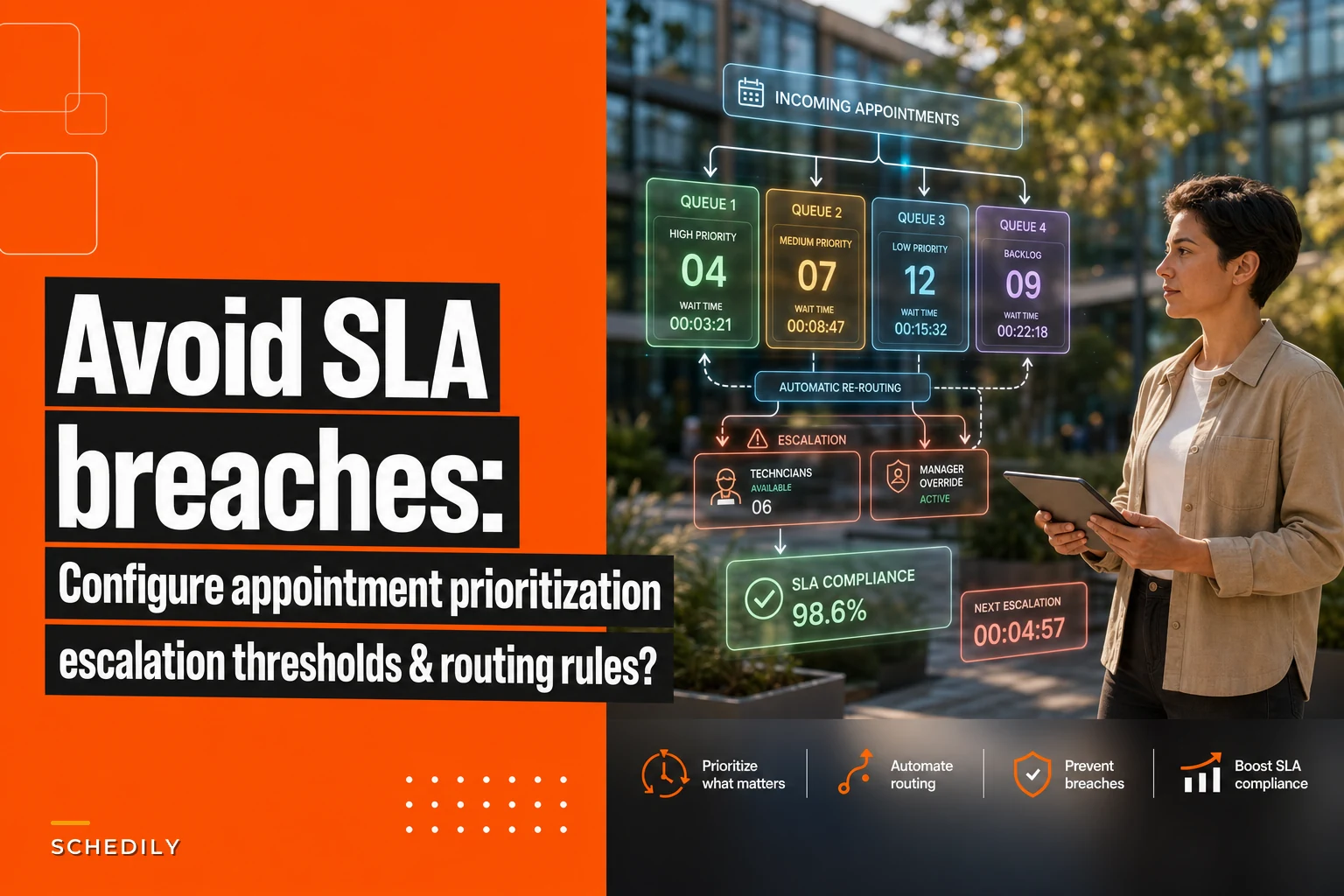

Your biggest client calls, frustrated. Their emergency maintenance request from yesterday morning got scheduled for next Tuesday. Meanwhile, your team knocked out three routine installations for walk-in customers that same day.
This happens when SLA appointment prioritization exists only as a promise in your contracts, not as actual rules in your scheduling system. That gap between what you promise and how your system books appointments creates the kind of operational mess that damages relationships and quietly costs you money.
SLA definitions without scheduling rules create expensive confusion
Most businesses write detailed SLAs into their contracts. Premium customers get 4-hour response times. Standard customers get 24 hours. Emergencies jump the queue. Makes perfect sense on paper.
But then Monday morning arrives. Your scheduler opens the system and sees 47 pending appointments. Which ones are actually premium? What counts as emergency versus urgent? The contract sitting in a filing cabinet doesn't help anyone make real-time decisions.
So the scheduler makes their best guess. They book based on who called most recently, who sounds most upset, or just straight first-come-first-served. Your carefully negotiated SLA terms become meaningless because they never translated into operational rules.
This creates cascading problems. Premium clients who pay extra for priority service watch standard customers get appointments first. Your team scrambles to fix breaches after they happen. Revenue from premium service tiers erodes because clients eventually realize they're not getting what they paid for.
Manual prioritization fails under real operational pressure
The human brain wasn't built to juggle 15 variables at once. When your scheduler looks at that morning queue, they're trying to balance contract terms, service types, customer history, technician availability, travel routes, and urgency levels — before the phone even starts ringing with new requests.
Eliminate scheduling conflicts and missed meetings.
Schedily helps you organize and manage all appointments and team availability effortlessly.
- Unified appointment and resource management
- Automated notifications & reminders
- Team calendar synchronization
No credit card required
Research on cognitive load suggests people can effectively track about 4 to 7 variables simultaneously. Your average scheduling decision involves closer to 12 to 15. No wonder prioritization breaks down.
-
2-hour response for no-cooling emergencies
-
Same-day service for maintenance plan members
-
48-hour standard service
-
Priority scheduling for commercial accounts
It's 2 PM on a 95-degree day. The scheduler is looking at:
-
3 residential no-cooling calls
-
2 commercial routine maintenance requests
-
5 maintenance plan holders needing service
-
8 standard service requests
Without clear rules, they pick based on gut feeling. They might prioritize the angriest caller and completely miss the commercial client whose contract includes liquidated damages for SLA breaches. Or they route technicians to nearby standard calls for efficiency while emergency calls sit waiting.
Priority queues turn promises into automatic decisions
Priority queues eliminate the guesswork by encoding your SLA terms directly into scheduling logic. Instead of one massive appointment list, you create separate queues with clear rules about who goes where and when they move.
A functional structure that actually holds up in practice:
Queue 1: Critical Emergency
-
System outages affecting safety or operations
-
Auto-assigns next available qualified technician
-
Overrides existing schedules if necessary
-
Triggers immediate manager notification
Queue 2: Contractual SLA
-
Appointments with specific response times in contracts
-
Sorted by deadline, earliest first
-
Shows remaining time until breach
-
Escalates automatically at 50% time remaining
Queue 3: Service Plan Priority
-
Maintenance plan members and premium tier customers
-
Sorted by plan level, then request time
-
Guaranteed scheduling within contracted window
Queue 4: Standard Service
-
All other requests
-
First-come, first-served within this queue
-
Can be bumped by higher priority only with customer notification
The rules between queues matter as much as the queues themselves. A Queue 1 emergency always gets the next slot, even if it means moving Queue 4 appointments. But Queue 3 can't bump Queue 2 unless that Queue 2 item still has more than 50% of its SLA window left.
These aren't suggestions — they're automatic. The system enforces them whether it's your most experienced dispatcher or a temp covering for the week.
Here's a quick workflow view:
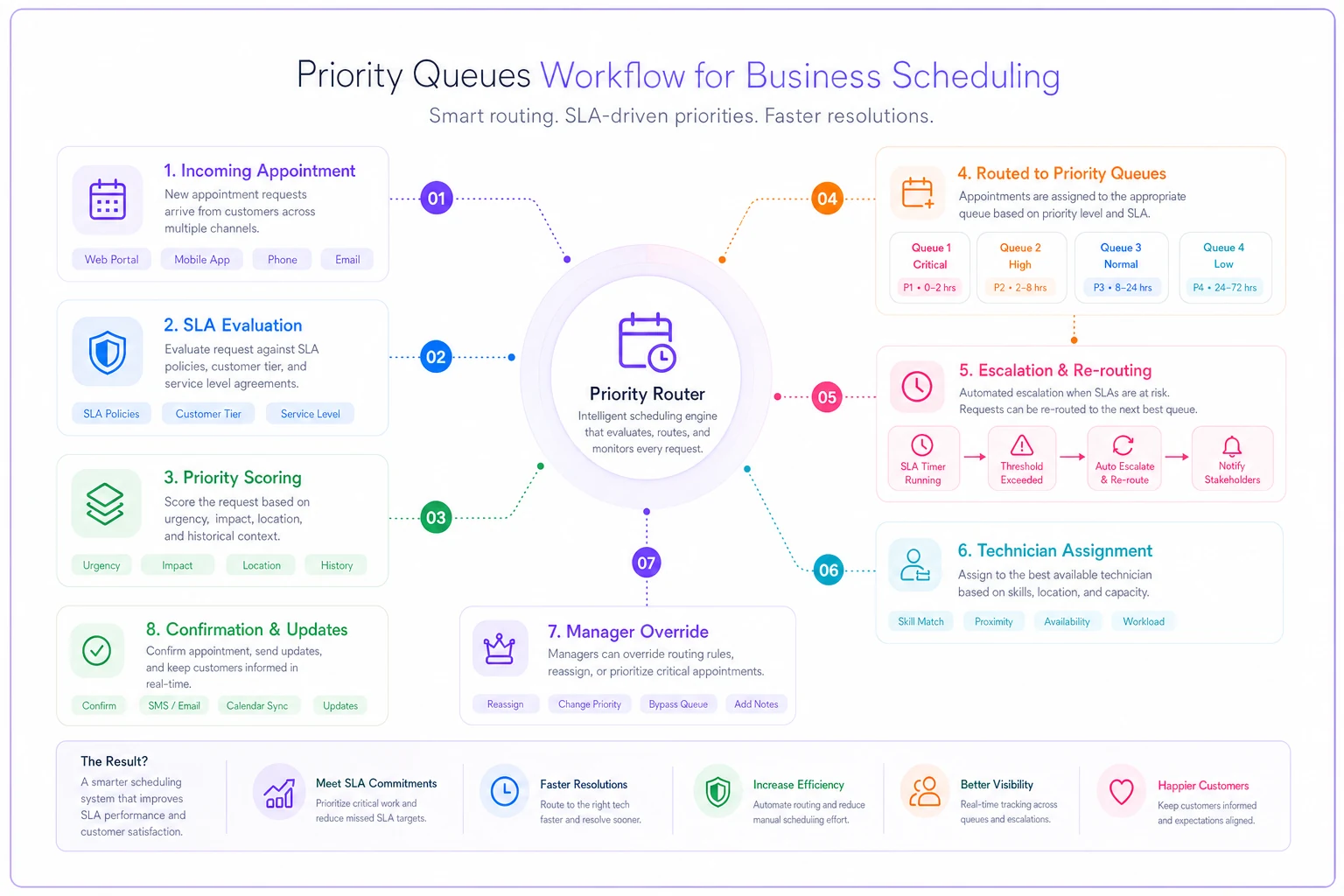
The system moves tickets between queues, triggers escalations, and assigns resources without human guesswork.
Escalation thresholds prevent breaches before they happen
Waiting until an SLA breach occurs is like waiting until your car runs out of gas before looking for a station. Escalation thresholds create early warning systems that trigger action while you still have options.
| Time Remaining | Trigger | Action |
|---|---|---|
| 50% of SLA window | Yellow alert | System suggests schedule adjustments |
| 25% of SLA window | Orange alert | Automatic re-routing evaluation |
| 10% of SLA window | Red alert | Manager override required |
| 5% of SLA window | Critical alert | Executive notification + all-hands mode |
A pest control company implemented these thresholds for their 24-hour termite inspection SLA. At the 12-hour mark, the system flags any unscheduled inspection. At 6 hours, it automatically looks for route optimization opportunities. At 2.4 hours, it alerts the operations manager who can authorize overtime or pull technicians from lower-priority work.
Before thresholds, they were averaging 3 to 4 breaches weekly, each costing around $200 in service credits. After implementation, breaches dropped to 1 or 2 per month. Catching problems early enough to actually fix them made all the difference.
Automatic re-routing preserves SLAs without manual intervention
Re-routing shouldn't require a crisis meeting. When an appointment enters the danger zone, your system should automatically evaluate options and execute the best one.
-
Check same-day capacity — Can any scheduled technician handle this appointment without affecting their other SLAs? The system calculates travel time, skill match, and existing commitments.
-
Evaluate swap opportunities — Would switching two appointments prevent a breach while keeping both customers happy? A non-urgent Tuesday appointment might easily move to Wednesday if it prevents a breach.
-
Consider overtime authorization — If the breach penalty exceeds overtime cost, the system can automatically approve extended hours for qualified technicians.
-
Explore subcontractor options — For specific service types, pre-approved contractors can handle overflow without dropping quality standards.
The system runs through these evaluations in seconds. A human dispatcher working through the same logic might take 20 to 30 minutes — and that's only if they remember to check in the first place.
An appliance repair company tested automatic re-routing across their 300-appointment weekly schedule. The system prevented roughly 89% of potential breaches by catching issues early and making small adjustments. Their previous manual process had only prevented around 40%, simply because dispatchers couldn't evaluate options fast enough.
Configure intelligent alerting that drives action, not anxiety
Bad alerting creates notification fatigue. When everything triggers an alert, nothing feels urgent. Your team starts ignoring the constant buzz of warnings and misses the ones that actually matter.
Structure alerts based on required action:
Information alerts (in-system only)
-
Queue changes
-
Successful re-routes
-
SLA timer starts
Action alerts (email/SMS to assigned staff)
-
Escalation threshold reached
-
Re-routing needed but not possible
-
Skill mismatch detected
Urgent alerts (phone call + multiple channels)
-
Imminent SLA breach
-
Critical customer at risk
-
System unable to resolve automatically
Each alert should tell the recipient exactly what to do. Not "SLA WARNING" — something like "Johnson Corp maintenance will breach in 2 hours — authorize overtime or reassign from Route 4."
One property management company cut their alert volume by around 70% while actually improving SLA performance. They eliminated alerts that didn't require action, consolidated related warnings, and added smart suppression — if an issue resolved within 5 minutes, no alert went out. Their operations manager went from 40+ daily alerts down to roughly 8 to 10 actionable notifications, and response time on critical issues improved because the important stuff stopped getting buried in noise.
Sample queue configurations that actually work
A real configuration for a commercial cleaning company with multiple service tiers:
Configuration 1: Platinum Healthcare Facilities
-
Queue
Priority 1
-
SLA
2-hour response for biohazard, 4-hour for standard
-
Escalation
50% / 25% / 10%
-
Re-routing
Automatic with override authority
-
Alerts
SMS to ops manager at 50%, phone call at 25%
-
Breach penalty
$500 per hour
Configuration 2: Gold Office Buildings
-
Queue
Priority 2
-
SLA
Same-day service guaranteed
-
Escalation
4 hours / 2 hours / 30 minutes before end of day
-
Re-routing
Automatic within region
-
Alerts
Email at 4 hours, SMS at 2 hours
-
Breach penalty
50% service credit
Configuration 3: Silver Retail Stores
-
Queue
Priority 3
-
SLA
48-hour response
-
Escalation
24 hours / 12 hours / 4 hours
-
Re-routing
Suggested, not automatic
-
Alerts
Dashboard only until 12 hours
-
Breach penalty
10% service credit
Configuration 4: Standard Service
-
Queue
Priority 4
-
SLA
Best effort within 72 hours
-
Escalation
None
-
Re-routing
Only if no impact on other queues
-
Alerts
Weekly summary only
-
Breach penalty
None
Each configuration reflects actual business reality. Healthcare facilities need immediate response because violations can trigger regulatory issues. Retail stores have more flexibility. Standard service customers chose the basic tier knowing they'd wait longer.
Including specific penalty amounts matters because it drives the system's decisions. If overtime costs $150 but a breach costs $500, the system knows to authorize the overtime.
Playbook responses for different breach scenarios
Even with solid prevention, some breaches will happen. How you respond determines whether you lose the customer or actually strengthen the relationship.
Scenario 1: Technical failure breach Your system crashed, causing multiple SLA breaches.
-
Immediate notification to affected customers with a specific resolution timeline
-
Offer a temporary solution if possible
-
Apply automatic service credits without requiring customers to ask
-
Schedule priority make-good service at customer convenience
-
Document root cause and prevention measures
A fire safety company had a system failure that delayed 12 inspections past their SLA windows. They immediately called each customer, sent a certified technician the next day at no charge, and included a detailed prevention plan with their credit notification. They retained all 12 customers — several actually increased their service agreements afterward.
Scenario 2: Capacity shortage breach Three technicians called in sick, causing premium SLA breaches.
-
Contact customers in reverse priority order to reschedule
-
Offer specific alternatives — overtime, weekend, subcontractor
-
Provide a larger credit if the customer accepts a reschedule
-
Dispatch a manager-level technician for breached appointments
-
Follow up within 48 hours to confirm satisfaction
Scenario 3: Customer-caused breach Customer site wasn't accessible during the SLA window.
-
Document the attempted service with photos and timestamps
-
Contact customer immediately to reschedule
-
Note the SLA clock pause in the system
-
Offer to extend the SLA window by the delay duration
-
Confirm the new appointment in writing
You're not at fault in this scenario, but treating it like a confrontation won't help anyone. Professional documentation protects you while keeping the relationship intact.
Continuous calibration keeps rules aligned with reality
Your initial configuration won't be perfect. Real operations expose gaps and edge cases you couldn't predict. Build a monthly calibration cycle that refines your rules based on what's actually happening.
Track these metrics:
-
Breach rate by queue and type
-
False positive escalations
-
Manual override frequency
-
Re-routing success rate
-
Customer satisfaction by service tier
If Gold tier customers show lower satisfaction than Silver tier customers, your prioritization is probably off somewhere. If managers are constantly overriding the system, your thresholds need adjustment.
A medical equipment company discovered their 4-hour emergency SLA was impossible to hit for about 15% of their service area because of geography. Rather than accept constant breaches or lose those customers, they created location-based SLA modifiers. Rural customers got 6-hour emergency SLAs with adjusted pricing. Urban customers kept 4-hour SLAs. Breaches dropped 78% and satisfaction went up because expectations finally matched reality.
They also found their escalation thresholds were too aggressive. Alerts at 50% time remaining created unnecessary panic for 24-hour SLAs. They adjusted to a combined threshold — 50% of time remaining or 4 hours, whichever came first. Small change, meaningful difference.
The real cost of continuing without proper configuration
A rough breakdown for a typical 50-technician field service operation:
Contractual penalties: 20 breaches monthly at $200 average = $4,000 Service credits: 35 minor breaches at $50 = $1,750 Customer churn: 2 premium customers monthly at $2,000 monthly value = $48,000 annual impact Operational chaos: 10 hours weekly firefighting at $50/hour = $26,000 annually Reputation damage: Harder to quantify, but you feel it when close rates start sliding
Total annual impact: somewhere around $85,000 in direct costs, plus the slower growth that comes from word getting around that your SLAs are unreliable.
Compare that to the cost of proper configuration. Most businesses can implement basic priority queues and escalation rules using existing scheduling software with minor customization. Even if you need a new platform or outside help, the investment typically pays back within two to three months.
Beyond the math, automated SLA management frees your team to focus on actual service delivery instead of constant schedule juggling. Operations become more predictable. Premium customers actually receive premium service. AI-powered scheduling platforms can take this further by learning from historical patterns and continuously refining thresholds — but even basic scheduling tools support priority queues and rule-based routing. The key step is just moving from good intentions to configured reality.
Moving from policy to practice
SLA appointment prioritization isn't about having better policies — it's about translating those policies into system behaviors that hold up under real operational pressure. The gap between your contract promises and your scheduling reality creates expensive problems that get worse over time.
Start with clear queue definitions that match your service tiers. Add escalation thresholds that catch problems while you can still fix them. Configure re-routing rules that preserve SLAs without manual intervention. Build alerting that drives action rather than anxiety. Create playbooks for when breaches do happen.
Whether you're managing 50 appointments or 5,000, the principle is the same: your system should enforce your service promises automatically, not depend on human judgment under pressure.
Your contracts make promises. Your configuration keeps them.
Ready to optimize your scheduling and operations?
Join thousands of businesses using Schedily to save time, improve coordination, and enhance operational efficiency.