



Most scheduling problems don't start in the scheduler. They start in the gap between departments that each think someone else owns the booking. Sales assumes onboarding confirmed the appointment. Onboarding assumes the customer got the reminder. The technician shows up to a site that isn't ready, and now everyone's pointing at the calendar like it betrayed them.
When you're running one location with five people, this works fine because everyone talks. When you're running twelve locations, three service lines, and a mix of in-person and remote appointments, the informal handoffs collapse. Nobody wrote down who owns the customer between "booked" and "confirmed," so it falls through.
A company-wide appointment scheduling system isn't really about the calendar software. It's about mapping the customer's journey to explicit policies, assigning ownership at every handoff, and defining exactly when a stuck appointment escalates and to whom. This post is the blueprint for building that connective tissue — the part that's usually invisible until it breaks.
Why the same failure keeps repeating across companies
The pattern almost every growing operation hits: the scheduling tool works, but the operation around it doesn't.
You can have a perfectly configured booking system and still lose a significant chunk of appointments to preventable friction. Someone books a consult, but nobody flags that it requires a specialist. The appointment sits in the calendar looking healthy right up until the day-of, when the assigned person realizes they can't handle it. Now it's a scramble.
In real operations, this usually happens because responsibilities are defined by role titles instead of journey stages. "The front desk handles bookings" sounds like ownership. It isn't. It doesn't say who owns a booking that needs a deposit, who owns one flagged for rescheduling, or who owns the one that's been sitting "pending confirmation" for three days.
Most multi-team businesses have somewhere around 7–9 distinct states in their appointment journey, and each state needs an owner. When you only have owners for two or three of them, the rest become nobody's job. And nobody's job is where revenue quietly leaks.
The second reason this repeats: escalation gets treated as a personality trait rather than a rule. The "good" employees escalate stuck appointments. The average ones let them sit. So your operation's reliability depends on which person happened to touch the booking. That's not a system — that's luck with a schedule attached.
Start by mapping the journey to states, not steps
Before you touch policies or roles, you need the actual map. Not the idealized "customer books, we deliver, everyone's happy" version — the real one with all the branches.
Eliminate scheduling conflicts and missed meetings.
Schedily helps you organize and manage all appointments and team availability effortlessly.
- Unified appointment and resource management
- Automated notifications & reminders
- Team calendar synchronization
No credit card required
-
Requested — customer initiated, nothing verified yet
-
Qualified — service type, requirements, and eligibility confirmed
-
Resourced — the right person, room, or equipment is assigned
-
Confirmed — customer acknowledged; deposit or prep collected if required
-
Ready — day-of checks passed (site prep, materials, certifications valid)
-
In progress — appointment is happening
-
Completed — service delivered, follow-up state assigned
-
Exception — anything that broke
cancellation, no-show, resource conflict, missing prerequisite
The insight most teams miss is that the Exception state needs the most design attention and gets the least. Everyone builds a smooth happy path and then acts surprised when a big slice of volume goes sideways. Your journey map is only as good as how it handles state 8.
Once you have the states, you can attach policy, ownership, and escalation to each one. That's what turns it into a system instead of just a diagram.
The policy matrix: what's allowed, who decides, when it escalates
This is the core artifact. A policy matrix answers three questions for every journey state: what's the standard action, who has authority, and what triggers an escalation.
Here's a simplified version for a services business running multiple locations:
| Journey State | Standard Policy | Owner | Escalation Trigger | Escalates To |
|---|---|---|---|---|
| Requested | Respond within 2 business hours | Front-line booking team | No response in 4 hrs | Location lead |
| Qualified | Verify service + requirements before advancing | Booking team | Ambiguous requirements | Service specialist |
| Resourced | Match by skill, certification, availability | Scheduler / dispatch | No valid resource in 24 hrs | Operations manager |
| Confirmed | Deposit + confirmation before day-of cutoff | Booking team | Unconfirmed 48 hrs before | Recovery / retention |
| Ready | Day-of checks pass | Assigned provider | Failed prep check | Location lead |
| In progress | Log start/end, flag overruns | Provider | Overrun >30% of slot | Scheduler |
| Completed | Assign follow-up state | Provider | Missing outcome data | Ops manager |
| Exception | Route by exception type | Depends on type | Unresolved >1 business day | Regional ops |
This matrix is not documentation you write once and file away. It's the operating logic of your whole scheduling operation. When someone asks "who handles a consult that hasn't confirmed with 36 hours left," the matrix answers immediately instead of the question bouncing around Slack for an hour.
A mistake people make here: they build one matrix for the whole company and try to force every location to follow it identically. That breaks fast, because a downtown clinic and a rural one have genuinely different resourcing realities. A better approach is a shared spine — same states, same escalation structure — with specific cells that locations can tune within set limits. Central consistency, local flexibility.
Role responsibility templates: ending the "I thought you had it" problem
Once policy is mapped to states, you assign humans. The key is defining responsibility as owned states, not vague duties.
-
States owned which journey states this role is accountable for
-
Decision authority what they can approve without escalating (refund thresholds, reschedule windows, resource swaps)
-
Handoff triggers the exact condition that moves the appointment to the next owner
-
Escalation obligations what they must escalate and how fast
A scheduler role might read: Owns Resourced and In-progress states. Can reassign resources within their location freely and across locations up to a 30-minute travel impact. Must escalate any appointment with no valid resource within 24 hours. Hands off to the provider once resourcing is locked and confirmed.
That's dramatically more useful than "manages the schedule." It tells the person exactly where their responsibility begins and ends — and critically, it tells everyone else too. Most handoff failures aren't laziness. They're two people who both genuinely believed the other one had it. State-based ownership mostly closes that gap.
One pattern worth calling out: as companies grow, they add roles without redrawing the ownership map. You hire a "customer success" person and a "dispatch coordinator," and suddenly three roles all sort of touch the Confirmed state, which means none of them fully own it. Every time you add a role, redraw state ownership. Overlap is where things fall.
Handoff flow: the moments where appointments actually die
Handoffs are the highest-risk moments in the entire journey. A handoff is any point where the appointment moves from one owner to another — and each one is a chance for the ball to drop.
Here's what a clean handoff flow looks like for a booking that requires a specialist:
The booking team takes the Requested appointment and confirms it needs specialist review. Instead of just tagging it and hoping, the handoff rule fires: the appointment moves to Qualified state, ownership transfers to the specialist queue, and a confirmation is required back within a set window. If the specialist doesn't claim it in that window, it doesn't just sit — it escalates to the service lead automatically. Once qualified, ownership passes to the scheduler for Resourcing, who locks the specialist and available slot, then hands to the provider for day-of Ready checks.
What makes this work: every handoff has an acknowledgment and a timeout. A handoff without acknowledgment is just a hope. A handoff without a timeout is a dead end nobody notices.
Here's a visual of a clean handoff flow with acknowledgments, timeouts, and escalation paths.
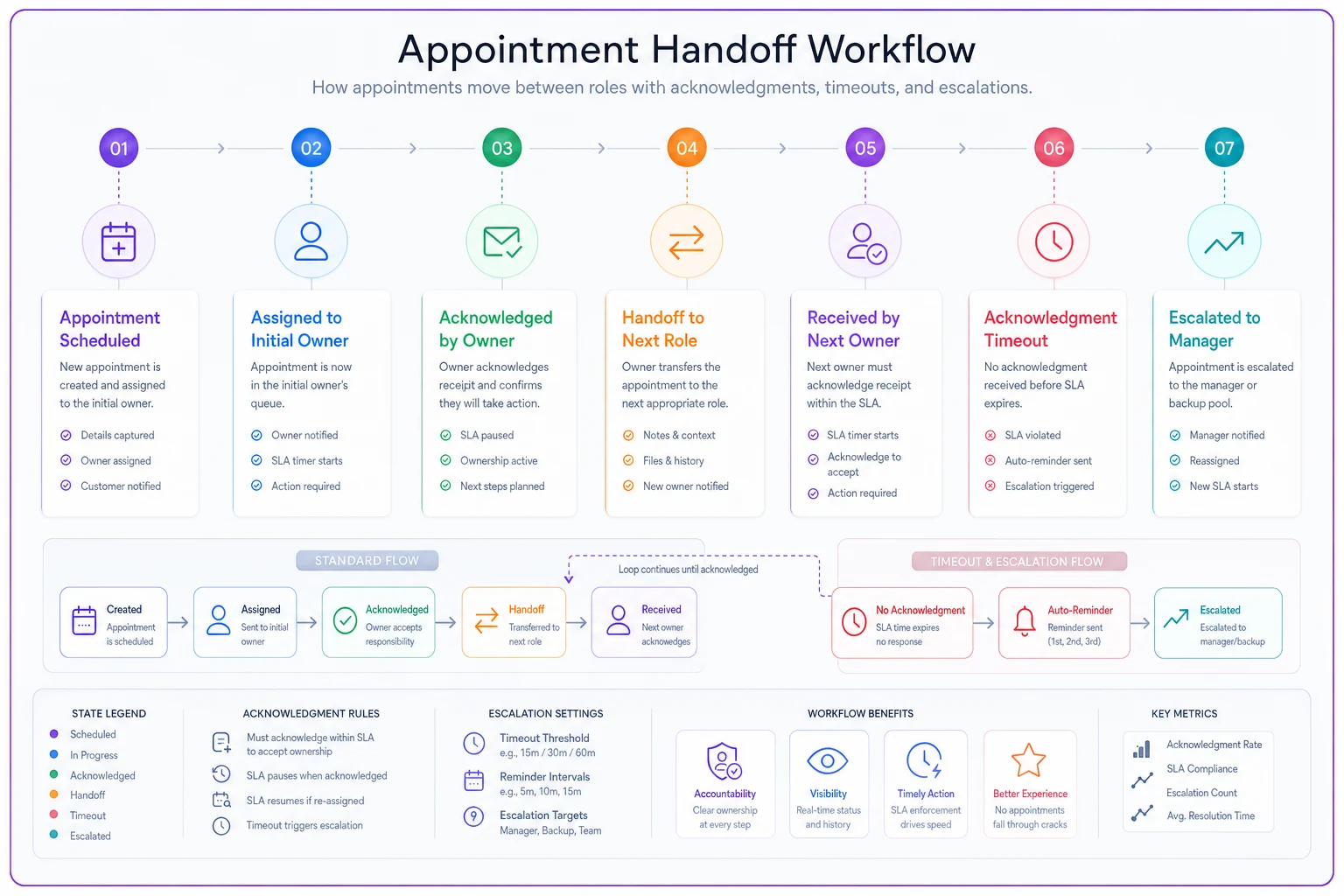
Require both acknowledgment and an automatic timeout on every handoff to prevent appointments from sitting in limbo.
The common failure looks like this: the booking team "sends it to" the specialist by leaving a note or a status flag. Nobody confirms receipt. Three days later the customer calls asking what's happening, and the appointment has been sitting in limbo the whole time. Multiply that across a few hundred bookings a month and you've got a retention problem you can't easily explain.
Every handoff in your system should answer:
-
Who is receiving ownership right now?
-
Did they acknowledge it?
-
What happens if they don't, and by when?
-
Where does the appointment go if this handoff fails twice?
Every handoff in your system should answer: Who is receiving ownership right now? Did they acknowledge it? What happens if they don't, and by when? Where does the appointment go if this handoff fails twice?
SLA-to-scheduling rules: turning promises into scheduling logic
If you've made commitments — response times, appointment lead times, priority tiers — those SLAs have to translate into concrete scheduling behavior. Otherwise they're just marketing copy.
The translation is more literal than most people expect. An SLA like "priority clients get an appointment within 48 hours" isn't a customer-service value statement, it's a scheduling constraint. It means your resourcing logic has to reserve or reallocate capacity so a priority request can't get buried behind standard volume.
A workable pattern for mapping SLAs to scheduling:
-
Define tiers with time commitments. Standard = 5 business days, Priority = 48 hours, Urgent = same day.
-
Reserve capacity per tier. Hold a percentage of daily slots for higher tiers so they aren't consumed by first-come standard bookings.
-
Set breach thresholds ahead of the actual deadline. If an Urgent request isn't resourced within 4 hours, it escalates before the SLA is blown, not after.
-
Route by tier at the resourcing state, not at intake. Intake shouldn't have to make judgment calls — the tier drives the routing rule automatically.
Most SLA breaches aren't caused by lack of capacity. They're caused by ordering — standard appointments eating the slots that priority work needed, because nothing enforced the reservation. When you bake tier logic into the resourcing state, the calendar protects your commitments instead of quietly undermining them.
This is one area where scheduling platforms with automated routing genuinely reduce error. When tier detection and capacity reservation run automatically at the resourcing step, you stop relying on someone remembering that the 2pm slot was supposed to stay open for priority requests. The rule enforces itself, and the humans focus on the exceptions that actually need judgment.
A real scenario: what changes when the system connects
Consider a regional home-services company running around 340 appointments a month across four locations, three service lines, and a mix of standard and priority commercial contracts.
Before: bookings came in through phone, web, and a couple of partner referrals. Front desk handled intake, then "passed" specialist jobs to whoever seemed free. There was no acknowledgment step. Roughly one in six appointments hit some kind of friction — wrong tech assigned, missing prep, or a priority contract sitting behind standard jobs. They were quietly breaching a handful of their commercial SLAs each month, and only found out when a client complained.
They didn't buy new software first. They mapped the journey into eight states, built the policy matrix, and rewrote three role descriptions around owned states with explicit handoff timeouts. Then they layered tier-based capacity reservation into their existing scheduler.
After about two months, the friction rate dropped noticeably — closer to one in fifteen — mostly because handoffs now had acknowledgment and escalation instead of just hope. Priority contract breaches went to nearly zero because those slots were protected at the resourcing step. The operations manager stopped being the human router for stuck appointments, because escalations surfaced on their own instead of after a client got angry.
The revenue impact was real but not dramatic in a single month — recovering a handful of appointments and avoiding a couple of SLA penalties added up to roughly $2k–$3k monthly. The bigger win was that adding a fifth location stopped feeling terrifying, because the system scaled instead of the manager's memory.
Decision checklist: is your operation ready for this?
Before investing in building all of this, run through where you actually are:
-
[ ] Can you name every state an appointment can be in, including exception types?
-
[ ] Does every state have exactly one accountable owner?
-
[ ] Does every handoff require acknowledgment, not just a status change?
-
[ ] Does every handoff have a timeout that triggers escalation automatically?
-
[ ] Are your SLA tiers translated into actual resourcing rules, not just promises?
-
[ ] Can a stuck appointment escalate without a specific person noticing it first?
-
[ ] When you add a role, do you redraw state ownership to prevent overlap?
If you're checking fewer than four of these, your scheduling reliability is running on individual diligence. That works until it doesn't — usually right when volume spikes.
When this makes sense — and when it doesn't
This full blueprint is worth building when you have multiple teams or locations touching the same appointments, when handoffs happen across departments, or when you carry SLA commitments you can't afford to breach. That's the environment where informal coordination breaks down and explicit systems pay off.
It's overkill if you're a single small team where everyone genuinely sees every booking. Building an eight-state matrix and formal handoff acknowledgments for a three-person shop just adds ceremony you'll ignore. A shared calendar and clear verbal ownership is fine.
The businesses that get burned are usually stuck in between: grown past the point where informal coordination works, but still operating like they're small. That's the gap where appointments fall through and nobody can quite explain why.
Bringing it together
A company-wide scheduling system isn't a piece of software you turn on. It's the alignment of three things that usually live in separate heads: the customer's actual journey, the policies that govern each stage of it, and the humans who own the handoffs between stages. When those line up — and escalation happens by rule instead of by whoever happens to be paying attention — your operation stops depending on heroics.
The map, the matrix, the role templates, the handoff acknowledgments, the SLA-to-scheduling translation: none of these are complicated on their own. What's hard is treating them as one connected system rather than five separate documents. Start with the journey states, because everything else attaches to them. Get the exception state right, because that's where volume actually goes when things get busy. And make sure every appointment always has one owner and one path forward — because the ones with neither are the ones you'll lose.
The map, the matrix, the role templates, the handoff acknowledgments, the SLA-to-scheduling translation: none of these are complicated on their own. What's hard is treating them as one connected system rather than five separate documents. Start with the journey states, because everything else attaches to them. Get the exception state right, because that's where volume actually goes when things get busy. And make sure every appointment always has one owner and one path forward — because the ones with neither are the ones you'll lose.
Ready to optimize your scheduling and operations?
Join thousands of businesses using Schedily to save time, improve coordination, and enhance operational efficiency.