

Calendar integration conflicts compound fast. A sales rep shows up for a meeting that got rescheduled three hours ago. A technician drives across town while the customer waits somewhere else. Your team double-books a conference room because two calendar systems show different availability.
These aren't random glitches. They're predictable failures that happen when businesses run multiple calendar systems without clear conflict resolution rules. The worst part? Most teams don't even know they have a conflict problem until customers start complaining.
The hidden complexity of calendar synchronization
Calendar sync looks simple on the surface. Connect System A to System B, enable two-way sync, done. Except real operations rarely work that cleanly.
Take a typical consulting firm. The account manager updates a client meeting in Microsoft Outlook. That change needs to flow to:
-
The shared Google Calendar the delivery team monitors
-
The Calendly booking system that blocks availability
-
The project management platform tracking billable hours
-
The CRM logging client touchpoints
Each system has its own update timing. Outlook might push changes every 5 minutes. Google Calendar could poll every 15 minutes. Calendly might use webhooks for instant updates. The project management tool syncs hourly.
One person moves a meeting 30 minutes earlier. For the next 14 minutes, those systems show different times. If someone books a conflicting appointment in that window, you've created a mess that takes hours to sort out.
The complexity compounds when you factor in:
-
Network delays and API rate limits
-
Different timezone handling across platforms
-
Partial sync failures that update some fields but not others
-
Conflicting changes made in multiple systems at the same time
Most businesses discover these issues through customer complaints. A medical practice realizes the problem when patients show up for appointments that were cancelled in one system but not another. A home services company finds out when two technicians arrive for the same job.
Why standard calendar integration creates conflicts
Timing gaps create booking conflicts Between sync cycles, your calendars diverge. A 15-minute polling interval means up to 14 minutes and 59 seconds where systems show different availability. During busy booking periods, those windows generate conflicts every single day.
Eliminate scheduling conflicts and missed meetings.
Schedily helps you organize and manage all appointments and team availability effortlessly.
- Unified appointment and resource management
- Automated notifications & reminders
- Team calendar synchronization
No credit card required
Last-write-wins destroys valid changes When two people update the same appointment in different systems, most integrations keep whichever change syncs last. The person who updated first loses their changes with zero warning. No notification, no conflict detection — just silent data loss.
Partial updates corrupt appointment data Network issues or API errors can cause partial synchronization. The appointment time updates but the location doesn't. The attendee list changes but the description stays old. These half-synced appointments are technically updated but operationally wrong.
Cascading delays compound problems When System A syncs to System B, which syncs to System C, delays stack. A change in System A might take 45 minutes to reach System C. By then, someone has already made conflicting changes based on outdated information.
Building effective conflict resolution rules
Conflict resolution starts with clear precedence rules. Which system wins when data disagrees? The answer depends on how your business actually operates.
Source-of-truth hierarchy Establish which system owns each data type:
-
Customer bookings
External booking system has precedence
-
Internal meetings
Team calendar system has precedence
-
Resource allocation
Operations platform has precedence
-
Client communication
CRM has precedence
This hierarchy prevents the common mistake of letting any system overwrite any data. Your booking system shouldn't override internal resource assignments. Your CRM shouldn't change appointment times set by customers.
Field-level conflict resolution Different fields need different conflict strategies:
| Field Type | Conflict Strategy | Reasoning |
|---|---|---|
| Appointment time | Most recent with validation | Prevents outdated times but checks for conflicts |
| Location | Source system wins | Maintains consistency with original booking |
| Attendees | Merge and deduplicate | Preserves all participants |
| Notes/Description | Append with timestamps | Retains all information |
| Status | Explicit precedence rules | Prevents cancelled appointments from reactivating |
Conflict detection windows Define how long to watch for conflicting changes. A 5-minute detection window catches most simultaneous updates. Extend to 15 minutes for systems with slower sync cycles.
During the detection window:
-
Flag appointments modified in multiple systems
-
Compare change timestamps and sources
-
Apply your precedence rules
-
Log the conflict and resolution for audit
When using "Most recent with validation" for times, validate across timezones before applying the change.
Log the conflict and resolution for audit
Implementing sync governance patterns
Sync governance means controlling when, how, and what synchronizes between systems. Random polling and instant webhooks create chaos. Structured sync windows create predictability.
Scheduled reconciliation windows Instead of continuous synchronization, use defined reconciliation windows:
-
Morning sync
6 AM before business hours
-
Lunch sync
12:30 PM during a natural break
-
Evening sync
6 PM after appointments end
-
Overnight full reconciliation
2 AM complete system alignment
Between windows, queue changes but don't apply them. This prevents mid-day conflicts while ensuring everything aligns at predictable times.
Webhook patterns for critical updates Some changes can't wait for the next sync window. Use webhooks selectively for:
-
New customer bookings (prevent double-booking)
-
Cancellations (free resources immediately)
-
Location changes (prevent wasted trips)
-
Day-of time changes (ensure everyone knows)
Non-critical updates — note additions, attendee changes — can wait for the next reconciliation window.
Change batching and ordering
-
Cancellations first (free resources)
-
Time changes second (might affect other bookings)
-
New bookings third (use updated availability)
-
Metadata updates last (notes, descriptions)
This ordering prevents scenarios where a new booking conflicts with a cancellation that hasn't processed yet.
Here's a simple visual of a sync governance workflow.
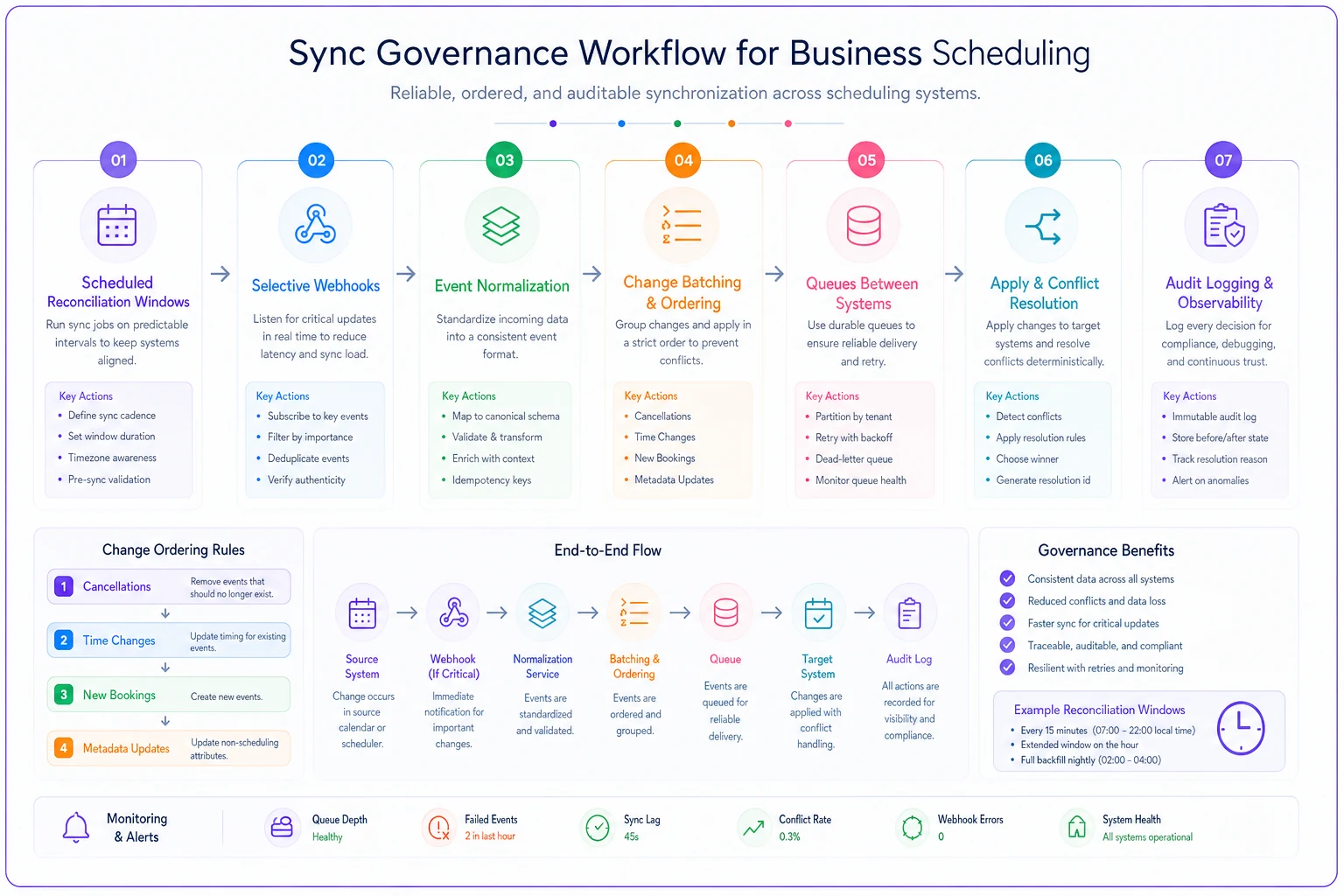
This diagram highlights queues, selective instant updates, and the ordered processing that reduces mid-day conflicts.
Proactive conflict detection workflows
Waiting for conflicts to cause problems is expensive. Proactive detection catches issues before they hit operations.
Pre-sync validation checks Before applying any synchronization:
-
Check for overlapping appointments in the target system
-
Verify resource availability hasn't changed
-
Validate that referenced entities still exist
-
Confirm the change timestamp isn't suspiciously old
These checks stop synchronization from creating new problems while fixing old ones.
Conflict monitoring dashboard
-
Sync delay by system pair
-
Conflicts detected per day
-
Resolution automation success rate
-
Manual intervention frequency
When conflict rates spike, something changed in your environment — maybe a system update altered API behavior, maybe increased booking volume overwhelmed your sync intervals.
Automated conflict alerts
-
Double-booked resources
-
Customer appointments moved without notification
-
Sync failures lasting over 30 minutes
-
Precedence rule violations
Route these alerts to whoever can resolve them quickly. The front desk needs to know about customer booking conflicts. IT needs to know about sync failures.
Reconciliation checklists and escalation flows
Even with solid conflict resolution rules, some situations require human intervention. Clear escalation paths prevent small conflicts from turning into operational disasters.
Daily reconciliation checklist Each morning, operations should verify:
-
All systems show matching appointment counts
-
No appointments exist in only one system
-
Resource allocations match across platforms
-
Customer-facing calendars match internal schedules
-
Previous day's conflicts are resolved
-
Sync logs show normal patterns
A 10-minute check catches drift before it wrecks the day.
Conflict escalation tiers
Tier 1: Auto-resolve
-
Single field differences with clear precedence
-
Updates within normal sync delay windows
-
Metadata changes that don't affect operations
Tier 2: Operations review
-
Time or location conflicts
-
Resource allocation mismatches
-
Changes affecting customer commitments
Tier 3: Management escalation
-
Conflicts affecting revenue-generating appointments
-
Repeated conflicts involving the same customer
-
Sync failures affecting multiple days
Resolution documentation requirements
-
Which systems showed conflicting data
-
What precedence rule applied (or why it was overridden)
-
Who made the resolution decision
-
What communication went to affected parties
-
Whether the conflict pattern warrants new rules
This documentation helps refine your rules over time rather than solving the same problems repeatedly.
When sync governance actually matters
Not every business needs complex calendar integration conflict resolution. A solo consultant using one calendar doesn't face these challenges. But certain operational patterns make sync governance critical.
Multi-location operations Businesses running multiple locations often use different calendar systems per site. The downtown clinic uses one platform, the suburban location uses another. Without sync governance, providers double-book themselves across locations without realizing it.
Mixed workforce models Companies with both employees and contractors face real calendar complexity. Employees use the corporate system. Contractors use their own tools. Client meetings need to appear correctly in both. Without conflict resolution rules, contractors can accidentally override employee schedules.
Customer self-service booking When customers book online, those bookings need to flow accurately to internal systems. A hair salon might use an online booking platform for customers while staff manages their own schedules internally. Without proper conflict resolution, an internal schedule change could quietly wipe out a customer's booking.
Regulated appointment tracking Healthcare, legal, and financial services need clean audit trails. When calendar sync conflicts corrupt that data, compliance suffers. Sync governance keeps the official record accurate regardless of which system people happen to prefer.
The real cost of calendar conflicts
Most businesses never fully calculate what calendar conflicts actually cost them.
A field service company with 12 technicians averaged around 3 calendar conflicts per week. Each one took roughly 45 minutes to resolve — identifying the issue, contacting affected parties, rescheduling. That's over 2 hours weekly in direct resolution time.
But the real costs went further:
-
Lost revenue from missed appointments
$400–600 per incident
-
Fuel costs for wasted trips
$30–50 per incident
-
Customer refunds and discounts
$100–200 per incident
-
Time spent trying to prevent future conflicts
4+ hours monthly
Their annual cost from calendar conflicts was well over $75,000. After implementing structured sync governance with clear conflict resolution rules, conflicts dropped to less than one per month. Most of those auto-resolved through precedence rules without anyone touching them.
Modern operational software and calendar integration
Calendar integration conflict resolution becomes much more manageable when your operational software handles the underlying complexity. Modern platforms with AI automation can detect conflicts before they affect operations, apply your business rules consistently, and keep multiple calendar systems in sync without someone manually babysitting the process.
The key is choosing software that treats calendar synchronization as more than just data copying. It's about maintaining operational consistency while accepting the reality that different teams use different tools and aren't going to stop anytime soon.
AI-powered conflict detection can catch patterns that are easy to miss manually. When Tuesday afternoon appointments consistently conflict, the system can identify that your sales team's weekly meeting runs long and bleeds into subsequent bookings. When conflicts cluster around specific customers, it can flag potential timezone confusion before it becomes a recurring problem.
The goal isn't replacing human judgment on the hard calls. It's handling routine conflicts automatically so your team can focus on the exceptions that actually need a decision.
Making calendar integration actually work
Calendar conflicts aren't really technology problems at their core. They're operational problems that technology makes visible. Two people scheduling the same resource wouldn't magically coordinate better with perfect calendar sync — they'd just find out about the conflict faster.
The solution requires both technical controls and operational discipline. Define precedence rules based on business reality, not system capabilities. Implement sync governance that matches your actual operational rhythm. Build escalation paths that get conflicts resolved before they reach customers.
Most importantly, treat calendar synchronization as an ongoing operational process that needs monitoring and refinement. Track your conflict patterns. Adjust your rules based on what actually happens, not theoretical edge cases. Document resolutions so institutional knowledge builds over time instead of walking out the door when someone leaves.
Calendar integration should reduce operational friction. When conflicts become exceptions instead of daily fires, your team can focus on doing actual work instead of fixing synchronization issues.
Ready to optimize your scheduling and operations?
Join thousands of businesses using Schedily to save time, improve coordination, and enhance operational efficiency.