



The Fed held rates at 3.50%–3.75% yesterday. Warsh's first meeting as chair ended exactly how most operations teams feared — with signals that rates could climb further if inflation stays sticky through summer.
For businesses running on credit lines or facing refinancing this year, yesterday basically locked in another six months of brutal borrowing costs. The median business we work with carries around $280k in operational debt. At current rates, that's an extra $850–$1,100 monthly compared to eighteen months ago.
What actually keeps me up at night though isn't the rates themselves — it's how businesses are responding. They're cutting hours randomly, pulling coverage during profitable periods, and creating service gaps that send customers straight to competitors. Last week I reviewed three different operations where panic-driven cuts actually increased per-service labor costs. Panic is expensive.
The businesses that survive this environment won't be the ones who cut deepest. They'll be the ones who cut smartest.
The scheduling inefficiency most operations teams completely miss
Every ops team understands the basic math — higher rates mean higher debt service, less cash for operations. What they miss is how traditional scheduling creates hidden labor waste that compounds under financial pressure.
A typical service business runs at 62–68% labor efficiency. For every dollar spent on labor, you're getting 62–68 cents of productive work. The rest disappears into transition time, setup, coordination gaps, and what I call "coverage insurance" — overstaffing because you don't fully trust your own schedule.
When budgets tighten, most managers attack visible waste first. Cut the obvious overstaffing on slow Tuesday afternoons. Reduce the backup tech on Saturdays. Trim the floater. These cuts feel productive because payroll drops immediately. But they leave the structural inefficiencies completely untouched.
A home services company I looked at last month had 12 technicians covering a metro area, averaging 5.2 appointments per tech daily. When financing costs jumped, they cut two positions and pushed the remaining techs to 6.5 appointments each. Seemed logical on paper.
Except travel time increased 23%. On-time rate dropped from 87% to 71%. Customer complaints spiked. Eight weeks later they'd lost enough business that overtime was required to cover remaining appointments. Actual labor cost per appointment went up $14.
The problem wasn't headcount. It was how they scheduled.
Six scheduling changes that actually reduce costs
After watching dozens of businesses navigate rate cycles, clear patterns show up. The operations holding margins while cutting costs share specific scheduling practices most teams haven't touched.
Eliminate scheduling conflicts and missed meetings.
Schedily helps you organize and manage all appointments and team availability effortlessly.
- Unified appointment and resource management
- Automated notifications & reminders
- Team calendar synchronization
No credit card required
1. Implement dynamic capacity blocking
Most scheduling systems treat all slots equally. A 9am Monday appointment costs the same to service as a 2pm Thursday. Operationally, that's false — and financially dangerous when margins are already thin.
Dynamic capacity blocking means restricting certain time windows based on actual service cost. Your most expensive slots — early mornings, late afternoons, geographic outliers — should only open for premium services or once other slots fill up.
Start by mapping true slot costs. Include travel time from previous appointments, setup requirements, coordination overhead. You'll usually find 20–25% of your slots cost 40–50% more to service than your median.
Block expensive slots for bookings under a certain value threshold. A plumbing company might restrict 7am openings to emergency calls only. A medical practice might hold Friday afternoon slots for procedures over $400.
This sounds restrictive, but the math holds up. One HVAC company did this last December and saw labor cost per service drop 11% while keeping 94% of previous appointment volume. Same revenue, meaningfully lower operational cost.
Start slot-cost mapping with your top routes and the most frequent appointment types to find the highest-impact blocks quickly.
2. Create skill-based routing instead of territory assignments
Traditional scheduling assigns technicians to geographic territories. Minimizes travel, builds local knowledge — makes intuitive sense. Under financial pressure, though, it creates expensive rigidity.
When techs are locked into territories, you lose scheduling flexibility. The complex-repair specialist in the north zone sits idle while basic maintenance backs up in the south. One tech hits overtime while another leaves early.
Replace territory assignments with skill-based routing that treats geography as one variable among several. Each appointment type gets tagged with required skills. Each technician gets scored on those skills. The system matches on skill fit first, then optimizes for travel.
A dental group made this switch when their loan rates jumped last fall. Specialists had been locked to specific offices. Moving to skill-based scheduling across locations reduced specialist downtime 31% and cut overtime by roughly $4,200 monthly. Patients complained initially about seeing different providers, but satisfaction scores recovered within six weeks as wait times dropped.
3. Build buffer pools instead of fixed coverage
Counterintuitive, but businesses that cut labor costs most effectively during downturns often add a specific position type — the buffer pool.
Fixed coverage means scheduling set numbers of people for set hours regardless of actual demand. You need eight people Monday morning, so you schedule eight. But demand varies. Some Mondays you need six. Some you need eleven.
Buffer pools are smaller groups of cross-trained staff who float between roles based on real-time demand. Instead of eight fixed positions, you run six fixed plus a three-person buffer pool shared across departments.
The critical piece is making buffer assignments algorithmic, not manual. Set clear trigger rules — when appointment density hits X, pull Y people from the buffer. When service type Z comes in, assign the buffer person with skill A. Otherwise managers spend half their day on the phone.
A veterinary hospital group did this after their credit line hit 8.5%. They replaced four full-time positions across three locations with a six-person buffer pool. Buffer staff cost more per hour but worked fewer total hours. Net savings came out around $11,000 monthly, with better coverage during demand spikes than they'd had before.
4. Configure appointment clustering
Appointment clustering is probably the highest-impact scheduling change most teams have never seriously considered. The idea is simple — group similar appointments together to cut transition costs. Execution is where things usually fall apart.
Most systems spread appointments evenly throughout the day to "balance the load." This maximizes transition waste. Every appointment carries setup time, context switching, sometimes travel. Alternating constantly between different appointment types multiplies all of that.
Proper clustering groups similar work while respecting service windows. Routine maintenance in the morning, complex repairs in the afternoon. North-side appointments before lunch, south-side after.
But rigid clustering breaks under real-world conditions. Customers have preferences. Emergencies don't schedule themselves neatly.
The fix is algorithmic clustering with flexibility parameters. Set a clustering strength score from 0–100. At 100, the system never breaks clusters. At 0, it ignores clustering entirely. Most businesses land around 65–75 — strong clustering preference but willing to break for high-value bookings or urgent service needs.
An appliance repair company tested this after financing costs jumped $3,400 monthly. They configured clustering rules grouping repairs by type and geography. Travel time dropped 19%. Technicians also completed about 8% more appointments in the same hours — less constant context switching between repair types adds up fast.
5. Replace availability schedules with commitment scoring
Traditional scheduling works on binary availability — someone is either available or not. Under budget pressure, this forces expensive either/or decisions. Commitment scoring adds nuance.
Instead of available/not available, each person gets scored on their actual commitment level for each time slot. Full-time staff might score 100. Part-time scores 75. On-call scores 40. Overtime scores 15.
The system then optimizes across those scores, maximizing coverage while minimizing low-score assignments. This naturally reduces overtime and on-call usage without hard rules that collapse during demand surges.
The real power is making scores dynamic. If someone consistently accepts Thursday overtime, their Thursday overtime score goes up. If they've declined Monday morning calls three times, that score drops. The system learns.
A physical therapy network built this when borrowing became expensive and lease renewals hit hard. They cut overtime costs 34% while actually improving appointment availability. The system stopped wasting time calling people who consistently said no.
6. Enable real-time schedule performance monitoring
You can't optimize what you only measure once a week. Most operations review scheduling performance in weekly or monthly reports — by then, the damage is done.
Real-time monitoring means tracking key metrics continuously and alerting when they drift outside acceptable ranges. Not end-of-day summaries. Actual visibility into whether your current schedule is creating or destroying value as it happens.
The metrics that matter under financial pressure:
-
Labor cost per appointment (rolling 4-hour window)
-
Capacity utilization by skill type
-
Travel time as percentage of total time
-
Buffer pool deployment rate
-
Overtime trending
-
Schedule stability score (changes in the last 2 hours)
A restoration company started tracking these after insurance and lending costs spiked simultaneously. They found Thursday afternoon labor costs running 40% higher than Tuesday mornings for identical work. By restructuring that specific scheduling window and monitoring impact in real-time, they brought that variance down to 11%.
This kind of monitoring pairs naturally with operational KPI frameworks that track scheduling performance systematically. Real-time alerting combined with structured performance tracking catches problems before they compound into actual losses.
Here's a quick visual of how these scheduling changes fit together as an operational workflow.
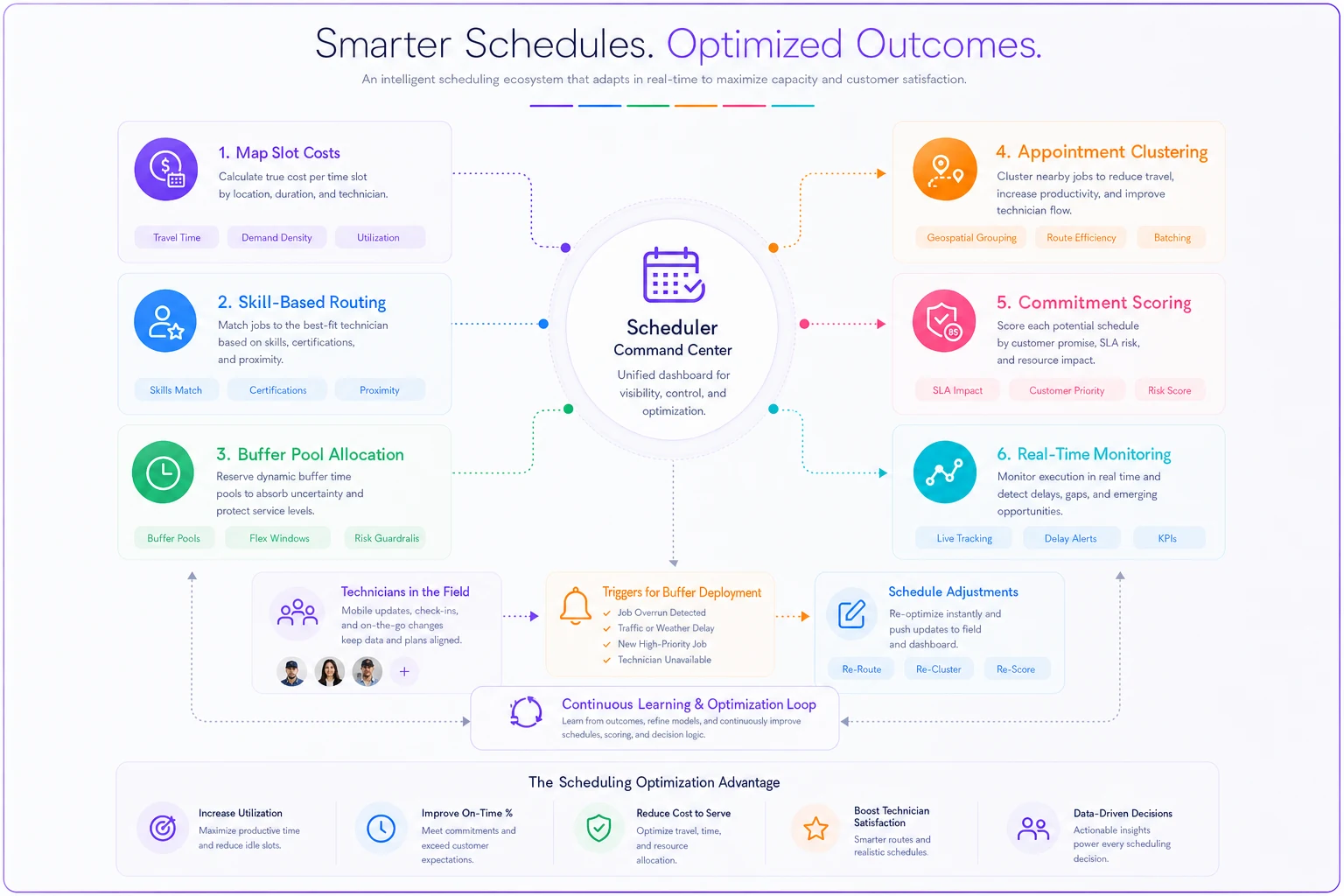
This image highlights the process flow from data inputs to automated schedule adjustments and continuous monitoring.
What doing nothing actually costs
Take a 50-person service business doing $4.2M annually. Typical operation — residential services, healthcare, specialty retail. In the current environment their debt service probably jumped $2,500–$3,500 monthly. Lease costs are up if they renewed recently. Suppliers are passing along their own financing pressure.
Standard response: cut 10% of labor hours across the board.
Except those cuts cascade. Service levels drop, customer retention falls 5–8%. Remaining staff gets stretched, mistakes increase. Good employees leave for competitors not playing defense. Overtime fills the gaps, eating half the supposed savings.
Six months later that business is down 12–15% in revenue but only saved 4–6% in costs. Worse off than doing nothing.
The alternative looks different. Same pressure, same need to cut. But instead of blind cuts, you go after waste. Improve density. Optimize routing.
Real example from about three months back: medical equipment company, 30 technicians, three counties. They needed to cut $28,000 monthly from operations. Instead of laying off 4–5 people, they implemented dynamic capacity blocking and skill-based routing. Labor costs dropped $19,000. Another $11,000 came from reducing overtime through better buffer pool management.
Same service levels. On-time performance actually improved. No layoffs.
When these changes make sense (and when they don't)
Not every business should implement all six. Your model, industry, and current efficiency level determine what's worth pursuing.
| Change | When it makes sense |
|---|---|
| Dynamic capacity blocking | works best when appointment values vary and customers have some booking flexibility. If all your services cost roughly the same or customers can't choose timing, the complexity probably isn't worth it. |
| Skill-based routing | requires meaningful skill variation among staff. If everyone can do everything equally well, geographic optimization matters more. |
| Buffer pools | need scale — usually 20+ operational staff minimum. Below that, coordination overhead eats the benefit. |
| Appointment clustering | demands customer flexibility. B2B services can cluster aggressively. Emergency services basically can't cluster at all. Most businesses fall somewhere in between. |
| Commitment scoring | assumes you have variable staff types — full-time, part-time, on-call, contractors. If everyone works identical schedules, binary availability is fine. |
| Real-time monitoring | almost always makes sense if you can afford the setup. The question is just how sophisticated it needs to be for your operation. |
The question is just how sophisticated it needs to be for your operation.
Building scheduling resilience into operational software
The businesses holding margins despite rate pressure share a common trait — they've moved beyond manual scheduling to algorithmic optimization. Not because they love technology, but because manual scheduling genuinely can't handle the complexity of modern constraints when margins are thin.
When we build operational platforms for service businesses, scheduling optimization is consistently where we see the fastest ROI. A properly configured system running these changes typically reduces labor costs 8–14% while maintaining or improving service levels.
The key is making algorithmic approaches accessible to actual operations teams, not just developers. You shouldn't need a data science background to configure clustering strength or build routing rules. The best platforms hide that complexity behind simple business rules anyone can understand and adjust.
AI-powered automation helps by continuously refining these parameters against actual performance. It notices when Tuesday clustering isn't working and adjusts. It detects when buffer pool triggers are too sensitive and dials them back. It learns which commitment scores actually predict availability.
But the AI isn't magic — it's just faster at testing and adjusting the rules you define. The strategic decisions, which changes to prioritize, how aggressively to optimize, what tradeoffs to accept, those stay with the people running the operation.
Moving forward under sustained pressure
The Federal Reserve's decision signals a prolonged period of financial pressure. Rates aren't dropping soon. Credit stays expensive. Operating margins stay compressed.
Start with one change. Pick the one that matches your biggest current pain point. Overtime killing you? Build buffer pools. Travel time excessive? Implement clustering. Overstaffed during slow periods? Configure dynamic capacity blocking.
Track the impact for 30 days — not just cost savings, but service levels, employee satisfaction, customer feedback. The goal isn't just surviving the current rate environment. It's coming out the other side with capabilities your competitors didn't bother building.
The businesses that master scheduling optimization under pressure end up doing more with less. They build systems that scale efficiently. When conditions eventually improve, they're positioned to grow faster than operations that just waited it out.
The question isn't whether you need to reduce costs — this rate environment makes that decision for you. The question is whether you do it intelligently through better scheduling, or desperately through service cuts that accelerate the decline.
The next six months will make that difference obvious.
Ready to optimize your scheduling and operations?
Join thousands of businesses using Schedily to save time, improve coordination, and enhance operational efficiency.