


Most migration runbooks tell you what to do: run in shadow mode, dual-write, compare outputs, then cut over. What they almost never give you is the actual SQL you paste into a psql prompt at 2am while 12% of production traffic is already flowing through the new scheduler and something looks off.
This post is that missing layer. If you've already set up shadow mode and dual-write using the approach in Migrate a legacy scheduler with minimal disruption, this is the operational companion — the reconciliation queries, the replay logic, the numeric thresholds that trigger an automatic hold, and the decision matrix that tells you whether to roll back by hand or let automation handle it.
Everything here assumes you have two systems writing to comparable stores (legacy = source of truth, new = candidate), plus a change-data-capture (CDC) or event stream between them. Adjust table and column names to your schema. I'll call out indexes and expected runtime on each query because a reconciliation query that table-scans 40M rows during peak load is itself an incident.
The four discrepancies you're actually hunting
During a scheduler cutover, divergence shows up in exactly four shapes, and conflating them is the most common reason teams panic over nothing:
-
Missing occurrences — an appointment exists in legacy but never materialized in the new system.
-
Duplicates — the new system created the same logical occurrence twice (usually a retry without idempotency).
-
Divergent payloads — both systems have the occurrence, but a field differs (start time, resource ID, status).
-
Pipeline lag — nothing is actually wrong with the data; the new side just hasn't caught up yet (CDC offset behind, consumer lag).
The trap is treating lag as divergence. A query run at the wrong second will show 4,000 "missing" occurrences that fully resolve 90 seconds later. So before you run any count comparison, check the pipeline position first.
Step zero: confirm the pipeline is caught up
Never reconcile counts until you've verified replication position. In PromQL, the two metrics that matter during cutover:
Eliminate scheduling conflicts and missed meetings.
Schedily helps you organize and manage all appointments and team availability effortlessly.
- Unified appointment and resource management
- Automated notifications & reminders
- Team calendar synchronization
No credit card required
``promql
# Consumer lag per partition (messages behind)
max by (consumergroup, topic) (
kafkaconsumergrouplag{consumergroup="scheduler-new-writer"}
)
# CDC end-to-end delay (seconds between source commit and sink apply)
histogramquantile(0.95,
sum by (le) (rate(cdcapplydelayseconds_bucket[5m]))
)
``
Verify both consumer lag and CDC p95 are within thresholds before interpreting any row-count diffs.
Rule of thumb during an active ramp: if consumer lag exceeds 2,000 messages on any partition, or the p95 CDC apply delay exceeds 30 seconds, pause the ramp and let it drain before interpreting any row-count diff. Running reconciliation over a lagging pipeline manufactures false alarms and burns your team's trust in the dashboards.
Reconciliation query 1: missing occurrences
This finds occurrences present in legacy but absent in the new store, scoped to a time window so it stays cheap.
``sql
-- Params: :windowstart, :windowend (keep windows <= 2h during cutover)
-- Required index: legacyoccurrences (startts) and newoccurrences (correlationkey)
-- Expected runtime: ~200-600ms on ~2M rows in window with the indexes below
SELECT l.correlationkey,
l.appointmentid,
l.startts,
l.resourceid
FROM legacyoccurrences l
LEFT JOIN newoccurrences n
ON n.correlationkey = l.correlationkey
WHERE l.startts >= :windowstart
AND l.startts < :windowend
AND n.correlationkey IS NULL
ORDER BY l.startts
LIMIT 5000;
``
The LIMIT 5000 is deliberate. If you're getting more than a few thousand genuine misses in a 2-hour window, you don't need the full list — you need to stop the ramp. The index to have in place before cutover is a btree on newoccurrences(correlationkey); without it this becomes a hash join over the whole table and runtime climbs into the tens of seconds.
Reconciliation query 2: duplicates
Duplicates almost always mean a retry fired without the idempotency key being honored on the write path.
``sql
-- Required index: newoccurrences (correlationkey)
-- Expected runtime: ~300ms-1s depending on window size
SELECT correlationkey,
COUNT() AS copies,
MIN(createdat) AS firstseen,
MAX(createdat) AS lastseen,
arrayagg(id) AS rowids
FROM newoccurrences
WHERE createdat >= :windowstart
AND createdat < :windowend
GROUP BY correlation_key
HAVING COUNT() > 1
ORDER BY copies DESC
LIMIT 1000;
``
The firstseen/lastseen spread tells you whether it's a tight double-fire (milliseconds apart = concurrent retry) or a wide gap (minutes apart = replay logic re-processing an already-handled event). Two different bugs, two different fixes. The timestamp spread is how you tell them apart without guessing.
Reconciliation query 3: divergent payloads
Both sides have the row; something inside differs. Compare only the fields that are authoritative.
``sql
-- Required indexes: both tables on (correlationkey)
-- Expected runtime: ~500ms-2s; keep field list tight, avoid SELECT *
SELECT l.correlationkey,
l.startts AS legacystart, n.startts AS newstart,
l.resourceid AS legacyres, n.resourceid AS newres,
l.status AS legacystatus, n.status AS newstatus
FROM legacyoccurrences l
JOIN newoccurrences n
ON n.correlationkey = l.correlationkey
WHERE l.startts >= :windowstart
AND l.startts < :windowend
AND ( l.startts IS DISTINCT FROM n.startts
OR l.resourceid IS DISTINCT FROM n.resourceid
OR l.status IS DISTINCT FROM n.status )
LIMIT 2000;
``
IS DISTINCT FROM instead of <> matters here — it handles NULLs correctly, so a field that's NULL on one side and populated on the other gets flagged instead of silently passing. The single most common divergence in scheduler cutovers is start_ts differing by exactly one hour, which is almost always a DST or timezone-storage mismatch, not a logic bug. Worth keeping in mind before you page the on-call engineer.
Canonical key formats: correlation and idempotency
Reconciliation is only as good as your keys. Two keys, two jobs:
-
Correlation key — stable logical identity of an occurrence, identical across both systems. Use it to join and compare.
-
Idempotency key — identity of a write attempt, used to deduplicate retries on the write path.
``
# Correlation key (one per logical occurrence)
corr:{tenantid}:{appointmentid}:{occurrencestartutciso}

# Example
corr:4821:APPT-9f2c:2026-03-08T14:00:00Z

# Idempotency key (one per write intent)
idem:{correlationkey}:{operation}:{payloadhash8}

# Example
idem:corr:4821:APPT-9f2c:2026-03-08T14:00:00Z:create:a93f1c08
``
Two things that save you later: always store occurrencestartutc in the correlation key in UTC, never local time (otherwise recurring rules across a DST boundary generate colliding keys), and put a short payload hash in the idempotency key so a legitimate update doesn't get deduped as if it were a retry of the create.
Idempotent replay with conflict detection
When you find missing occurrences, you replay them into the new system. Replay that isn't idempotent is how a 400-row backfill becomes an 1,100-row duplicate mess. Here's the pattern in pseudocode:
``
function replay(occurrence):
    idem = buildidempotencykey(occurrence)

    # Fast path: already applied?
    if store.exists(idem):
        auditlog("skip", idem, reason="alreadyapplied")
        return OK

    attempt = 0
    backoff = 250ms   # base
    while attempt < 5:
        try:
            result = store.writeconditional(
                occurrence,
                idempotencykey = idem,
                expect = NOTEXISTS
            )
            auditlog("applied", idem, attempt=attempt)
            return OK

        except ConflictError:            # someone else wrote it
            auditlog("conflict", idem, attempt=attempt)
            return OK                     # conflict == success for create

        except TransientError:           # timeout, 503, lock wait
            attempt += 1
            sleep(backoff + jitter(0..100ms))
            backoff = min(backoff * 2, 8s)
            auditlog("retry", idem, attempt=attempt)

    audit_log("failed", idem, attempt=attempt)
    raise ReplayExhausted(idem)
``
A diagram of the idempotent replay flow:
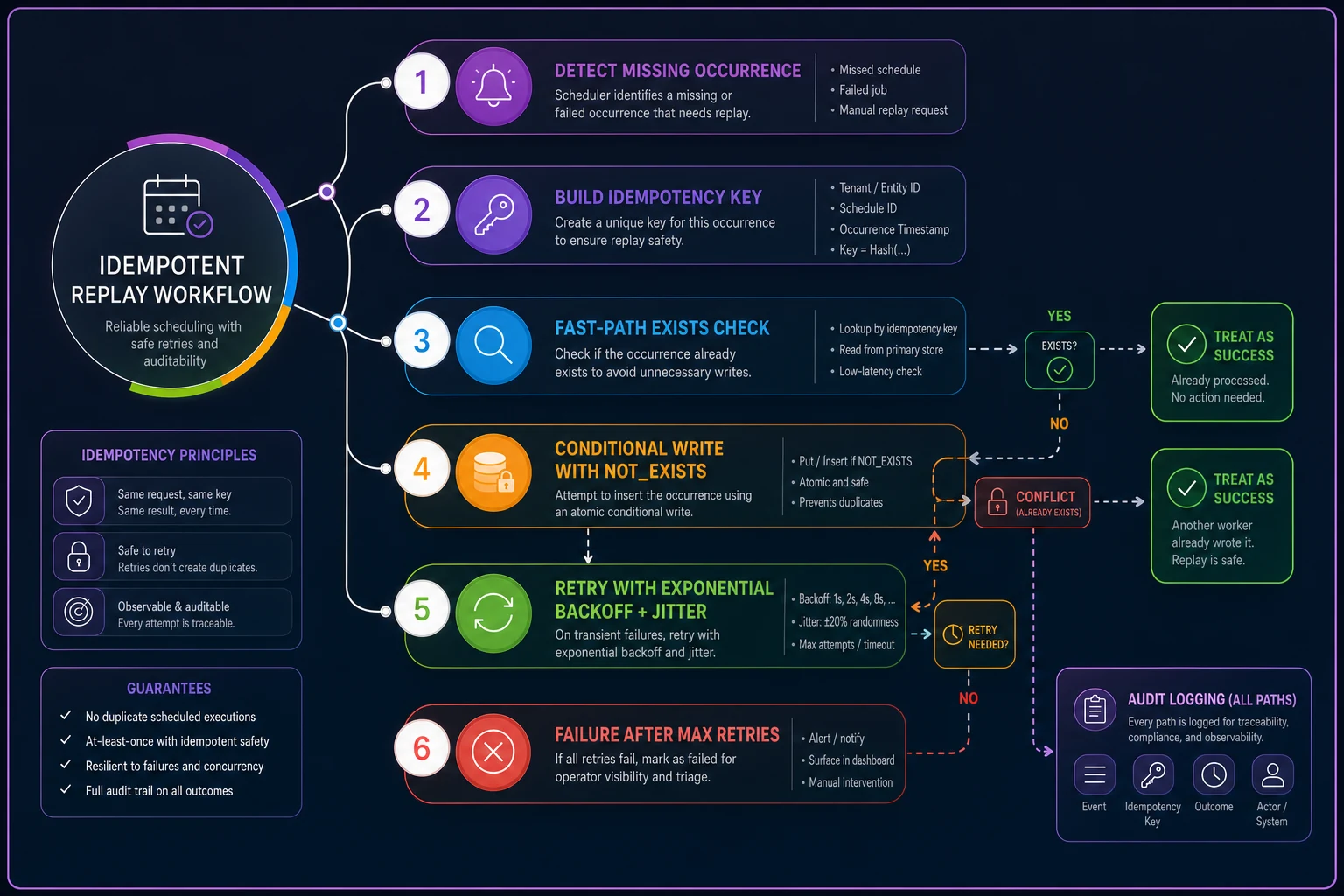
Three non-obvious things baked into this. First, a ConflictError on a create is a success, not a failure — it means the occurrence exists, which is the outcome you wanted. Second, every path writes an audit record, because during post-cutover forensics you'll need to prove exactly which rows were replayed and when. Third, backoff is capped and jittered so a batch replay doesn't synchronize all its retries into a thundering herd against the new store.
Minute-by-minute guardrails and the actions they trigger
This is the part runbooks consistently leave vague with phrases like "monitor for anomalies." Here are concrete numbers. Treat them as starting points and tune to your volume.
| Metric | Green (continue) | Yellow (hold, investigate) | Red (auto-rollback) |
|---|---|---|---|
| Missing occurrences / 2h window | < 10 | 10–100 | > 100 |
| Duplicate rate | < 0.05% | 0.05–0.5% | > 0.5% |
| Divergent payloads / window | < 25 | 25–150 | > 150 |
| p95 write latency delta (new − legacy) | < +40ms | +40–120ms | > +120ms |
| Consumer lag (max partition) | < 2,000 | 2,000–10,000 | > 10,000 sustained 5m |
| CDC apply p95 | < 30s | 30–90s | > 90s sustained |
The "sustained 5m" qualifier on the red thresholds matters more than the number itself. A single scrape spiking past a threshold is noise; a threshold held for five consecutive minutes is a trend. Wiring auto-rollback to instantaneous values instead of sustained windows is how teams end up flapping in and out of rollback every time a GC pause hits.
Yellow actions are automatic holds, not rollbacks: freeze the ramp at the current percentage, page the on-call, and keep running reconciliation. Red actions execute the rollback path (below) and notify. Green lets the ramp schedule proceed to its next gate.
The traffic ramp schedule with verification gates
Don't ramp on a timer. Ramp on gates — each step has to pass reconciliation before the next unlocks. The hold window is minimum soak time at each stage even if everything looks green, because some divergence only shows up under accumulated volume.
-
1% — hold 30 min. Verify zero red metrics, confirm idempotency keys landing correctly.
-
5% — hold 30 min. First real duplicate check with meaningful volume.
-
10% — hold 45 min. Run all three reconciliation queries; divergent payload count must be green.
-
25% — hold 60 min. This is where DST/recurring-rule bugs usually surface if they exist.
-
50% — hold 60–90 min. Watch latency delta closely; new store is now under real pressure.
-
100% — hold 24h before declaring legacy decommissionable. Keep dual-write on the whole time.
The gate between 10% and 25% is the one people rush. Resist. More cutover surprises surface in that jump than anywhere else, because 25% is usually the first point where you've got enough recurring-appointment volume to trip rule-expansion bugs.
Flipping flags and toggling the authoritative system
Keep these commands in the runbook so nobody improvises syntax mid-incident. Examples using a generic feature-flag API and a config toggle:
``bash
# Ramp the new writer to 25%
curl -s -X PATCH https://flags.internal/api/v1/flags/scheduler-new-writer \
-H "Authorization: Bearer $FLAGTOKEN" \
-d '{"rolloutpercentage": 25}'
# Flip authoritative read source back to legacy (rollback read path)
curl -s -X PATCH https://flags.internal/api/v1/flags/scheduler-auth-source \
-H "Authorization: Bearer $FLAG_TOKEN" \
-d '{"value": "legacy"}'
# Pause the ramp at current percentage (hold)
schedctl ramp hold --flag scheduler-new-writer
``
One detail that consistently bites people: the write path and the authoritative read path are separate flags. During rollback you flip the read source back to legacy first (so customers immediately see correct data), then decide whether to stop new writes. Flip them in the wrong order and you get a window where customers are reading from a system you've already decided to abandon.
Failure-injection and edge-case checklist
Before you trust the cutover, prove it survives the ugly cases. Run these in staging against production-shaped data:
-
- [ ] DST spring-forward — occurrence at 02
30 local on the skipped-hour day. Does the new system reject, shift, or duplicate it?
-
- [ ] DST fall-back — occurrence at 01
30 local on the repeated-hour day. Does the correlation key stay unique?
-
- [ ] Recurring rule expansion — a weekly rule spanning a DST boundary; verify occurrence count and start times match legacy exactly.
-
- [ ] Bulk import — drop 5,000 occurrences in a single batch; confirm idempotency holds and duplicate rate stays at zero.
-
- [ ] Retry storm — replay the same 500 occurrences twice concurrently; expect zero net duplicates.
-
- [ ] CDC pause/resume — stop the consumer for 10 minutes, resume, confirm it drains without gaps.
-
- [ ] Clock skew — inject 5s skew between services; confirm idempotency keys (UTC-based) still match.
-
- [ ] Partial write failure — kill the writer mid-batch; confirm replay cleanly completes the remainder.
The recurring-rule-across-DST test is the one almost everyone skips and almost everyone regrets. Rule expansion logic that silently drops or doubles one occurrence per boundary won't show up in a smoke test — it only appears when real recurring volume flows through at the 25% gate.
Shadow log retention and security
Your shadow and audit logs contain real appointment data — names, times, sometimes customer identifiers. Treat them as production PII, not debug scratch:
-
- Encrypt at rest; restrict access to the migration team only.
-
- Set a hard retention window — 30 days is usually enough to cover post-cutover forensics. Longer just increases breach surface.
-
- Redact or hash customer-identifying fields in comparison logs where the field value isn't needed for reconciliation (you rarely need the actual name to detect divergence — the correlation key is enough).
-
- Log who ran each replay and rollback command. When someone asks three weeks later why 240 occurrences were backfilled on cutover night, the audit trail is the only honest answer.
Treat them as production PII, not debug scratch.
Cost and ops impact you should budget for
Dual-write plus shadow comparison roughly doubles write load on the scheduling path and adds the full comparison workload on top. During the migration window you're realistically looking at:
-
- Compute
an extra shadow-comparison worker plus the new store running in parallel — often a 40–70% bump in infra cost for the migration weeks, not permanent.
-
- Storage
shadow logs can grow fast. At moderate booking volume, plan for a few hundred GB over a 30-day retention window, then it drops off.
-
- People
realistically two engineers plus one ops person on call across the ramp, with the heaviest attention on the 10%→50% stretch.
None of this is permanent, but teams that don't budget for the temporary doubling get surprised by the infra bill and cut the shadow period short — which is exactly when divergence slips through.
Decision matrix: automated vs manual rollback
Not every rollback should be automated, and not every one should wait for a human. The dividing line is reversibility and blast radius.
| Situation | Rollback type | Command / operator action |
|---|---|---|
| Red metric sustained 5m, read-path only | Automated | Auto-flip scheduler-auth-source → legacy |
| Duplicate rate > 0.5% | Automated | Auto-hold ramp + flip auth source, page on-call |
| Divergent payloads 25–150 (yellow) | Manual | Ops reviews diff, decides hold vs proceed |
| Suspected data corruption in new store | Manual | Human halts writes, runs integrity check before any flip |
| Latency delta red, data otherwise clean | Manual | Ops decides — may be infra, not correctness |
| CDC pipeline stalled > 90s | Automated | Auto-hold ramp (not full rollback) until drain |
The principle: automate rollbacks that are cheap and reversible (flipping the read source back to legacy costs you nothing and is instantly undone). Keep humans in the loop for anything involving suspected corruption or irreversible writes, because an automated system reacting to a corruption signal can make the mess worse by replaying bad data faster.
When this level of rigor is overkill
If you're migrating a single-location business with a few hundred appointments a week, most of this is more machinery than you need. Shadow mode, a couple of count queries, and a manual eyeball check will get you there safely. The full guardrail-and-automation stack earns its keep when you've got multi-tenant volume, recurring appointments across timezones, and enough traffic that a 0.5% duplicate rate means hundreds of real broken bookings.
Where it absolutely pays off: any business where a missed or duplicated appointment has a real downstream cost — double-booked resources, charged-but-not-scheduled customers, or compliance exposure. In those operations the reconciliation queries aren't bureaucracy, they're the difference between a quiet cutover and a week of cleanup.
Closing thought
Cutovers don't usually fail from some dramatic blowup. They fail from a slow accumulation of small, uncaught divergences that nobody queried for until customers complained. The queries, keys, and thresholds above exist so you catch those divergences at 10% traffic instead of 100%, while rollback still costs one flag flip instead of a weekend of reconstruction.
Paste them into staging, run them against production-shaped data, tune the thresholds to your volume, and keep dual-write running longer than feels necessary. The teams that cut their shadow period short to save a few days of infra cost are the same ones explaining a backfill three weeks later. Give the new system time to prove itself under real load, and let the numbers — not the calendar — decide when you're done.
Ready to optimize your scheduling and operations?
Join thousands of businesses using Schedily to save time, improve coordination, and enhance operational efficiency.