

Most scheduling migrations don't fail because the new system is bad. They fail because someone flipped the switch on a Tuesday morning, three double-bookings hit before 9 AM, the front desk panicked, and by 10:30 the owner told everyone to "just go back to the old thing." Now you've got half your appointments in one system, half in another, and nobody trusts either.
That's the real risk when you migrate a legacy scheduling system: not the technology, but the moment of handoff. The old scheduler is ugly and slow, but it works, and everyone knows its quirks. The new one is better on paper but unproven under real load. The gap between those two states is where money leaks and reputations get scratched.
This playbook is about closing that gap safely. Shadow mode to build confidence. Dual-write to keep both systems honest. Minute-by-minute cutover triggers so nobody's improvising. And clear rollback criteria written before the stress hits — because deciding whether to roll back at 9:15 AM with the phones ringing is how businesses make expensive mistakes.
Why scheduling migrations are uniquely painful
Migrating a CRM or an accounting tool is rough, but you usually have some breathing room. Scheduling is different because it's live every single hour you're open. Appointments are being created, moved, and cancelled while you migrate. It's like changing the tires on a moving car.
A few things make it worse than a normal data migration:
-
State keeps changing during the copy. By the time you finish exporting yesterday's bookings, thirty new ones exist.
-
Both customers and staff touch the data. A client reschedules online while a receptionist edits the same slot on the phone.
-
Errors are immediately visible. A missing invoice line is quiet. A missing appointment means a real person shows up to a locked door, or nobody shows up at all.
The typical failure pattern: a business does a big-bang cutover over a weekend, assumes the weekend was quiet enough to be safe, and discovers Monday that recurring appointments didn't map correctly. Every standing weekly client is now either doubled or dropped. The team spends two weeks manually reconciling while apologizing to regulars.
Shadow mode and dual-write exist specifically to kill that pattern.
Phase 1: Shadow mode — run the new system silently
Shadow mode means the new scheduler runs in parallel, receiving the same inputs as the old one, but its output goes nowhere the customer can see. Nobody books through it. It doesn't send confirmation texts. It's just watching and computing.
Eliminate scheduling conflicts and missed meetings.
Schedily helps you organize and manage all appointments and team availability effortlessly.
- Unified appointment and resource management
- Automated notifications & reminders
- Team calendar synchronization
No credit card required
The point is to answer one question before you risk anything: does the new system produce the same schedule the old system does, given identical inputs?
In practice, every booking, reschedule, and cancellation that hits your legacy system also gets fed into the new one. Then you compare the two resulting schedules and log every difference. Not to fix them live — just to catalog them.
-
Slots the new system thinks are free but the old one has booked (or vice versa)
-
Recurring appointments that expanded differently
-
Buffer-time and travel-time rules that don't match
-
Resource assignments — rooms, equipment, specific staff — that drift apart
-
Timezone or DST edge cases producing off-by-one-hour bookings
A realistic example: A three-location physical therapy clinic ran shadow mode for about three weeks before cutover. On paper the schedules matched 97% of the time. The 3% mismatch was almost entirely recurring "every other week" appointments — the legacy system counted from the first booking, the new one counted from the most recent completed visit. That's roughly 40–50 appointments a week landing on the wrong days. They never would have caught it in a weekend test. Shadow mode caught it because it ran against real, messy, recurring load.
Run it through at least one full cycle of whatever your business does — a full week minimum, ideally through a busy period and a slow one, so you see how both systems behave under different conditions.
The mistake people make is stopping shadow mode too early. One clean day feels reassuring, but scheduling bugs are seasonal and situational. Run it through at least one full cycle of whatever your business does — a full week minimum, ideally through a busy period and a slow one, so you see how both systems behave under different conditions.
Phase 2: Dual-write — both systems become the source of truth
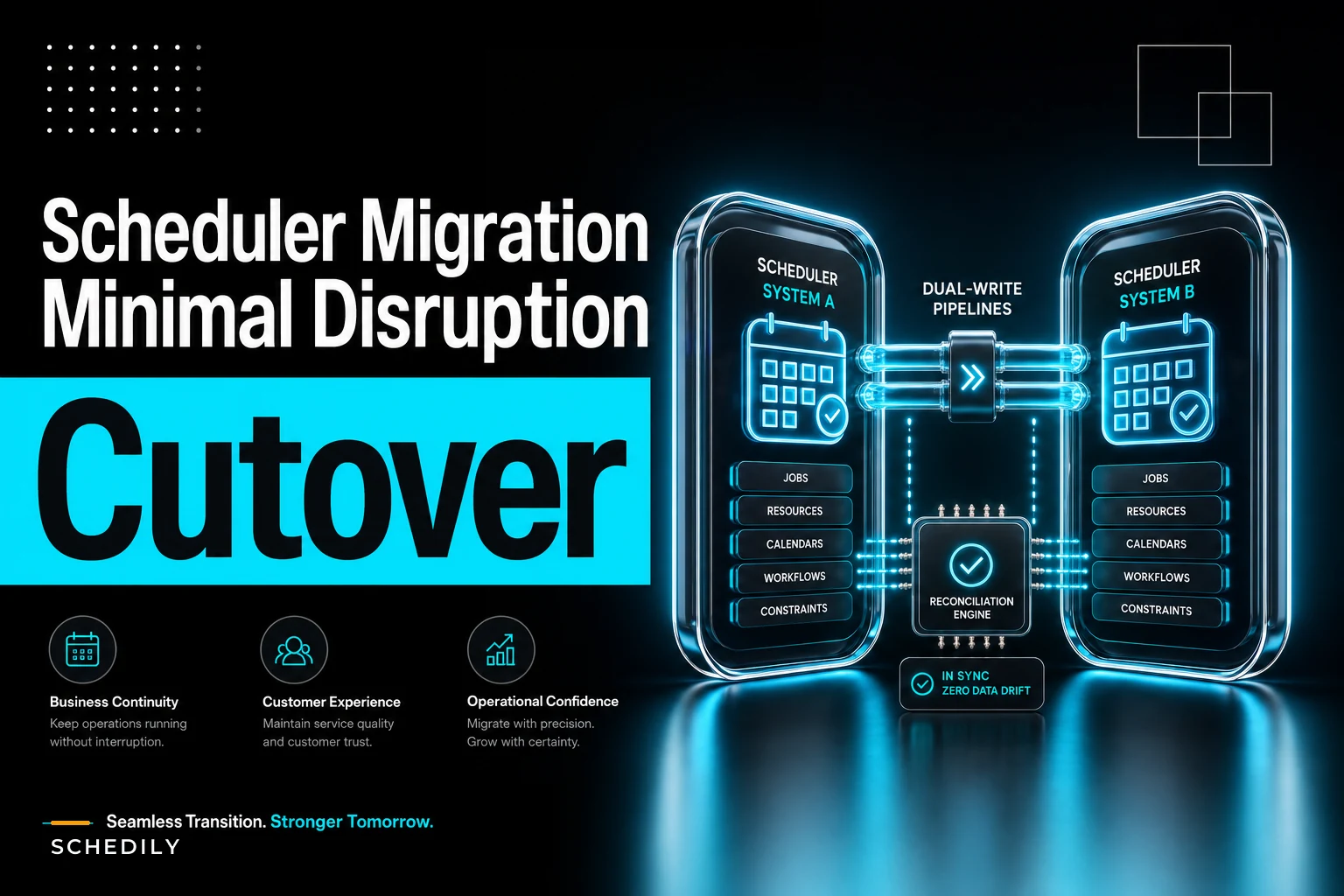
Once shadow mode is boring — meaning mismatches are near zero and the ones that remain are explained — you move to dual-write. Now the new system isn't just watching. Every write goes to both systems, and both are considered live.
-
A booking made online writes to old and new.
-
A change made at the front desk writes to old and new.
-
Both systems can send confirmations — though you pick one to actually notify customers, usually still the old one during early dual-write.
The reason dual-write matters is that it lets you cut over gradually and roll back instantly. If the new system chokes, the old one still has every appointment. No data loss, no reconstruction.
But dual-write introduces its own problem: the two systems can silently diverge. A write succeeds in one and fails in the other. A network blip drops half a transaction. Now they disagree, and disagreement in scheduling means someone's appointment exists in one place and not the other.
This is exactly the kind of consistency problem that comes up in conflict-resolution rules and sync governance for calendar integrations — dual-write is essentially a temporary, high-stakes two-way sync, and it needs the same discipline.
Reconciliation scripts you actually run
You do not eyeball dual-write consistency. You run a reconciliation script on a schedule — every 15 to 30 minutes during business hours is a reasonable cadence during active cutover.
| Discrepancy type | What it means | Default action |
|---|---|---|
| Exists in old, missing in new | New-system write failed | Replay write to new; alert if repeats |
| Exists in new, missing in old | Old-system write failed | Replay write to old; investigate source |
| Same appointment, different time | Update lost on one side | Old system wins during early cutover |
| Same appointment, different resource | Assignment drift | Flag for human review, don't auto-fix |
| Cancelled in one, active in other | Delete didn't propagate | Old system wins; log and alert |
The "old system wins" rule during early dual-write is deliberate. Until the new system has earned trust, the legacy system is your tiebreaker. As confidence grows and mismatches approach zero, you flip that rule so the new system becomes authoritative — and that flip is effectively your cutover moment.
One more thing worth building: idempotency in your reconciliation replays. If your script re-sends a write it already sent, you don't want to create a duplicate booking. Every replay should carry a stable key so re-running the script is safe. If you've dealt with dependency models and resource locking in sequenced scheduling, the same locking instincts apply here — reconciliation should never race against a live booking.
Phase 3: The minute-by-minute cutover
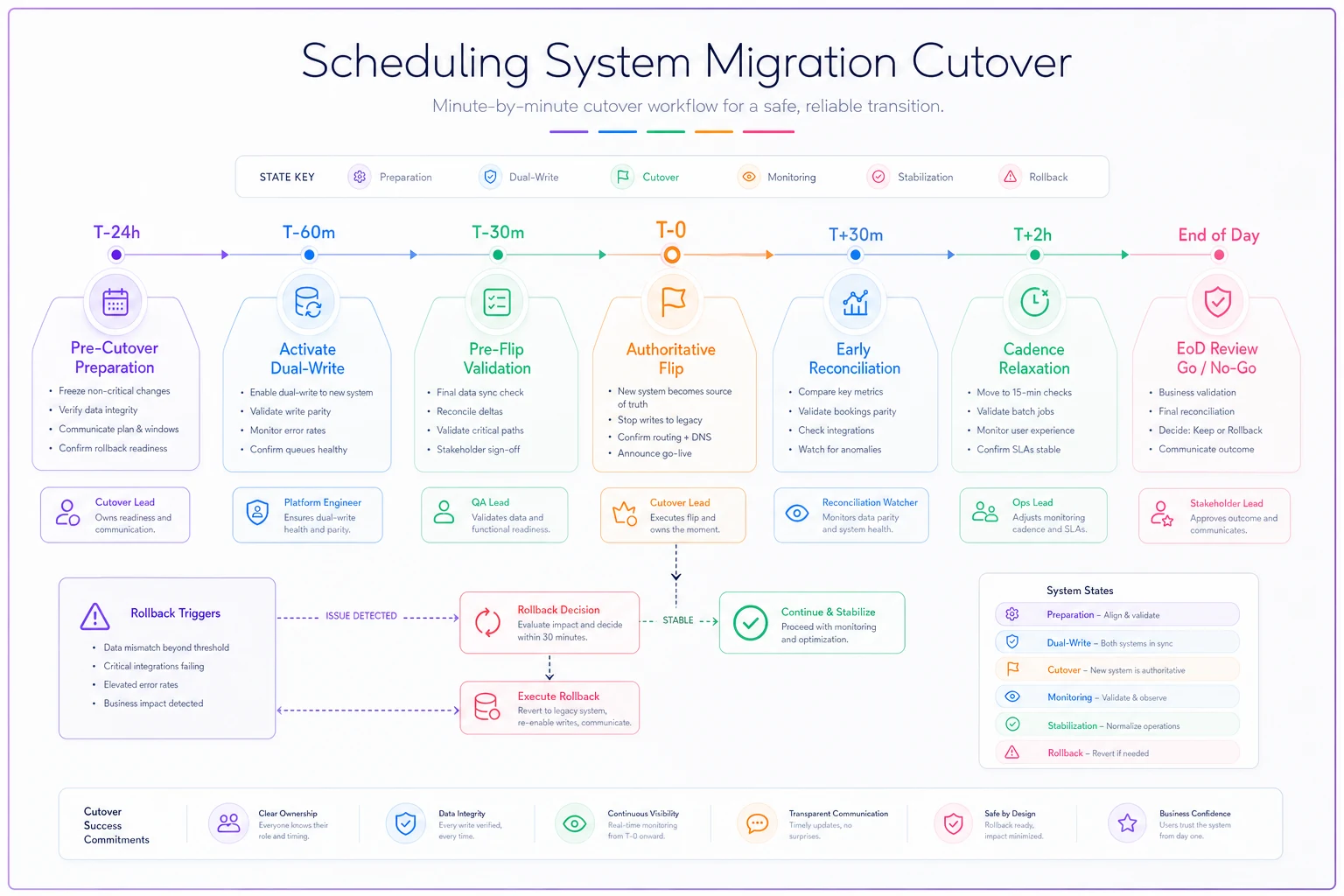
The actual cutover — the moment the new system becomes authoritative and the old one becomes a fallback — should be scripted like a flight checklist. Not because it's complicated, but because you want zero improvisation when adrenaline is up.
A simple diagram of the cutover checklist workflow.
-
T-minus 24h Freeze non-critical config changes on both systems. No feature tweaks the night before.
-
T-minus 60 min (before open) Run a full reconciliation. Mismatches must be zero or fully explained. If not, cutover is postponed — this is a hard gate, not a judgment call.
-
T-minus 30 min Confirm all staff are logged into the new system and can see today's schedule correctly. Front desk pulls up the first three appointments and verifies against the old system by eye.
-
T-minus 15 min Switch customer notifications — confirmations, reminders — to originate from the new system.
-
T-0 (open) Flip the "authoritative" flag. New system now wins reconciliation ties. Old system stays in dual-write as fallback only.
-
T+30 min First live reconciliation post-cutover. Everyone watches this one.
-
T+2h If clean, relax reconciliation cadence. Old system remains in dual-write for the agreed rollback window — usually the rest of the day, sometimes a few days.
-
T+end of day Go/no-go decision on decommissioning old-system writes.
Assign one person as the cutover lead who makes the calls, and a separate person watching reconciliation output whose only job is to flag if numbers move. Splitting those roles matters — whoever's making decisions shouldn't also be the one staring at logs.
Rollback criteria: decide before you're stressed
The single most valuable thing in this whole playbook is writing your rollback triggers down before cutover day, when your judgment is calm. In the moment, everything feels like an emergency, and teams either roll back too fast — throwing away a good migration over a minor hiccup — or too slow, letting a real problem compound for an hour.
-
Immediate rollback if more than 3 customer-visible booking errors in the first 30 minutes, OR any data-loss event where an appointment vanishes from both systems, OR reconciliation mismatch count keeps climbing after two replay cycles.
-
Hold and investigate (don't roll back yet) if isolated single mismatches that self-resolve on replay, OR performance is slow but bookings are correct.
-
No rollback for cosmetic issues, staff unfamiliarity, or complaints about the new UI. Those are training problems, not migration failures.
Because you kept dual-write running, rollback is genuinely simple: flip the authoritative flag back to the old system, switch notifications back, and you're where you started with zero data loss. That safety net is the entire reason dual-write is worth the effort. A migration you can undo in thirty seconds is a migration you can attempt with confidence.
Stakeholder sign-off checklist
Migrations get messy when responsibility is fuzzy. Before you go live, get explicit sign-off from everyone who'd be affected by a bad day. Not a meeting — a checklist with names next to items.
-
- [ ] Operations lead confirms staff are trained on the new system and can handle a busy morning without hand-holding
-
- [ ] Front desk / booking team has verified today's schedule matches in both systems and knows who to call if it doesn't
-
- [ ] Whoever owns the tech confirms reconciliation scripts are running and rollback has been tested — actually tested at least once, not just assumed
-
- [ ] Owner / manager has seen and approved the rollback criteria and knows a postponement is acceptable
-
- [ ] Customer notification templates verified in the new system — reminder times, timezone display, correct business name and address
-
- [ ] A named person is on-call for the full rollback window
-
- [ ] Cutover date deliberately avoids your busiest day — cut over into a slower period, never into your peak
That last point is consistently underrated. Businesses love to migrate "before the busy season starts," which somehow always means the day before it starts. Give yourself a buffer of at least a few normal days between cutover and peak load.
When this full playbook makes sense — and when it's overkill
Shadow mode plus dual-write plus reconciliation is real work. It's justified when the cost of a bad cutover is high: lots of recurring appointments, multiple locations, tight resource constraints, or customers who won't forgive a missed slot.
When it's overkill: a solo operator with 20–30 appointments a week and no recurring bookings doesn't need dual-write reconciliation scripts. Exporting, importing, spot-checking, and keeping the old system readable for a couple weeks is plenty. Building elaborate machinery around a tiny dataset wastes more time than a rare error would cost.
Who should slow down entirely: if you can't clearly answer "how do I roll back?", you're not ready to cut over — regardless of size. And if your legacy data is genuinely messy — duplicate clients, appointments with no assigned resource, half-cancelled bookings — clean that up before migrating. Shadow mode will surface every one of those problems, which is either a gift or a delay depending on how you look at it.
A short real scenario
A mid-sized grooming and boarding business — two locations, roughly 300–350 appointments a week, heavy on recurring standing appointments — had been running an aging desktop scheduler for years. Their first migration attempt, a year earlier, was a weekend big-bang that went sideways: recurring boarding reservations didn't map, and they spent about ten days rebuilding schedules by hand while fielding upset regulars.
The second attempt used the phased approach. Shadow mode ran for about two and a half weeks and immediately flagged the recurring-reservation mismatch that had burned them before — this time with zero customer impact, because nothing was live. They fixed the mapping, moved to dual-write, watched reconciliation numbers sit near zero for several days, then cut over on a quiet Wednesday.
The actual cutover was almost boring. A couple of minor mismatches during the first hour, both self-resolved on replay, neither ever visible to a customer. They kept the old system in dual-write for three more days, never needed to roll back, and decommissioned it the following week. The difference between the two attempts wasn't the software. It was having a way to see problems before they hit customers, and a way to undo the switch if needed.
The takeaway
The reason to migrate a legacy scheduling system with shadow mode and dual-write isn't perfectionism — it's that scheduling never stops, and you can't afford to guess. Run the new system silently until it's boring. Write to both until they agree. Script the cutover so nobody improvises. And decide your rollback rules while you're calm, not while the phones are ringing.
Do that, and the switch stops being the scary part. It becomes the easy part — the moment you've already rehearsed a dozen times in shadow, with a safety net still under you.
Ready to optimize your scheduling and operations?
Join thousands of businesses using Schedily to save time, improve coordination, and enhance operational efficiency.