



The hardest part of a scheduling change is almost never the tool itself. The tool works fine in the demo. The rules make sense on the whiteboard. What breaks is the gap between the person who designed the policy and the person who has to apply it at 7:45am with a walk-in standing at the counter and two techs texting that they're running late.
That gap is where rollouts die. A schedule policy that looks airtight in a planning doc gets quietly ignored, worked around, or half-implemented — and three weeks later you're running two systems at once. The official one and the real one people actually use. Then nobody trusts the data, and you're back to guessing.
This is a playbook for closing that gap deliberately. Not a list of "communicate early and often" clichés — the actual sequence: how to design a pilot cohort that tells you something real, who owns what, how you train the people whose job the schedule actually is, when to pull the plug, and which numbers tell you whether it's sticking. Treat it as the operational spine for any scheduling change — a new booking policy, a cancellation rule, a dispatch logic change, or a full platform swap.
Why scheduling rollouts fail differently than other rollouts
Most software rollouts fail from lack of adoption. Scheduling rollouts fail from partial adoption, which is worse, because partial adoption produces data that looks real but isn't.
The pattern is pretty consistent. You change a rule — say, a new 24-hour cancellation window with a deposit hold. The front desk applies it to some customers and waives it for the regulars they don't want to upset. Now your no-show numbers, your deposit revenue, and your utilization figures are all contaminated by an invisible discretionary layer. You can't tell if the policy is working because it was never fully in effect.
The second thing that makes scheduling special: the schedule is a shared artifact. When you change how billing works, one team feels it. When you change scheduling rules, the front desk, the providers, dispatch, and the customer all hit the new behavior simultaneously — and they all have different incentives. The provider wants a clean day. The front desk wants a full day. The owner wants a profitable day. A scheduling policy is really a negotiation between those three, encoded as rules. Rollouts fail when you push the rules without acknowledging the negotiation.
The third factor is timing. You can't take the schedule offline. There's no maintenance window for "we're not booking appointments this week." Whatever you roll out has to run alongside a live, revenue-generating operation, which means your rollback path matters as much as your rollout path.
Start with a pilot cohort that actually isolates the variable
The instinct is to pilot with your best location or your most flexible team. That's exactly the group that will make a bad policy look good, because good operators compensate for weak rules automatically. You learn nothing. You want a pilot cohort that's representative, not exceptional.
Eliminate scheduling conflicts and missed meetings.
Schedily helps you organize and manage all appointments and team availability effortlessly.
- Unified appointment and resource management
- Automated notifications & reminders
- Team calendar synchronization
No credit card required
What tends to work: pick a cohort that spans the range of your operation, not the top of it. If you run five locations, don't pilot the flagship. Pilot one mid-performing location plus one that struggles, and if you can, include one provider or team member who's openly skeptical of the change. The skeptic is your best sensor. If the policy survives contact with someone looking for reasons it won't work, it'll survive the general rollout.
-
Big enough to generate signal, small enough to reverse in a day. For an appointment business, a pilot that touches 200–400 bookings over two to three weeks usually gives you enough volume to see the metrics move without betting the whole operation on it.
-
Fenced, not blended. The pilot group should apply the new rule to all their relevant bookings, not sprinkle it in. Half-applied pilots are the number-one reason a pilot's results are useless.
-
Comparable baseline. You need the same cohort's numbers from the prior four to six weeks under the old rules. Comparing the pilot location to a different location introduces too many variables to trust the read.
One thing people skip: write down, before you start, what result would make you kill the policy — not just what success looks like.
If you only define success, you'll find a way to interpret ambiguous results as success. Defining failure in advance keeps you honest.
Pick a cohort that's representative, not exceptional.
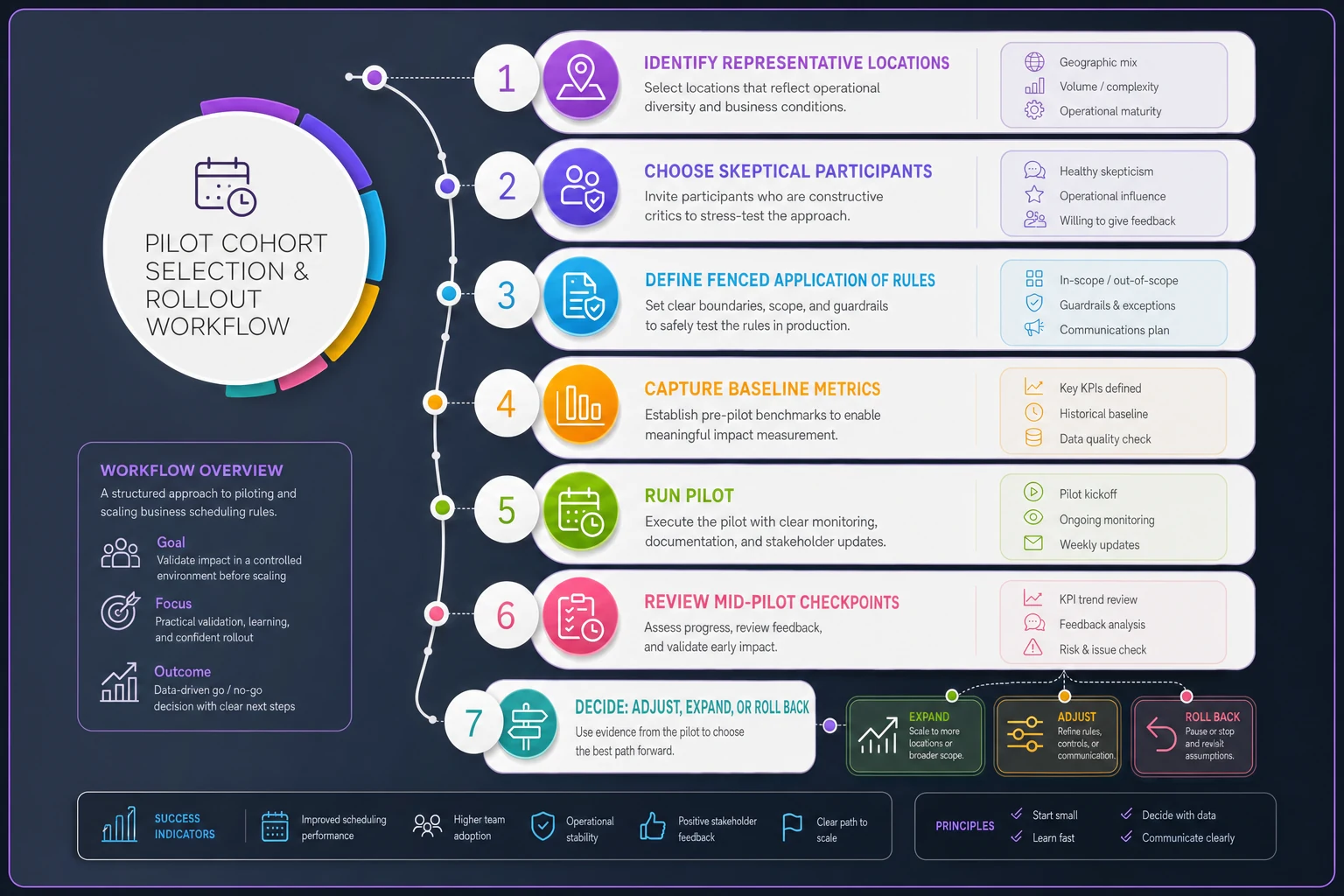
The diagram above shows the pilot selection steps and decision checkpoints in sequence.
Assign ownership before you assign tasks — a RACI that fits scheduling
Scheduling changes stall in the seams between roles. The front desk assumes the manager approved the exception. The manager assumes the owner set the policy. The provider assumes nobody's really enforcing it. Everyone's operating on an assumption about who owns the decision, and the assumptions don't match.
A lightweight RACI (Responsible, Accountable, Consulted, Informed) fixes this, but only if you map it to the actual decisions people make during a scheduling day — not to abstract project phases. Here's a version that fits most appointment-driven operations:
| Decision / Activity | Responsible | Accountable | Consulted | Informed |
|---|---|---|---|---|
| Setting the policy (rules, windows, thresholds) | Ops lead | Owner / GM | Front desk lead, senior provider | All staff |
| Configuring the rules in the tool | Ops lead / admin | Ops lead | Vendor / IT | Front desk |
| Applying rules day-to-day | Front desk / schedulers | Front desk lead | — | Providers |
| Granting exceptions | Front desk lead | Ops lead | — | Owner |
| Monitoring adoption metrics | Ops lead | Owner / GM | — | Managers |
| Calling a rollback | Ops lead | Owner / GM | Front desk lead | All staff |
The row that prevents the most chaos is "Granting exceptions." In most small operations, exceptions are the real policy. If anyone at the desk can waive a deposit or override a buffer without logging it, your written policy is decorative. Naming a single person accountable for exceptions — and requiring that exceptions get recorded — turns discretion from a leak into a data point you can actually review.
Worth noting who's Consulted on setting the policy: a senior provider and the front desk lead. Skip that step and you'll ship a rule that's physically awkward to apply, and the people applying it will route around it within a week.
Train the schedulers as a role, not the software as a feature
Most training decks teach the buttons. "Here's where you click to add a buffer." That's the least important part. The scheduler role is fundamentally about judgment under time pressure — how to sequence a day, when to hold a slot, how to say no to an overbook request, how to apply a policy to a customer who's pushing back. The tool is downstream of that judgment.
A curriculum that actually changes behavior has three layers, and they should be taught in this order:
-
Why the rule exists. Not the corporate reason — the operational one. "We hold a 15-minute buffer after color services because the last three months show they run over by 12 minutes on average, and that overrun is what wrecks the 4pm slot." When people understand the mechanism, they apply the rule even in situations you didn't script.
-
The decision, not the click. Teach the judgment calls
what qualifies for an exception, what the escalation path is, what to say to a customer. Role-play the awkward conversations — the regular who expects a waiver, the provider who wants a double-book. This is where new policies actually live or die.
-
The tool as the last mile. Now the buttons. By this point the click is trivial because the person already knows what they're trying to accomplish.
A practical detail: schedulers learn scheduling by doing scheduling, not by watching. Build training around real (or realistic) bookings from your own operation, mistakes and all. Generic vendor training uses clean, cooperative scenarios that never happen in practice. Your training should include the double-booking near-miss, the last-minute cancellation, the provider who called in — because those are the moments the policy is actually for.
Name your power users early too. In every rollout there are one or two people who click with it fast. Make them the go-to for the first few weeks instead of routing every question back to you. Peer support during a rollout is worth more than any documentation.
Set rollback criteria before you need them
The most common rollout mistake is treating rollback as an admission of failure. It's the opposite. A rollout with no rollback plan isn't confident — it's stuck. If leadership can't reverse the change quickly, they'll hesitate to launch it fully, and you end up with a permanent half-implementation.
Rollback criteria should be written, numeric where possible, and agreed on before launch. Some examples that map cleanly to scheduling:
-
Booking friction spike. Booking abandonment or "can't complete" rate rises above a set threshold and stays there for more than a few days.
-
Revenue leakage. Utilization or deposit capture drops below the pre-pilot baseline by a meaningful margin — not a one-day blip, a sustained trend.
-
Support load. Staff time spent handling policy-related complaints or overrides exceeds what the change was supposed to save.
-
Data integrity failure. If a tool change starts producing scheduling conflicts, sync errors, or double-bookings, that's an automatic rollback regardless of the other numbers. This is exactly the kind of drift that's expensive to unwind — the mechanics of catching it are covered well in conflict-resolution rules and sync governance.
Two things make rollback real instead of theoretical. First, the technical ability to reverse — if you're on a new tool, keep the old one warm and reconcilable for the pilot window, don't decommission it on day one. Second, a named person (see the RACI) who's allowed to make the call without convening a meeting. Rollbacks that require consensus don't happen fast enough to matter.
Also worth distinguishing rollback from a fix. Not every problem means reversing the whole change. Sometimes the policy is right and the threshold is wrong — the buffer was 20 minutes and it should be 12. Build a checkpoint where you decide: adjust, or roll back? Reversing a directionally-correct policy over a tuning problem is its own kind of failure.
Governance checkpoints that keep the rollout honest
A rollout without scheduled checkpoints drifts. Everyone's busy, the pilot "seems fine," and nobody formally decides to expand — the change just leaks outward without anyone confirming it actually works. Then a problem surfaces at month two and there's no clean record of what was tested.
Keep the checkpoint rhythm light but real:
-
Pre-launch gate. Rules configured, cohort defined, baseline captured, rollback criteria written, exception owner named. If any of these is missing, don't launch.
-
Mid-pilot review (around day 7–10). Early read on the metrics and, just as important, a debrief with the pilot staff. The numbers tell you what happened; the staff tell you why. Often the fix surfaces here — a rule that's technically working but generating friction you can smooth out.
-
End-of-pilot decision. Expand, adjust, or roll back — an explicit, recorded call, not a drift.
-
Post-rollout audit (30–60 days after full launch). This is where you check whether the pilot's results held up at scale, and whether the discretionary layer crept back in. Adoption almost always decays after the initial attention fades; the audit catches it before decay becomes the norm.
The checkpoint people skip is the last one. The pilot goes well, the full launch happens, everyone moves on — and three months later the front desk has quietly reverted to old habits on half their bookings. The 30-to-60-day audit is what separates a policy that stuck from one that was merely announced.
Tie adoption to scheduling metrics, not activity metrics
"Adoption" is easy to fake. Logins, features touched, training completed — none of that tells you whether the schedule got better. You have to tie the rollout to outcomes the schedule actually produces, or you'll declare victory on activity while the operation runs the same as before.
The metrics that matter split into two groups. Adoption metrics tell you if people are using the new rules. Outcome metrics tell you if the rules are doing their job.
| Metric type | What to watch | What it tells you |
|---|---|---|
| Adoption | % of eligible bookings using the new rule | Whether the policy is actually in effect or half-applied |
| Adoption | Exception / override rate | Whether the "real policy" is drifting from the written one |
| Adoption | Time-to-book at the desk | Whether the change is slowing people down (a rollback signal) |
| Outcome | Utilization / fill rate | Whether scheduling quality is improving |
| Outcome | No-show and late-cancel rate | Whether policy changes are changing customer behavior |
| Outcome | Deposit / prepay capture | Whether revenue-protecting rules are holding |
| Outcome | Idle-gap and overrun time | Whether buffers and sequencing are landing right |
The override rate is the one people underuse. If your new rule is "applied" on paper but the override rate is climbing, the policy isn't sticking — it's being tolerated. A low, stable override rate is often a better sign of real adoption than any usage stat, because it means the rule fits the work.
Pin all of this to a baseline you captured before the pilot. Comparing to a baseline is the whole game — without it, every number is just a number. If you don't already have a defensible way to measure scheduling performance, that foundation matters more than the rollout itself. It's worth building the operational KPI framework before you start changing policies, because you can't manage a rollout against metrics you don't yet trust.
A real scenario: rolling out a deposit-and-buffer change
A three-location clinic wanted to fix two problems at once: too many no-shows on high-value consults, and providers routinely running over into the next slot. The plan was a small deposit hold on consults plus an automatic 15-minute buffer on specific service types. Reasonable rules. The first attempt, launched everywhere at once, fell apart within a week — the front desk waived the deposit for anyone who grumbled, and the buffers got manually deleted whenever a day looked slow.
The second attempt used the playbook. They piloted at the two weaker locations, not the busy flagship, over about three weeks and roughly 300 bookings. One front-desk lead was named accountable for exceptions, and every waiver had to be logged. Training spent most of its time on the conversation — how to explain the deposit to a hesitant customer — and almost none on the software.
The mid-pilot checkpoint came back mixed in a useful way. No-shows on consults dropped noticeably, and the override rate was low, which meant staff were actually holding the line. But the 15-minute buffer was too aggressive on one service type and was chewing up capacity — the data showed the actual overrun there was closer to 8 minutes, not 15. So they adjusted rather than rolled back: trimmed that buffer, kept the deposit rule intact. By the end of the pilot, utilization was roughly flat while no-show-driven revenue leakage was down meaningfully. The full rollout stuck because the rules had already been tuned against real friction, and the 45-day audit showed the override rate had stayed low instead of creeping back up.
The difference between attempt one and attempt two wasn't the policy. The policy was nearly identical. It was the rollout.
When this level of rigor makes sense — and when it's overkill
Not every scheduling tweak needs a pilot cohort and a RACI. If you're changing a buffer from 10 minutes to 12, just change it and watch the numbers. The full playbook is for changes that meet at least one of these bars:
-
The change touches customer-facing behavior (deposits, cancellation windows, booking flow) where a bad rollout costs you bookings.
-
The change involves a new tool or a data migration, where reversibility and reconciliation matter.
-
The change affects multiple locations or teams who will implement it inconsistently without structure.
-
The change is politically loaded — providers or staff have strong opinions and will route around a rule they don't buy into.
When it's overkill: running this whole apparatus for a trivial change wastes credibility. If you're convening checkpoints and RACI meetings for a minor setting tweak, people stop taking the process seriously — and the next time you actually need the rigor, they'll treat it as bureaucracy.
Who should skip most of this: a solo operator or a very small single-location shop. When one or two people run the whole schedule, the gap between designer and applier barely exists — you are both. Change the rule, watch the week, adjust. The playbook earns its keep once the schedule is a shared artifact across enough people that assumptions start to diverge.
The point
A scheduling rollout is a coordination problem wearing a software costume. The tool and the policy are the easy 20%. The hard 80% is getting a group of people with different incentives to apply the same rule the same way, at speed, under pressure — and to keep doing it after the launch excitement wears off.
Everything in this playbook exists to shrink the gap between the rule you wrote and the rule that actually runs your days: a pilot that isolates the real variable, ownership that names who decides, training built on judgment instead of buttons, rollback criteria you agreed on while you were still calm, checkpoints that force honest decisions, and metrics tied to what the schedule produces rather than what people clicked. Get those right and the tool almost doesn't matter — which, if you've watched enough rollouts go sideways, is the whole lesson.
Ready to optimize your scheduling and operations?
Join thousands of businesses using Schedily to save time, improve coordination, and enhance operational efficiency.