

Most scheduling stacks don't fail loudly. They fail in a way that looks fine on the surface — the booking page loads, the calendar shows open slots, the confirmation email goes out — but somewhere underneath, a reminder queue stalled, a webhook retried itself into a double-booking, or a timezone conversion silently pushed 8 AM appointments to 1 PM for a whole batch of customers. By the time someone notices, you've got angry clients and a support inbox full of "where's my therapist?" messages.
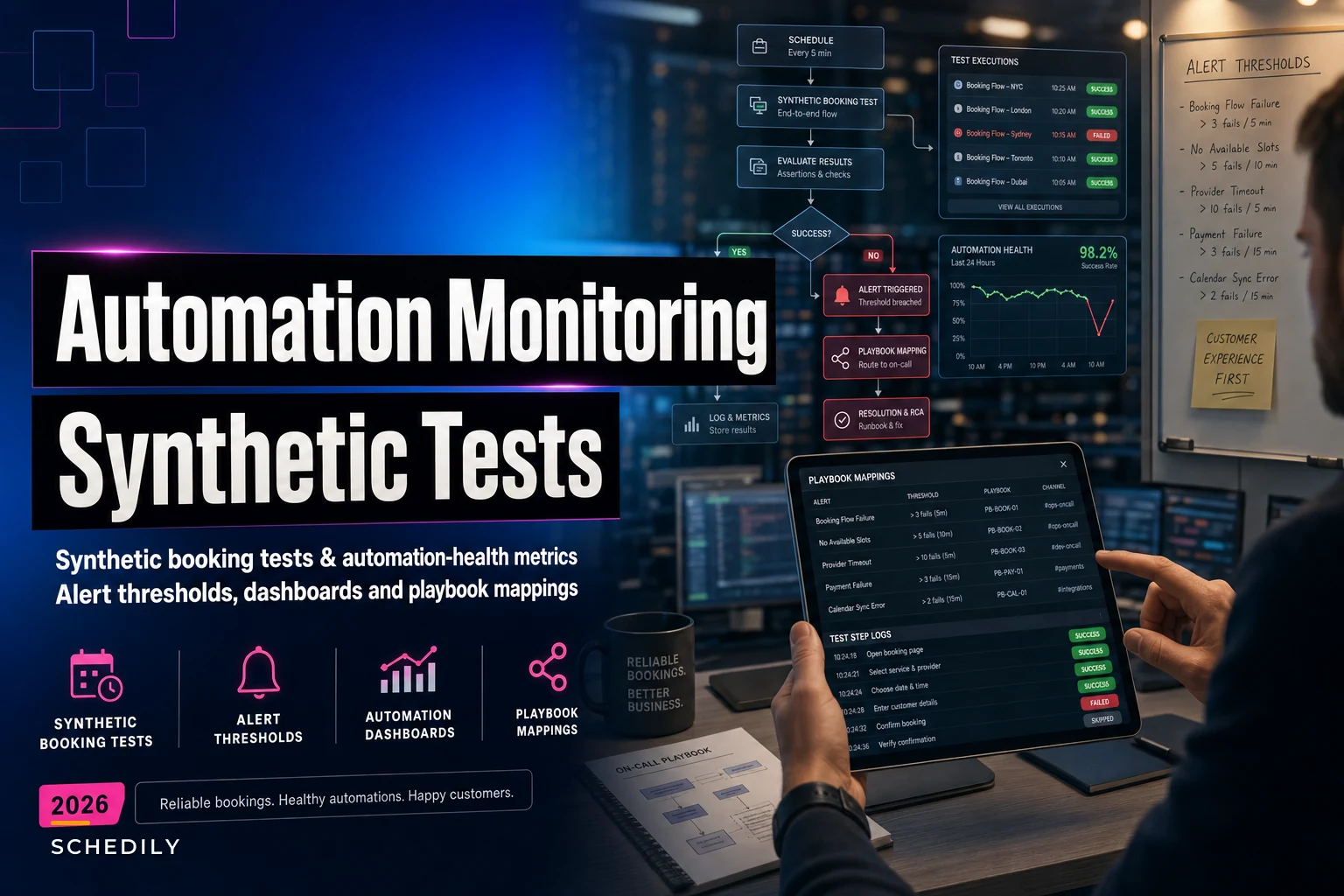
The frustrating part is that the dashboards you already have usually look green. Uptime monitoring tells you the server is up. That's not the same as knowing a customer can actually complete a booking end to end. This article is about closing that gap specifically for scheduling flows: what synthetic booking tests should actually check, which automation-health metrics are worth alerting on, where to set thresholds so you don't drown in noise, and how to connect each alert to a concrete playbook instead of a panicked Slack message.
Why "the site is up" tells you almost nothing
Scheduling is a chain of dependencies, and uptime checks only look at the first link. A typical booking involves availability lookup, slot locking, payment or deposit handling, calendar write, confirmation messaging, and reminder scheduling. Any one of those can break while everything else stays healthy.
A pattern that keeps showing up: a business integrates a third-party reminder service, it works perfectly for months, then the provider rotates an API key or changes a rate limit. Bookings keep succeeding. Reminders quietly stop. There's no error on the booking page, no 500 in the logs the ops team watches, nothing. Three weeks later no-shows have crept up and nobody connects it to the silent reminder failure.
The reason this slips through is that most monitoring is built around infrastructure signals, not business outcome signals. Your scheduling automation can be 100% "up" and still be producing the wrong result. What you actually want to monitor is whether a real booking, with real steps, completes correctly — which is exactly what synthetic tests are for.
Synthetic booking tests: what to actually simulate
A synthetic booking test is a scripted fake customer that walks through your booking flow on a schedule — every few minutes — and verifies not just that each step responded, but that the result is correct. The mistake most teams make is writing a synthetic test that stops at "got a 200 response." That's not enough. You need to assert on state.
Eliminate scheduling conflicts and missed meetings.
Schedily helps you organize and manage all appointments and team availability effortlessly.
- Unified appointment and resource management
- Automated notifications & reminders
- Team calendar synchronization
No credit card required
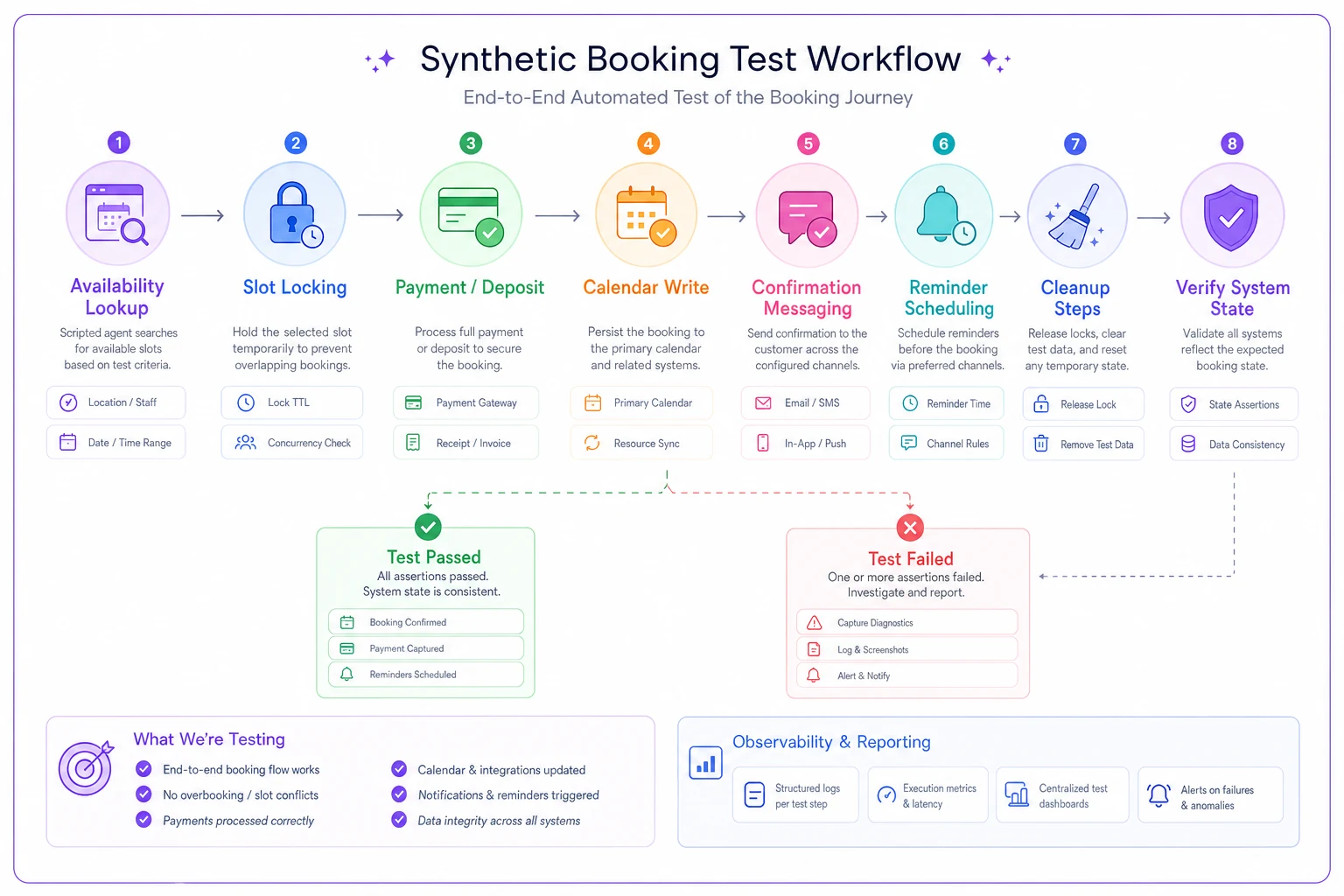
A good synthetic test for scheduling confirms things like: the slot that showed as available actually got locked, the confirmation record exists in the database, the reminder was queued with the correct send time, and the slot no longer appears available to the next person. Then it cleans up after itself so you're not polluting real capacity.
| Test case | What it simulates | What it asserts (pass condition) | Catches |
|---|---|---|---|
| Happy-path booking | Full booking of an open slot | Confirmation row exists, slot now unavailable, reminder queued with correct send_at | Broken writes, silent calendar failures |
| Double-book race | Two near-simultaneous bookings for same slot | Exactly one succeeds, the other gets a clean conflict response | Slot-locking regressions |
| Reminder scheduling | Book an appointment 48h out | Reminder job scheduled at T-24h with correct recipient | Dead reminder queues |
| Cancellation release | Book then cancel | Slot returns to available within X seconds | Capacity leaks from cancellations |
| Timezone integrity | Book across a DST boundary / foreign TZ | Stored UTC + displayed local time match expected | Timezone drift |
| Deposit path | Book a slot requiring a deposit | Payment authorized, booking in "pending" until capture | Broken deposit gating |
| Resource conflict | Book requiring room + staff + equipment | All three locked together, no partial lock | Multi-resource booking gaps |
Below is a visual workflow for running synthetic booking tests.
A practical note on the double-book race test: fire the two requests within the same ~50ms window if you can, because the bug you're hunting only appears under near-simultaneous load. A sequential test will almost always pass and give you false confidence.
For the cleanup side — run these against a dedicated test resource or a staff member flagged as "synthetic," on dedicated test time slots. Nothing erodes trust in monitoring faster than synthetic tests that accidentally block real customer capacity or trigger real SMS charges.
Automation-health metrics worth tracking
Synthetic tests tell you if the flow works right now. Health metrics tell you how the whole system is trending across real traffic. The ones that actually matter for scheduling are narrower than people expect. You don't need fifty metrics. You need the handful that map to money or trust.
-
Booking success rate — completed bookings ÷ booking attempts. The denominator matters; track attempts, not just successes, or you'll never see a drop-off.
-
Reminder delivery rate — reminders sent ÷ reminders scheduled, over a rolling window. This is the single most under-monitored metric in scheduling.
-
Webhook processing lag — time between event fired and event processed. Lag creeping up is an early warning of queue backup.
-
Slot-lock conflict rate — how often two bookings collide. A sudden spike usually means a locking regression, not more customers.
-
Confirmation latency — time from booking to confirmation message sent. Climbing latency precedes outright failures.
-
Sync divergence — count of appointments that exist in your system but not the connected calendar (or vice versa). This is the quiet killer behind calendar mismatches; there's a deeper look at that in stop schedule drift: conflict-resolution rules and sync governance.
The insight most teams miss: these metrics are only useful as rates over a window, never raw counts. "5 failed bookings" means nothing. "5 failed bookings out of 12 attempts in the last 15 minutes" means stop what you're doing. Always alert on the ratio, and always include the sample size so you're not paged at 2 AM because one person with a dead credit card abandoned checkout.
Example queries you can adapt
SELECT COUNT() FILTER (WHERE status = 'confirmed') AS confirmed, COUNT() AS attempts, ROUND( COUNT() FILTER (WHERE status = 'confirmed')::numeric / NULLIF(COUNT(), 0), 3 ) AS successrate FROM bookingattempts WHERE created_at > NOW() - INTERVAL '15 minutes';
SELECT COUNT(*) AS stuckreminders FROM reminders WHERE sendat < NOW() - INTERVAL '5 minutes' AND status = 'scheduled';
That second query is the one to run every few minutes. If stuck_reminders is anything other than zero for more than a couple of cycles, your reminder pipeline is backing up — and that's a problem you want to catch before the appointment day arrives, not after.
Setting alert thresholds without drowning in noise
Thresholds are where most monitoring setups go wrong in both directions. Set them too tight and the team mutes the channel within a week. Set them too loose and you find out about outages from customers. The fix is to tie thresholds to normal variance, not arbitrary round numbers, and to require a minimum sample size before any alert can fire.
| Metric | Warning | Critical | Min sample | Sustained for |
|---|---|---|---|---|
| Booking success rate | < 95% | < 85% | 10 attempts | 10 min |
| Reminder delivery rate | < 97% | < 90% | 20 scheduled | 30 min |
| Stuck reminders | > 5 | > 25 | — | 10 min |
| Webhook processing lag | > 30s | > 120s | — | 5 min |
| Slot-lock conflict rate | > 2% | > 8% | 50 bookings | 15 min |
| Sync divergence | > 3 records | > 15 records | — | one scan cycle |
Two things make these work in practice. First, the sustained-for column — a scheduling system has brief, normal hiccups, and you only care about problems that persist. Second, the min sample column prevents the classic false alarm where your success rate shows 0% because exactly one booking was attempted in a quiet overnight window and it happened to be a test card.
One pattern worth adopting: make thresholds time-aware. A 93% booking success rate at 3 AM with 4 attempts is noise. The same rate at 11 AM with 200 attempts is an incident. If your tooling supports it, scale sensitivity by expected volume for that hour.
Mapping alerts to playbooks
An alert that doesn't tell you what to do is just anxiety with a timestamp. The whole point of this setup is that every critical alert resolves to a specific, written first action — so whoever's on call isn't improvising at 2 AM.
-
Booking success rate critical → Check payment provider status first (most common root cause), then check the slot-availability service. If payment is down, flip the booking flow to "reserve without deposit" mode and capture later.
-
Reminder delivery rate critical → Check the messaging provider's API key and rate-limit status. If the provider is down, trigger a bulk reminder via the fallback channel (email if SMS is dead, and vice versa) for all appointments in the next 48 hours.
-
Stuck reminders climbing → Inspect the job queue for a poison message blocking the worker. Requeue or dead-letter the blocker, then confirm throughput recovers.
-
Webhook lag critical → Check consumer health and scale workers. Enable the reconciliation job to catch any events dropped during the lag window.
-
Sync divergence critical → Run the reconciliation report, identify the direction of drift, and apply your source-of-truth rule before manually reconciling the outliers.
The mistake that keeps coming up: teams writing playbooks that describe the problem instead of the action. "Reminders may be failing" is useless. "Open the provider dashboard at this URL, check for a 429 rate-limit, if present do X" is a playbook. Write them like you're handing them to a brand-new team member who's never seen the system — because eventually you will be.
If you're building out the underlying KPIs that these alerts sit on top of, it's worth aligning them with a broader measurement framework rather than inventing metrics ad hoc; there's a fuller treatment of that in an operational KPI framework for appointment-driven businesses.
A sample dashboard layout
A monitoring dashboard for scheduling should be readable in five seconds by someone who isn't technical. The person glancing at it before opening the salon or clinic should know instantly whether today's bookings are safe.
-
Status row — three big tiles
Booking flow, Reminders, Calendar sync. Green/amber/red only. No numbers.
-
Success rate trend — booking success rate over the last 24 hours, with the warning/critical lines drawn in so deviations are visually obvious.
-
Synthetic test results — a simple grid of the last run per test case with pass/fail and timestamp. This is where you confirm the flow actually works, not just that it's up.
-
Reminder pipeline — scheduled vs sent vs stuck, over the last few hours.
-
Active alerts — current firing alerts with their mapped playbook link right there, one click away.
That last item matters more than it looks. Putting the playbook link directly on the alert tile removes the "wait, what do we do about this?" delay that turns a five-minute fix into a forty-minute scramble.
A real scenario
A mid-sized physiotherapy group running four locations had roughly 300–350 appointments a week flowing through an online booking widget wired to a third-party SMS reminder service. Everything looked healthy on their uptime monitor for months.
Their SMS provider changed a rate limit during a busy Monday. Bookings kept working perfectly. Reminders started silently queuing and dropping — the provider was returning 429s that their integration swallowed without logging. No alert fired because nobody was monitoring reminder delivery rate, only whether the booking endpoint responded.
Over about two and a half weeks, their no-show rate drifted from the usual ~8% up to somewhere around 15–17%. At roughly 320 weekly appointments, that's a meaningful chunk of unfilled chair time — a few thousand dollars a week in lost capacity across four sites, plus staff standing around waiting for patients who never knew they had an appointment.
The fix wasn't complicated. They added a reminder delivery-rate metric with a critical threshold at 90% sustained over 30 minutes, a synthetic test that booked a dummy appointment and verified the reminder got queued and sent to a test number, and a playbook that failed reminders over to email automatically when the SMS provider threw rate limits. The next time the provider hiccupped — about six weeks later — the alert fired within half an hour, email fallback kicked in, and no-shows never moved. The whole monitoring addition took them under a day to build.
When this level of monitoring is worth it — and when it isn't
If you're doing a handful of appointments a week and you personally text every client, you don't need synthetic booking tests. The overhead of maintaining them outweighs the risk, and you'll notice problems yourself. Honest assessment: below roughly 50–75 bookings a week with a single owner watching everything, this is probably over-engineering.
Where it becomes clearly worth it is once bookings are high enough that no single person sees every one, or once you've got multiple locations, automated reminders, deposits, or calendar integrations in the chain. The moment an automation can fail silently and affect dozens of customers before anyone notices — that's when synthetic tests and health metrics pay for themselves fast.
The one group that should be cautious: teams that bolt on alerting without first writing the playbooks. Alerts without playbooks just create a new form of stress and a channel everyone eventually mutes. If you only have time to do half of this, do the playbooks and manual checks first, then add automated alerting once you know exactly what each alert means.
Where to start
You don't need to build all of this at once, and trying to will probably stall the whole project. Start with the two checks that catch the most damage for the least effort: the stuck-reminders query running every few minutes, and a single happy-path synthetic booking test. Those two alone would have caught the physio group's problem weeks earlier.
From there, add the booking success-rate metric, then the double-book race test, then sync divergence if you've got calendar integrations. Write the playbook for each alert as you add it, not later — later never comes.
The goal isn't a perfect observability platform. It's making sure that the next time a scheduling automation fails quietly, a script notices before your customers do.
Ready to optimize your scheduling and operations?
Join thousands of businesses using Schedily to save time, improve coordination, and enhance operational efficiency.