

Most booking systems don't fail because someone hacked them. They fail because a front-desk person had edit rights they never should've had, a manager "temporarily" got admin access two years ago and nobody revoked it, and when a $1,400 appointment mysteriously got refunded, nobody could reconstruct who did it or why.
That's the real access-control problem in scheduling operations. It's not glamorous. It's not about firewalls. It's about the slow accumulation of permissions, the gaps in your scheduling access controls audit trails, and the fact that most teams only discover how bad their setup is after an incident — when they're staring at a booking record trying to figure out what happened between 2:14 PM and 2:19 PM on a Tuesday.
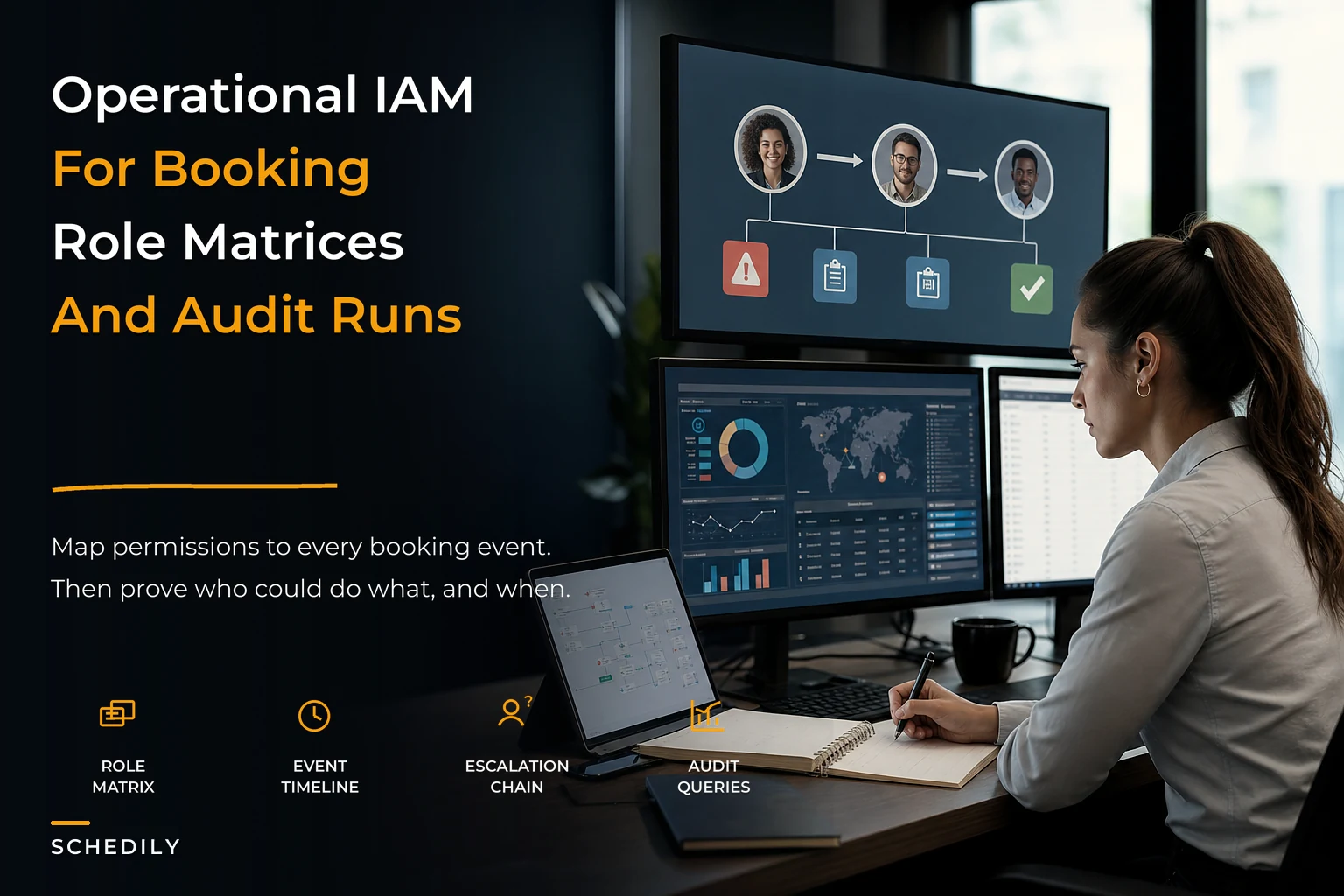
This is a systems article, not a tips list. The point is to show how permissions, booking lifecycle events, and audit logging are actually one connected system — and what breaks when you treat them as three separate things.
Why booking permissions rot over time
Permissions in a scheduling system don't stay clean. They degrade. And they degrade in a pretty predictable pattern that has almost nothing to do with security and everything to do with day-to-day operational pressure.
You start with two roles — owner and staff. Simple. Then you hire a manager, so you give them "a bit more access." Then a staff member covers reception during a busy season, someone bumps their permissions and forgets to bump them back. Then you add a location, and instead of designing a clean role structure, you clone the existing one and tweak it. Within 18 months you've got seven "custom" permission sets, three people with admin rights who don't need them, and a booking system where nobody can confidently answer "who can issue a refund?"
The core mistake is that permissions get assigned to people based on trust, instead of to roles based on the lifecycle events those roles actually touch. Trust-based access feels efficient early on. It becomes a disaster as headcount grows because trust doesn't leave an audit trail, and it doesn't transfer cleanly when someone leaves.
The permission mess usually surfaces during a dispute — a chargeback, a customer complaint, a payroll disagreement — where suddenly you need to prove exactly what an employee could and couldn't do. And you can't.
Start from lifecycle events, not job titles
The better approach flips the usual thinking. Don't start by asking "what should a receptionist be able to do?" Start by mapping the booking lifecycle events your system produces, then decide which roles can trigger, approve, or view each one.
Eliminate scheduling conflicts and missed meetings.
Schedily helps you organize and manage all appointments and team availability effortlessly.
- Unified appointment and resource management
- Automated notifications & reminders
- Team calendar synchronization
No credit card required
A typical appointment moves through events like:
-
Created (new booking placed)
-
Modified (time, service, or resource changed)
-
Reassigned (moved to a different staff member or room)
-
Cancelled (by customer or staff)
-
No-show marked
-
Payment captured / refunded / adjusted
-
Deposit forfeited
-
Consent or record accessed (viewing customer PII/history)
-
Override applied (double-book override, buffer override, capacity override)
Once you list events this way, a lot of hidden risk becomes obvious. "Refunded" and "Override applied" are high-blast-radius events. "Created" is low risk. Treating them all as one bucket called "edit access" is exactly why things go sideways.
The insight most teams miss: the dangerous permissions aren't the everyday ones. It's the exception events — overrides, refunds, retroactive edits to completed appointments — that cause almost all the real damage. Those are the ones that should require elevated roles and always leave a trace.
Building the role & permission matrix
A role/permission matrix is just a grid: roles across the top, lifecycle events down the side, and each cell marked with what that role can do — nothing, view, do, or approve. The magic isn't the grid itself. It's the discipline of forcing every event into an explicit decision instead of an implied one.
Below is a simplified version for a mid-sized appointment business. Real ones get more granular, but this shows the shape:
| Lifecycle Event | Front Desk | Staff Provider | Location Manager | Ops/Owner |
|---|---|---|---|---|
| Create booking | Do | Do | Do | Do |
| Modify (future appt) | Do | Own only | Do | Do |
| Modify (completed appt) | — | — | Approve | Do |
| Reassign resource | Do | Request | Do | Do |
| Cancel booking | Do | Own only | Do | Do |
| Mark no-show | Do | Own only | Do | Do |
| Capture payment | Do | — | Do | Do |
| Issue refund | Request | — | Approve (≤$X) | Do |
| Apply double-book override | — | — | Do | Do |
| Access full customer history | Limited | Own clients | Do | Do |
| Export data / reports | — | — | View | Do |
A few things worth calling out in that table.
"Own only" is underused and powerful. A provider can modify or cancel their own appointments but not someone else's. This single distinction kills a whole category of "why did another stylist move my client" conflicts, and it makes the audit log dramatically cleaner because actions map to the person who owns the work.
Lean into the "own only" distinction early — it prevents a lot of cross-client edit disputes before they start.
"Request" and "Approve" create a paper trail on purpose. When front desk requests a refund and a manager approves it, you now have two logged actors on a sensitive event. That's not bureaucracy — that's the thing that saves you during a chargeback dispute or an internal theft investigation.
Dollar-thresholded approvals matter. A manager approving refunds up to some cap, with anything above escalating to ownership, is one of the highest-leverage controls you can add. Most refund abuse hides in amounts small enough that nobody's watching but large enough to add up over a few months.
If you run multiple locations, this matrix is also where central control and local flexibility have to be reconciled. That balance is its own discipline — we've written about the central policy plus local autonomy framework that keeps multi-location permissions from fragmenting into chaos, and it pairs directly with the matrix approach here.
When strict permissions are a bad idea
This is where a lot of security-minded advice falls apart in real operations. Locking everything down sounds responsible. In practice, over-restricting a small team creates a worse problem: people share logins.
The moment your front desk can't do their job without pinging a manager fifteen times a day, someone hands out the manager password "just for today." Now every action that person takes is logged under the manager's identity, and your entire audit trail is fiction.
Permissions should be as tight as they can be without pushing people toward workarounds. For a three-person shop, an elaborate approval chain is overkill and actively harmful. For a 40-person multi-location operation, loose permissions are a liability.
A rough guide on when tightening actually makes sense:
-
Under ~5 staff, single location Keep it simple. Two or three roles, clear ownership of actions, basic logging. Don't build approval chains yet.
-
Roughly 5–20 staff Introduce the "own only" distinction, separate refund/override permissions from everyday edits, start reviewing the audit log monthly.
-
20+ staff or multi-location Full matrix, thresholded approvals, quarterly access reviews, and automated alerts on high-risk events.
The mistake is applying enterprise-grade controls to a five-person team, or running a 30-person operation on the two-role setup they started with. Both fail, just in opposite directions.
Audit trails: what to actually log (and query)
An audit trail that only records "record was modified" is close to useless. When you're reconstructing an incident, you need enough context to answer who, what, when, from where, and what did it look like before.
-
Actor identity (real user, not a shared account)
-
Timestamp with timezone
-
The specific lifecycle event
-
Before and after values on the changed field
-
Source (which interface — web, mobile, API integration)
-
Any linked approval record
That "before and after" piece is the one people skip, and it's the one that matters most in forensics. Knowing an appointment price changed is useless. Knowing it changed from $220 to $0 four minutes before a no-show was marked — that tells a story.
Here are the kinds of audit queries an ops person should be able to run without a developer. Even if your system doesn't support them out of the box, these are the questions to design toward:
-
All refunds and price adjustments above a threshold in the last 30 days, grouped by actor. Catches quiet financial leakage.
-
All modifications to completed appointments. Editing the past is almost always suspicious or a training problem.
-
All actions taken by any account outside normal working hours. Not automatically bad, but worth eyeballing.
-
All double-book or capacity overrides, by location and staff. Spots the person who's "solving" scheduling problems by breaking rules.
-
All customer-history accesses for a specific client. Essential when a customer asks who viewed their record.
-
Any single account that touched an unusually high number of records in a short window. Classic signature of either a bug, a data scrape, or a departing employee.
The pattern to watch for isn't a single bad action. It's velocity and timing — a normally-quiet account suddenly issuing refunds at 11 PM, or one login modifying dozens of past appointments in a ten-minute stretch.
An incident-forensics checklist ops can run
When something goes wrong — a disputed refund, a data-access complaint, a booking that shouldn't exist — the worst time to figure out your process is in the middle of it. Have this ready.
-
[ ] Freeze the record. Note the exact appointment/transaction ID before anything else changes it.
-
[ ] Pull the full event history for that record, including before/after values.
-
[ ] Identify every actor who touched it, and confirm each was a real individual login, not a shared account.
-
[ ] Establish a timeline — order events by timestamp and look for the gap or anomaly.
-
[ ] Check for approval records on any sensitive event. Missing approval = process failure or bypass.
-
[ ] Widen the query to the same actor's other actions in that window.
-
[ ] Compare against permissions. Could this actor legitimately do what they did? If not, you've got a permission gap or a shared-credential problem.
-
[ ] Document findings in writing before drawing conclusions. Memory rewrites itself fast during a dispute.
-
[ ] Decide the fix category permission change, training issue, policy gap, or malicious act. Each has a different follow-up.
The step people rush is "widen the query." One weird refund is an incident. The same account with six weird refunds is a pattern, and you'll never see it if you tunnel-vision on the one that got reported.
Escalation workflows that don't stall
Detection means nothing without a clear path for what happens next. A workable escalation flow for booking incidents generally looks like this:
Tier 1 — Front desk / staff: Handles routine anomalies (a genuine customer error, a mistaken cancellation). Logs it, resolves it, moves on. No escalation needed unless money or data access is involved. Tier 2 — Location manager: Anything touching refunds above the cap, overrides, or repeated small anomalies from one account. Manager reviews the audit trail, decides if it's a training issue or something worse. Tier 3 — Ops / owner: Suspected credential sharing, financial patterns, or any customer data-access complaint. This is also where you loop in whatever compliance obligations apply to your industry.
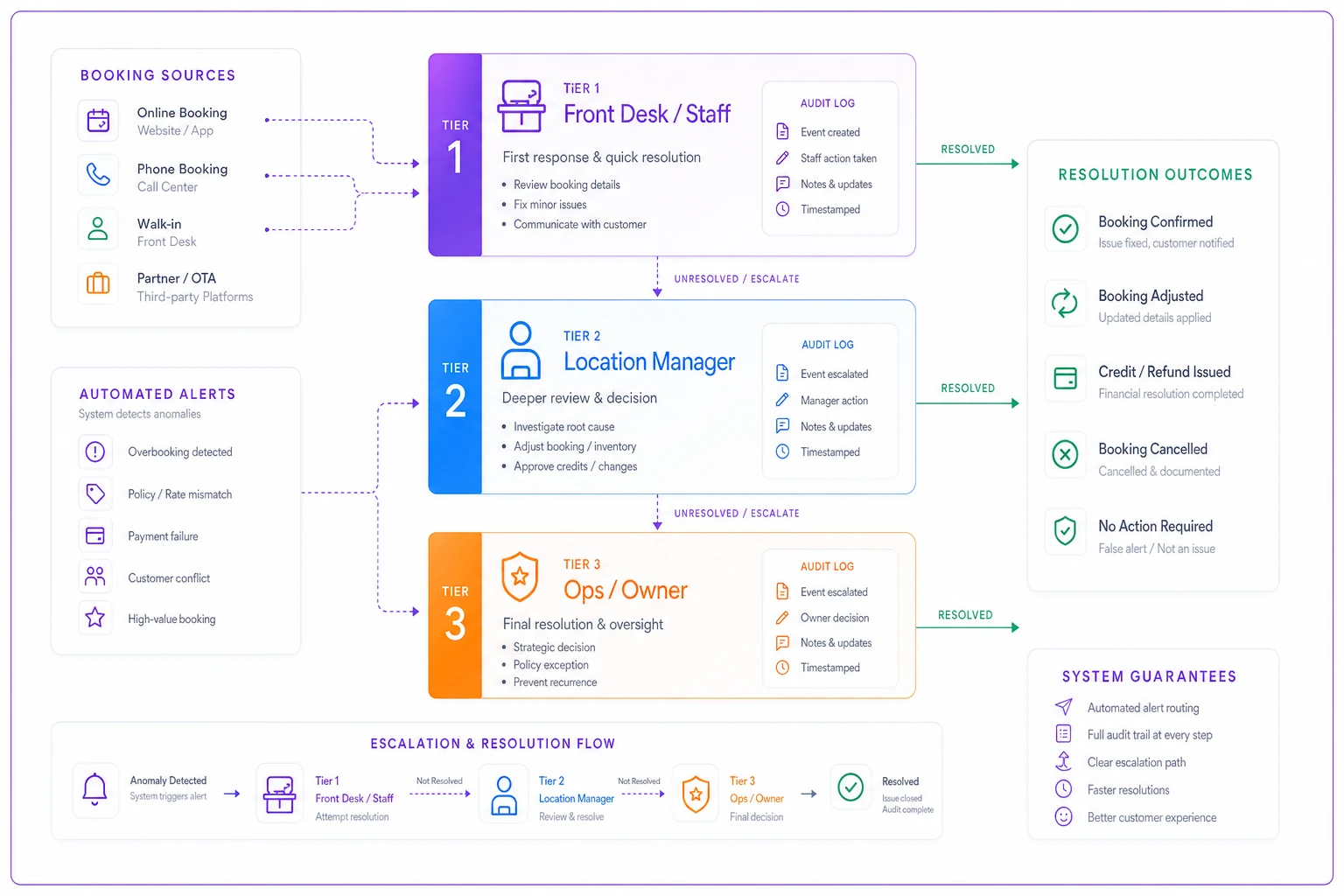
Here's a simple visual of that flow and where automated alerts and audit records should attach.
The failure mode here is the "quiet resolution" — a manager who spots a problem, fixes the immediate symptom, and never escalates because it feels minor. Small unescalated incidents are exactly how a bad actor learns what they can get away with. Build the expectation that certain event types always generate a record upstream, even when they're resolved locally.
Where automation quietly earns its keep
You can run all of this manually. Plenty of businesses do, with a spreadsheet and a diligent ops person. It works right up until volume outpaces attention.
The realistic breaking point is when your event log gets too large to eyeball. Nobody's manually scanning thousands of monthly booking events looking for the three that matter. This is where operational software with built-in access controls and automated audit monitoring stops being a nice-to-have. Instead of you remembering to run the "refunds after hours" query, the system flags the anomaly and routes it to the right tier automatically. Instead of hoping someone captures before/after values, the platform does it on every event by default.
The same logic applies to keeping permissions from drifting in the first place. Automated access reviews that surface "this account hasn't used its admin rights in 90 days" catch exactly the kind of permission rot described at the top. And because scheduling systems constantly sync with external calendars, the audit trail has to survive those syncs too — if you're wrestling with reconciliation and conflicting edits across integrations, that problem connects directly to what we covered on stopping schedule drift and calendar sync governance.
The point isn't automation for its own sake. Human attention is your scarcest resource, and it should be spent judging flagged anomalies — not hunting for them.
A real scenario
A regional med-spa group running four locations, roughly 330–360 appointments a week per site, kept seeing small refund discrepancies that never quite added up. Nothing dramatic — a handful of refunds a month across all locations that ownership couldn't fully explain. Their setup was the classic mess: everyone above front-desk level had effectively the same broad access, and refunds left no approval trail.
When they finally mapped a proper role matrix, the fix was almost boring. They split "issue refund" from everyday edits, capped manager refund approval at $150, and turned on before/after logging. Within the first two months, the audit query for "refunds without a linked approval" surfaced a pattern at one location — one staff member issuing modest refunds to a small cluster of "regulars," somewhere in the $600–$900 a month range.
It wasn't a sophisticated scheme. It was just an open door nobody had closed. The recovered leakage wasn't life-changing money, but the bigger win was that the same controls caught a few other minor incidents over the following year before they had any room to grow. The system flagged them at the "one weird event" stage instead of the "how did we not notice for a year" stage.
Bringing it together
Access control in booking systems isn't a security bolt-on. It's part of how the whole operation coordinates — it defines who can act, it produces the record of what happened, and it determines whether you can defend yourself when a customer, a bank, or an employee disputes something.
The businesses that get this right don't have more rules than everyone else. They have clearer ones, tied to actual lifecycle events, matched to their size, and backed by logs detailed enough to reconstruct a bad day. Get the matrix right, log the events that matter, and make sure anomalies actually reach someone who can act on them. Everything else — the forensics, the escalation, the disputes — gets dramatically easier when that foundation is in place.
Ready to optimize your scheduling and operations?
Join thousands of businesses using Schedily to save time, improve coordination, and enhance operational efficiency.