

Your HVAC tech shows up to a commercial installation without their EPA certification. The dental hygienist gets assigned to a pediatric cleaning but their pediatric cert lapsed last month. Your electrician arrives at a job site that requires a license they haven't renewed. Each time this happens, you're scrambling to reassign work, apologizing to customers, and watching your operational efficiency crater.
The weird part? Most scheduling systems know about certifications when you first enter them. They just don't bother checking if they're still valid when actually booking appointments weeks or months later. It's like a security system that checks IDs on the way in, then never again.
The certification tracking gap
Here's what certification management actually looks like in most service businesses: you collect the info during onboarding, maybe update it during annual reviews, then hope nothing expires between those checkpoints. Meanwhile, your scheduling system happily books certified work to people whose credentials might have lapsed yesterday.
The disconnect happens because certification data and scheduling logic usually live in different places. HR tracks expiry dates. Your scheduling platform handles assignments. They rarely talk to each other properly, and even when they do, the rules engine usually can't handle the real complexity of certification requirements.
Think about what certification-aware scheduling actually needs to track:
-
Base certification requirements Not just whether someone has a certification, but which specific types, levels, and specializations. A master electrician certification isn't the same as a journeyman license. An EPA Type II certification covers different equipment than Type III.
-
Validity windows Certifications expire on different schedules. Some need annual renewal. Others last three years. A few require continuing education credits quarterly. Your system needs to track all of these simultaneously.
-
Geographic variations The same work might require different certifications depending on location. What's valid in one state might not count in another. Some cities layer additional licensing requirements on top of state rules.
-
Customer-specific requirements Certain clients demand certifications beyond legal minimums. Government contracts often require additional clearances. Healthcare facilities might need specific infection control credentials.
The disconnect happens because certification data and scheduling logic usually live in different places. HR tracks expiry dates. Your scheduling platform handles assignments. They rarely talk to each other properly, and even when they do, the rules engine usually can't handle the real complexity of certification requirements.
Building certification-aware routing rules
Real certification-aware scheduling needs more than a simple checkbox system. You need weighted matching, automatic fallbacks, and proactive renewal tracking.
Eliminate scheduling conflicts and missed meetings.
Schedily helps you organize and manage all appointments and team availability effortlessly.
- Unified appointment and resource management
- Automated notifications & reminders
- Team calendar synchronization
No credit card required
Start with skill tags that actually capture certification granularity:
| Skill Tag Structure | Components | Example |
|---|---|---|
| Base Certification | Type + Level + Specialization | HVACEPATypeII_Commercial |
| Validity Status | Active/Warning/Expired + Days Remaining | Active_245days |
| Geographic Scope | State/Region/National | CA_Licensed |
| Customer Requirements | Client-Specific Add-ons | Kaiser_Approved |
| Renewal Status | Pending/Scheduled/Complete | RenewalScheduledMar15 |
Your routing engine needs to evaluate these tags dynamically—not just "does this person have the certification?" but "will they still have it when the appointment actually happens?"
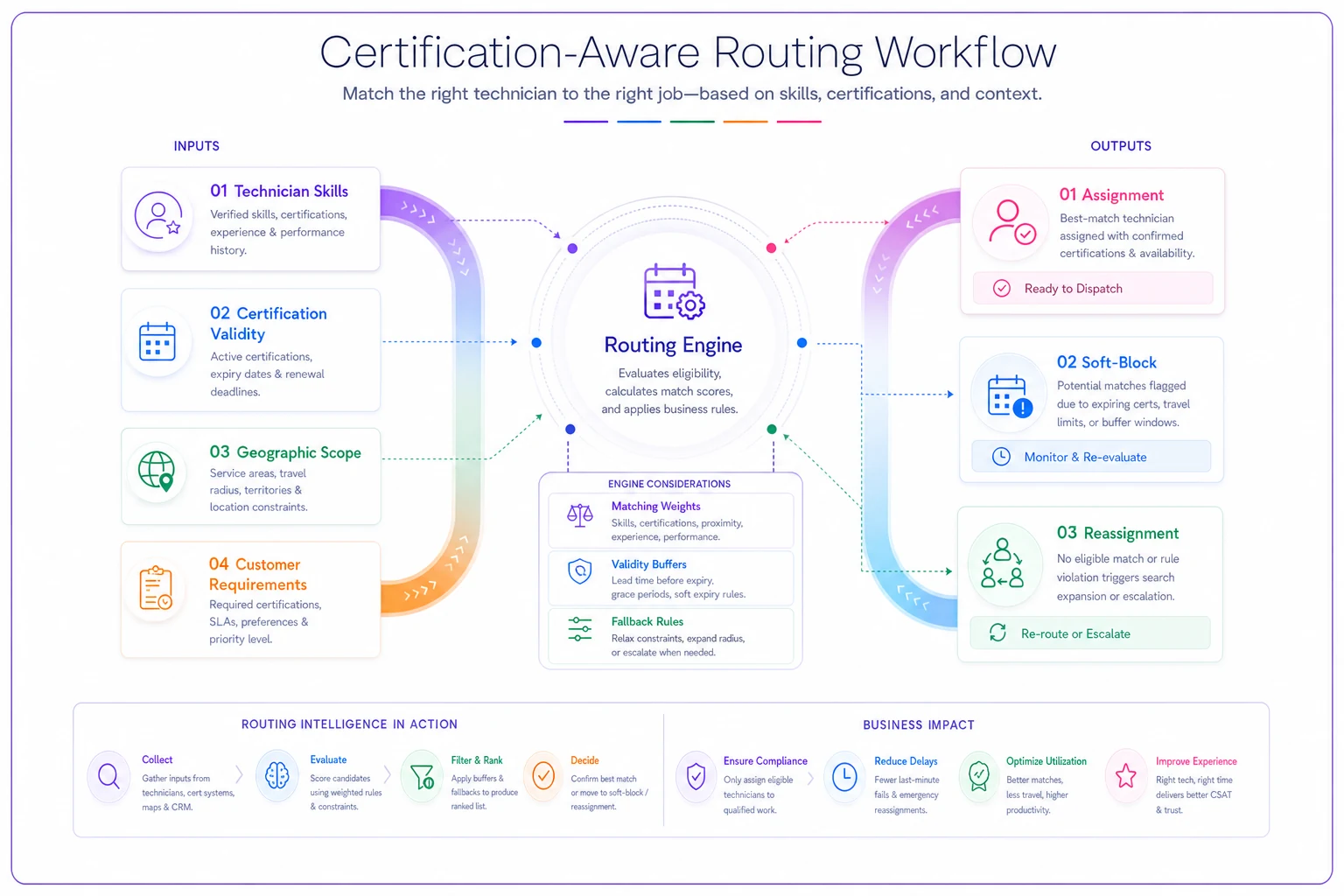
This illustrates how the routing engine checks current validity, applies weights, and triggers fallbacks if needed.
Here's a working configuration for HVAC service routing:
CERTIFICATIONREQUIREMENTS = { 'commercialinstall': { 'required': ['EPAUniversal', 'StateHVACLicense'], 'preferred': ['NATECertified', 'ManufacturerSpecific'], 'validitybuffer': 30, # Days before expiry to stop scheduling 'customeroverrides': { 'hospitalaccounts': ['HealthcareHVACCert'], 'governmentcontracts': ['SecurityClearanceActive'] } } } MATCHINGWEIGHTS = { 'hasrequiredcert': 1000, # Must have 'certvalidthroughappointment': 500, 'haspreferredcert': 50, 'daysuntilexpiry': -2, # Penalty per day closer to expiry 'recentsimilar_work': 20 }
The validity buffer matters more than most people realize. If someone's certification expires in two weeks, you probably shouldn't be scheduling them for work three weeks out. Most systems miss this completely.
Automatic fallback and reassignment policies
When certification issues come up, you need automated responses, not manual scrambling. Your system should handle three scenarios automatically: preventive reassignment, expiry warnings, and emergency rerouting.
Preventive reassignment happens before problems occur. Set up rules that trigger when certifications approach expiry:
REASSIGNMENTTRIGGERS = { 'certificationexpiring': { 'daysbefore': 30, 'action': 'softblockfuturebookings', 'notify': ['scheduler', 'technician', 'HR'] }, 'certificationexpired': { 'action': 'immediatereassignment', 'fallbacksearch': 'nearestqualifiedavailable', 'customernotification': 'autowithnew_eta' } }
Use soft blocks to stop new certified bookings while keeping time to renew or reassign without immediate disruption.
Notice the soft block approach. You don't want to suddenly dump all future appointments at once. Stop accepting new certified work while leaving time to handle renewals or reassignments.
Your fallback search also needs more intelligence than "find anyone available." Weight your alternatives:
| Fallback Priority | Weight | Reasoning |
|---|---|---|
| Same team member, overtime | 100 | Maintains continuity |
| Different team, same day | 80 | Preserves schedule |
| Same team, reschedule | 60 | Keeps work internal |
| Subcontractor, premium rate | 40 | Expensive but immediate |
| Full reschedule | 20 | Last resort |
These weights shift based on context. Emergency work might prioritize same-day completion over team continuity. Relationship-sensitive accounts might accept rescheduling rather than an unfamiliar technician showing up.
Certification lifecycle management in scheduling
Most businesses treat certification tracking as an HR function that occasionally impacts scheduling. That's backwards. Your scheduling system actually generates the most accurate picture of who needs which certifications and when.
Track certification utilization through your appointment data:
CERTIFICATIONMETRICS = { 'utilizationrate': appointmentsrequiringcert / totalappointments, 'coveragedepth': qualifiedstaff / totalstaff, 'expiryrisk': upcomingappointmentsatrisk / totalfutureappointments, 'renewalroi': (certifiedrevenue - renewalcost) / renewalcost }
If someone hasn't used a specific certification in six months, maybe you don't need to renew it. If certain certification requirements keep causing scheduling conflicts, you probably need more people certified. The data makes that visible in a way that gut instinct doesn't.
Build renewal workflows directly into your scheduling logic:
RENEWALWORKFLOW = { '90daysbefore': { 'action': 'schedulerenewaltraining', 'blocktime': '2hoursweeklyforstudy' }, '60daysbefore': { 'action': 'confirmexamregistration', 'schedulingadjustment': 'reducecertifiedworkby20%' }, '30daysbefore': { 'action': 'assignshadowcoverage', 'fallbackactivation': 'identifybackuptechnician' } }
The gradual transition matters. Start reducing certified work assignments as renewal approaches, so you're not scrambling if the renewal gets delayed.
Real scenario: Multi-state electrical contractor
An electrical contractor operating across three states was losing around $18K monthly to certification-related scheduling failures. Different states required different licenses. Some jobs needed both state and local permits. Individual customer facilities added their own requirements on top of that.
Their original system tracked certifications in a spreadsheet. Schedulers manually checked requirements for each job. By the time appointments rolled around, certifications had sometimes expired or technicians got sent to the wrong jurisdiction.
They rebuilt their routing rules with certification awareness built in:
Hierarchical skill tags: Created nested certification tags like ELECCAMasterCommercialHealthcare. Each component could be validated separately. The system understood that a Master license included Journeyman permissions but not vice versa.
Dynamic validity checking: Instead of static certification flags, every routing decision checked current validity. The system calculated whether certifications would remain valid through appointment completion, including multi-day projects.
Weighted technician pools: Built overlapping coverage pools. Primary technicians held all certifications for their main territory. Secondary technicians maintained certifications for adjacent areas. Overflow contractors kept current on high-demand certifications only.
Automatic requalification: When certifications expired, the system didn't just remove technicians from pools. It automatically reassigned them to work matching their remaining valid certifications while flagging them for renewal.
Four months later, certification-related scheduling failures dropped from roughly 12% of appointments to under 1%. Last-minute customer rescheduling complaints nearly disappeared.
The unexpected benefit was discovering certification gaps they didn't know existed. The system flagged that about 30% of commercial work required a specific low-voltage certification that only two technicians held. They got four more people certified and picked up an additional $8K monthly in work they'd previously been declining.
Configuration examples for common industries
Different industries need different certification tracking approaches. Here are tested configurations you can adapt:
Healthcare services
HEALTHCARECERTCONFIG = { 'baserequirements': { 'allstaff': ['CPRCurrent', 'HIPAATraining'], 'clinicalstaff': ['StateLicense', 'MalpracticeInsurance'], 'specialized': ['ProcedureSpecificCert'] }, 'renewalcycles': { 'CPR': 24months, 'StateLicense': 12months, 'Malpractice': 12months, 'HIPAA': 12months }, 'bufferdays': 60, # Stop scheduling 60 days before expiry 'compliancetracking': true, 'audittrail': 'detailed' }
Construction trades
CONSTRUCTIONCERTCONFIG = { 'licensehierarchy': { 'master': ['alljourneymanwork', 'permitpulling', 'supervision'], 'journeyman': ['independentwork', 'standardinstallations'], 'apprentice': ['supervisedworkonly'] }, 'projectrequirements': { 'commercial': ['CommercialLicense', 'LiabilityInsurance'], 'residential': ['ResidentialLicense'], 'government': ['PrevailingWageCert', 'BackgroundCheck'] }, 'multitradecoordination': { 'electricalplumbing': 'requirebothcertsonsite', 'structuralmechanical': 'sequencebycertification' } }
IT and technical services
ITCERTCONFIG = { 'vendorcertifications': { 'Microsoft': ['Azure', 'Office365', 'WindowsServer'], 'Cisco': ['CCNA', 'CCNP', 'CCIE'], 'Security': ['SecurityPlus', 'CISSP', 'CEH'] }, 'certificationscoring': { 'exactmatch': 100, 'higherlevel': 80, # CCNP can do CCNA work 'relatedcert': 40, # Azure helps with AWS work 'expiredbutexperienced': 20 }, 'continuousedtracking': true }
Different industries need different certification tracking approaches. Here are tested configurations you can adapt:
Preventing cascade failures from certification gaps
A single certification issue can trigger a full operational cascade. One expired license leads to reassignments, which overloads other technicians, which causes delays, which frustrates customers. Building resilient certification-aware systems means planning for these chain reactions, not just the initial problem.
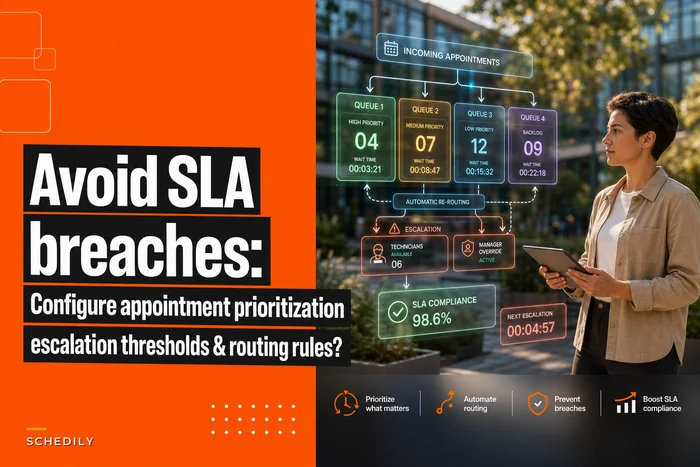
Your appointment prioritization and escalation rules need certification awareness baked in. High-priority appointments should route to technicians with the most stable certification status, not just whoever's available.
Similarly, when handling multi-resource scheduling scenarios, certifications add another dimension to resource matching. A job might need both a certified technician and specialized equipment. If the only certified technician is tied up, having the equipment sitting available doesn't help you.
Create certification coverage maps that surface risk zones:
COVERAGEANALYSIS = { 'singlepointfailure': certificationswithoneholder, 'expiryclustering': certificationsexpiringsamemonth, 'geographicgaps': locationswithinsufficientcoverage, 'customerrisk': highvalueaccountswithcoveragegaps }
Single points of failure either need backup certifications or explicit contingency plans. Some specialized certifications genuinely don't justify multiple holders, but you need to know that going in, not when something breaks. A coverage map makes those vulnerabilities visible before they become customer problems.
The right tools for certification-aware operations
Manual certification tracking breaks down as your operation grows. Spreadsheets can't handle dynamic validity checking. Calendar reminders don't connect to actual scheduling impact. Most scheduling platforms treat certifications as static attributes rather than dynamic constraints with real scheduling consequences.
Modern operational platforms solve this by integrating certification lifecycle management directly into scheduling logic. AI-powered automation helps by predicting certification needs based on upcoming work patterns, flagging renewal priorities based on actual utilization, and suggesting coverage distribution across your team.
The platform handles the complexity of multi-dimensional matching: checking base requirements, validating timeframes, evaluating customer specifications, calculating fallback options. When certifications approach expiry, the system gradually adjusts scheduling patterns rather than creating sudden disruptions.
These platforms also learn from your actual operations over time. They surface which certifications drive revenue, which create recurring bottlenecks, and occasionally which ones might be unnecessary overhead. Patterns like seasonal certification needs or undocumented customer-specific requirements tend to show up in the data before anyone explicitly calls them out.
Moving beyond reactive certification management
Certification-aware scheduling isn't just about preventing disasters. It's about matching your team's actual capabilities against market demand more intelligently. When you know which certifications generate revenue and which ones create scheduling flexibility, you can make smarter investments in training.
Track certification ROI through your scheduling data. Getting two more people certified in a specific area to eliminate 80% of your scheduling conflicts is measurable value you can actually justify to anyone asking where the training budget went. Certifications that never get used despite expensive annual renewals are costs worth cutting.
Build certification requirements into your pricing models too. Work requiring rare certifications should command premium rates. Customers demanding certifications beyond standard requirements should understand the operational cost that comes with it.
Certifications aren't compliance checkboxes. They're operational assets that need active management, and your scheduling system should be the command center for that management—not just a passive recipient of whatever HR updates whenever they get around to it. The businesses that get this right turn certification management from a cost center into a genuine competitive advantage: they take on specialized work others can't handle, avoid the hidden costs of last-minute scrambling, and build reputations for reliability in certification-sensitive industries. Start with accurate tracking, dynamic validation, and intelligent fallbacks. Once those work, layer in predictive renewal management and ROI optimization. The goal isn't perfect certification coverage across the board—it's the right coverage for your actual operational needs.
Ready to optimize your scheduling and operations?
Join thousands of businesses using Schedily to save time, improve coordination, and enhance operational efficiency.