
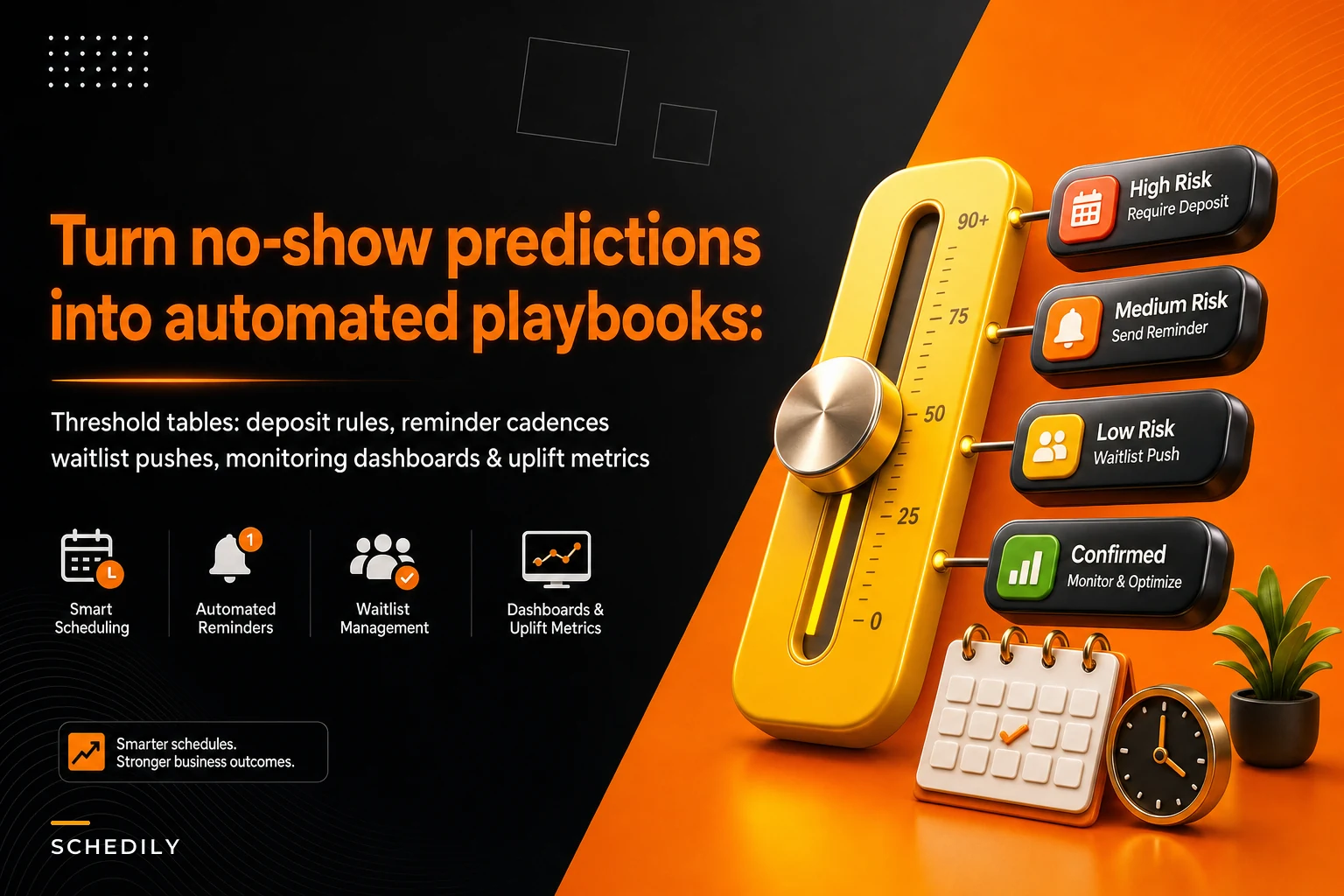

Most teams that bolt a no-show model onto their scheduling stack end up in the same strange place: a prediction appears next to each booking — a number, a color, maybe a little flag — and nobody is quite sure what to do with it. The front desk sees "68% likely" and shrugs. The model ships. The no-show rate barely moves.
The problem isn't the model. A reasonably decent no-show model is easy to build now. The hard part is the translation layer — turning a probability into a deposit rule, a reminder cadence, a waitlist push, and a dashboard that tells you whether any of it worked. That translation layer is where almost all the revenue hides, and it's the part teams skip.
This is about building that layer. How to turn a risk score into a threshold-to-action table, what reminder logic actually belongs in each band, how to push waitlist fills before the no-show happens, and which metrics prove the whole thing is earning its keep. If you've already set up behavioral nudges and recovery flows for high-value consults, this is the upstream decision engine that decides who gets which treatment.
The gap between a score and an action
This is where most implementations stall. The model outputs a continuous probability — say, 0.00 to 1.00 — but a continuous number maps to nothing operationally. Your staff can't run 100 different plays. Deposits are binary-ish (you charge one or you don't). Reminder channels are discrete (SMS, call, email). Waitlist pushes happen or they don't.
So the first real job is banding. You collapse the continuous score into a small number of risk tiers, and each tier gets exactly one playbook. Three to four bands is the sweet spot. Two is too blunt. Six is more than a front desk can remember or a system can cleanly report on.
A common mistake: teams pick band cutoffs by eyeballing a histogram — "let's put the line at 50%." That ignores the thing that actually matters, which is the cost asymmetry at each slot. A no-show on a 90-minute high-margin procedure is not the same event as a no-show on a 15-minute follow-up. Your bands should be anchored to what a missed slot costs, not to round probability numbers.
Building the threshold-to-action table
The threshold-to-action table is the core artifact. It's a single source of truth that says: at this risk level, for this type of appointment, these things happen automatically, and these things require a human.
Eliminate scheduling conflicts and missed meetings.
Schedily helps you organize and manage all appointments and team availability effortlessly.
- Unified appointment and resource management
- Automated notifications & reminders
- Team calendar synchronization
No credit card required
Here's a worked example for a mid-sized clinic running mixed appointment types. The cutoffs aren't clean round numbers — they're set where the historical no-show curve actually bends for this business.
| Risk band | Score range | Deposit action | Reminder cadence | Waitlist action | Human step |
|---|---|---|---|---|---|
| Low | 0.00–0.22 | None | Standard: email 48h, SMS 2h | None | None |
| Moderate | 0.23–0.48 | None | SMS 72h + 24h + 2h, require tap-to-confirm | Warm waitlist (notify, no overbook) | None |
| Elevated | 0.49–0.71 | Soft hold / card on file | SMS + live confirmation call 24h prior | Active: identify 1 backup | Desk reviews if unconfirmed by 18h |
| High | 0.72–1.00 | Deposit required at booking | Confirmation call + SMS, confirm-or-forfeit language | Pre-commit backup, allow controlled overbook | Manager approves overbook |
A few things worth pulling out of that table.
The moderate band does no deposit on purpose. Deposits create booking friction, and applying them to borderline cases suppresses bookings you'd probably have kept anyway. Deposit friction gets spent only where the expected loss justifies it — the elevated and high bands.
The "require tap-to-confirm" in the moderate band is doing quiet work. An unanswered confirmation is itself a signal. If someone in the moderate band ignores three reminders, you can dynamically bump them toward elevated treatment the day before. The band isn't frozen at booking time; it refreshes as the appointment approaches and new behavior comes in.
The high band allows controlled overbooking — but gated behind manager approval. This is where waitlist strategy and no-show prediction meet, and it's also where people get burned if they automate too aggressively.
Set band cutoffs where your slot economics change, not at round probability numbers.
Here's a simple visualization of how the table maps scores to actions.
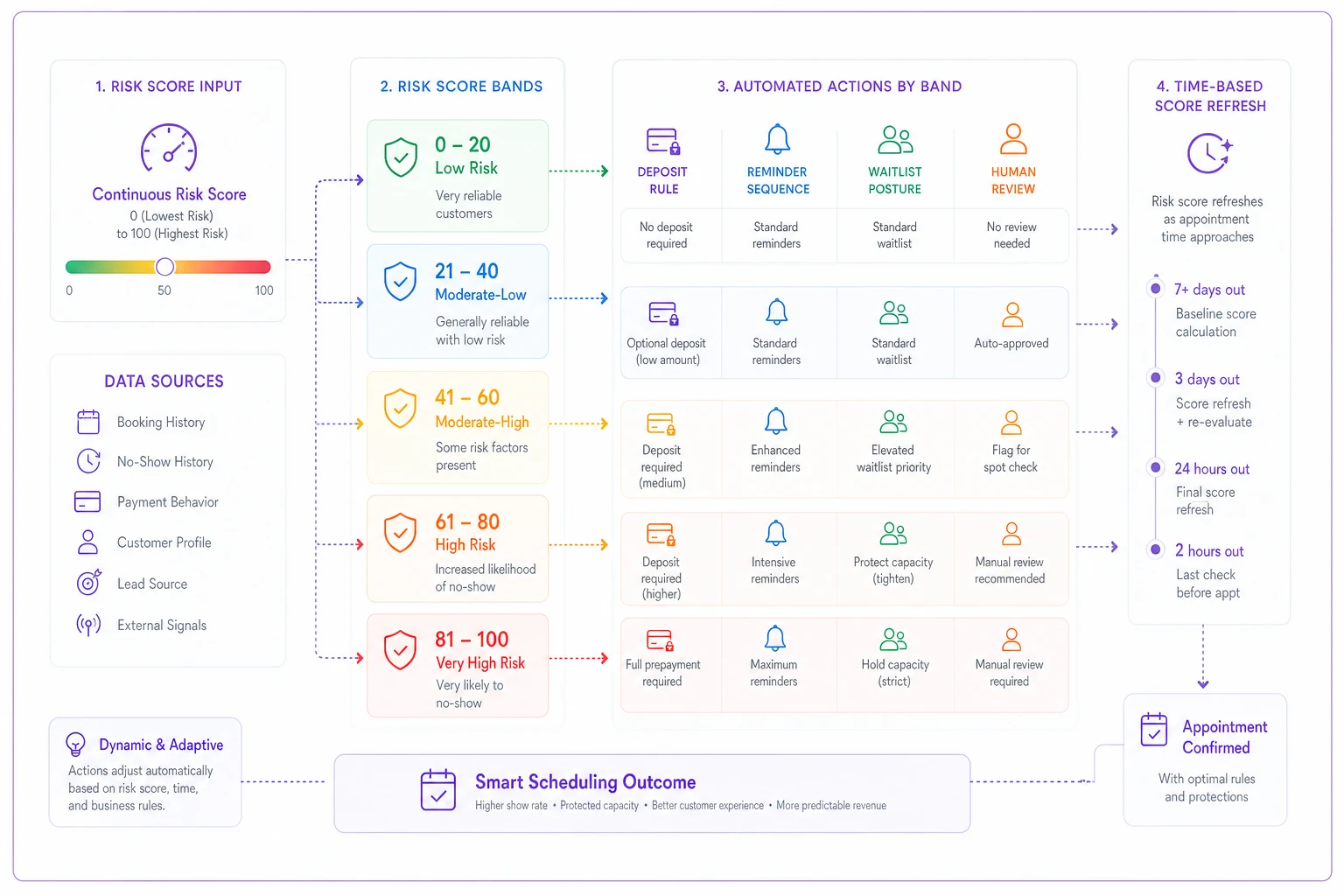
The point is that the band maps to a playbook, and that playbook is operational: reminders, deposits, waitlist logic, and escalation rules all wired to fire automatically.
Reminder logic that matches the risk, not the calendar
Most reminder systems are dumb in the same way: everyone gets the same two-message sequence regardless of how likely they are to flake. That's backwards. Reminder intensity should scale with risk, because reminders have a cost too — over-messaging low-risk, reliable clients annoys exactly the people you want to keep.
The pattern that works across most appointment businesses:
-
Low risk light touch. One useful reminder, one short nudge. The goal is information, not persuasion.
-
Moderate risk add a confirmation requirement and a mid-range touch (72h) so there's time to rebook the slot if they bail early.
-
Elevated risk introduce a human channel. A live confirmation call converts dramatically better than another SMS for people already leaning toward not showing. Yes, it costs staff time — that's why it's reserved for the band where it pays off.
-
High risk combine the deposit's commitment effect with confirm-or-forfeit language and a backup already lined up. At this point you're not just reminding, you're protecting the slot.
One thing that surprises people: adding more SMS messages to high-risk clients often does nothing. Past a certain point, the marginal reminder is ignored by exactly the population that ignores reminders. The lever that moves high-risk behavior is usually a deposit or a live human voice, not message volume. Teams that respond to a stubborn no-show rate by cranking up SMS frequency are optimizing the wrong knob.
Waitlist push: filling the slot before it empties
The waitlist is the part that turns a good prediction into recovered revenue, and it's the part most teams underuse. If your model flags an elevated-risk slot 48 hours out, you don't have to wait for the no-show to happen — you can start staging a backup now.
There are three postures, and choosing the wrong one is a classic mistake:
-
Warm waitlist — notify interested clients that a slot might open, no commitment. Used for moderate-risk slots. Low downside, moderate fill rate.
-
Active backup — identify a specific client who's ready to take the slot if it frees up and hold a soft confirmation. Used for elevated risk.
-
Controlled overbook — book the backup into the same slot before the no-show, betting on the prediction. Used only for high-risk slots, and only where you have a graceful fallback if both clients show up.
The overbook posture is where the real money is, and where the real danger is. If you overbook on a 0.72 prediction and the client actually shows, you now have two people for one slot and an angry customer. The guardrail is twofold: only overbook in the band where the no-show probability is high enough that double-arrival is rare, and always have a defined fallback — a buffer slot, a second provider, or a goodwill compensation script. Overbooking without a fallback plan isn't a strategy, it's a lawsuit waiting room.
A practical workflow for the active-backup posture:
-
At 48h, the system flags elevated/high-risk slots.
-
A waitlist candidate matching the slot type and provider is auto-identified and sent a "would you like this earlier slot if it opens?" message.
-
If they say yes, they're tagged as the backup — no money moves yet.
-
At the confirm deadline (say 18h), if the original client hasn't confirmed, the backup is promoted and notified.
-
If the original does confirm late, the backup is offered the next available slot with a small priority perk so the goodwill isn't wasted.
This kind of coordination is tedious to run by hand across hundreds of appointments but straightforward once the rules live inside your scheduling platform. The point of operationalizing no-show predictions isn't the model — it's wiring these if-then sequences so they fire the same way every time, at 2am, without a staff member remembering to check a dashboard.
The monitoring dashboard: what you actually watch
A no-show program you can't measure will quietly drift until it's noise. You need a dashboard that answers one question above all others: is the intervention changing behavior, or are we just spending deposit friction and call-center minutes for nothing?
Track these per band:
-
No-show rate by band — the bands should separate cleanly; if they don't, the model isn't working
-
Confirmation response rate by band and channel
-
Deposit decline-at-booking rate — are deposits suppressing bookings you actually wanted?
-
Waitlist fill rate — of flagged slots, how many got a backup seated
-
Net fill rate — occupied slots ÷ bookable slots, which ties directly to revenue
-
Intervention cost — calls made, deposits held, staff minutes spent
The single most important view is band separation over time. If your "high" band and your "low" band start showing similar no-show rates, your model has decayed and your whole action table is now misfiring. This drifts silently. Seasonal behavior shifts, your client mix changes, and a model trained six months ago quietly stops discriminating. Watching band separation is your early warning.
A subtle trap on dashboards: celebrating a falling no-show rate without checking the booking rate. If you slapped deposits on half your appointments and your no-show rate dropped — great. But if total bookings also dropped because people balked at the deposit, you may have lost revenue while improving a vanity metric. Always read no-show rate and booking volume together.
Measuring uplift without fooling yourself
No-show rates move for reasons that have nothing to do with your program. Seasonality, a local event, a rough weather week. If you compare this month to last month and call the difference "uplift," you'll eventually attribute a lucky month to your genius and get burned the next quarter.
The cleaner approach is a holdout. Take a slice of eligible appointments — somewhere around 10–15% — and run them on the old standard treatment. Everyone else gets the banded playbook. Compare fill and revenue between the two groups over the same period. Same weather, same season, same client mix. The difference is a far more honest estimate of uplift than any month-over-month chart.
What to measure for genuine uplift:
-
Fill-rate lift net fill rate in the treated group minus the holdout group.
-
Revenue-per-available-slot lift this catches cases where you filled slots but with lower-value appointments.
-
Recovered revenue from waitlist revenue from slots that were flagged, vacated, and refilled before the day.
-
Deposit suppression cost estimated bookings lost to deposit friction, netted against no-shows prevented.
A grounded example. A mid-market dermatology practice ran banded playbooks against a roughly 12% holdout for about a quarter. Baseline no-show rate sat around 18%. In the treated group it came down to somewhere in the 11–12% range, with most of the gain in the elevated and high bands where the confirmation calls and deposits lived. Net fill rate improved a few points — not dramatic on paper, but on their slot economics it worked out to low-to-mid four figures of recovered revenue per month. The quiet win was the waitlist: slots they used to simply lose were getting refilled before the day about a third of the time.
The number isn't huge or clean. Real uplift from no-show work usually isn't a transformation — it's a steady recovery of slots you were bleeding, compounding month after month. The practices that treat it as capacity recovery, not a miracle cure, stick with it long enough to see the compounding.
When this is worth it — and when it isn't
When it makes sense: you run high-value, limited-capacity slots where an empty chair is pure lost margin; your no-show rate is meaningfully above single digits; and you have enough history to build bands that actually separate. Specialty medical, aesthetics, high-end personal services, consultations — these benefit most.
When it's a bad idea: if your appointments are cheap, abundant, and easily walked-in-replaced, the overhead of deposits, confirmation calls, and waitlist orchestration can cost more than the no-shows. If your booking volume is small, you won't have the data to band reliably, and a simple universal reminder plus a deposit on the biggest-ticket items will get you 80% of the value with none of the complexity.
Who should not do this yet: anyone whose booking data is messy enough that "no-show" isn't recorded consistently. If half your no-shows are logged as cancellations and the other half as nothing at all, fix your data discipline first. A model trained on garbage outcomes produces confident bands that are quietly wrong — and confidently-wrong is worse than no model. The same data-quality thinking that goes into turning appointment history into reliable forecasts applies here: the predictions are only as trustworthy as the outcome labels underneath them.
Feature notes: what to actually build (or buy)
If you're specifying this for your scheduling platform, the pieces that matter:
-
A score field that refreshes as the appointment approaches, not just at booking.
-
A configurable band table your ops team can edit without an engineer — cutoffs will change seasonally.
-
Per-band action hooks deposit rules, reminder sequences, waitlist triggers, and a human-review flag.
-
A waitlist engine that can stage warm, active, and overbook postures with fallback handling.
-
Band-level reporting with holdout support, so uplift measurement is built in rather than reconstructed in a spreadsheet later.
-
An audit trail of which action fired on which appointment — because when a client disputes a forfeited deposit, you need the receipt.
What separates a program that works from one that fizzles isn't any single feature. It's that the whole chain — score, band, action, measurement — runs automatically and consistently. A front desk running these rules from memory will do it well on a quiet Tuesday and poorly on a chaotic Friday. The rules fire the same either way when they live in the system.
Bringing it together
A no-show model is the easy 20% of this project. The 80% that pays the bills is the translation layer: bands anchored to real slot economics, a threshold-to-action table that every slot type maps into, reminder intensity that scales with risk instead of annoying your best clients, a waitlist engine that fills slots before they empty, and a dashboard honest enough to run a holdout so you're not fooling yourself about uplift.
Start narrow. Build three bands, one action table, and a holdout. Watch band separation and net fill rate. Resist the urge to overbook until your high band proves it's actually high. Get that loop running cleanly, and the model stops being a number nobody uses and starts being the quiet engine that keeps your chairs full.
A no-show model is the easy 20% of this project. The 80% that pays the bills is the translation layer: bands anchored to real slot economics, a threshold-to-action table that every slot type maps into, reminder intensity that scales with risk instead of annoying your best clients, a waitlist engine that fills slots before they empty, and a dashboard honest enough to run a holdout so you're not fooling yourself about uplift.
Start narrow. Build three bands, one action table, and a holdout. Watch band separation and net fill rate. Resist the urge to overbook until your high band proves it's actually high. Get that loop running cleanly, and the model stops being a number nobody uses and starts being the quiet engine that keeps your chairs full.
Ready to optimize your scheduling and operations?
Join thousands of businesses using Schedily to save time, improve coordination, and enhance operational efficiency.