

Most scheduling teams treat accessibility like a home inspection. Someone runs a scan, files a report, fixes the obvious problems, and everyone moves on. Six months later a new widget ships, a vendor pushes an update, a developer swaps a date picker, and the whole thing quietly breaks again. Nobody notices until a customer who uses a screen reader can't confirm an appointment and calls the front desk frustrated.
That cycle is the actual problem. Not the individual bug — the fact that accessibility has no owner, no cadence, and no teeth. A fix without governance decays. And in scheduling specifically, where flows change constantly because of pricing experiments, new resource types, and calendar integrations, decay happens faster than almost anywhere else in the product.
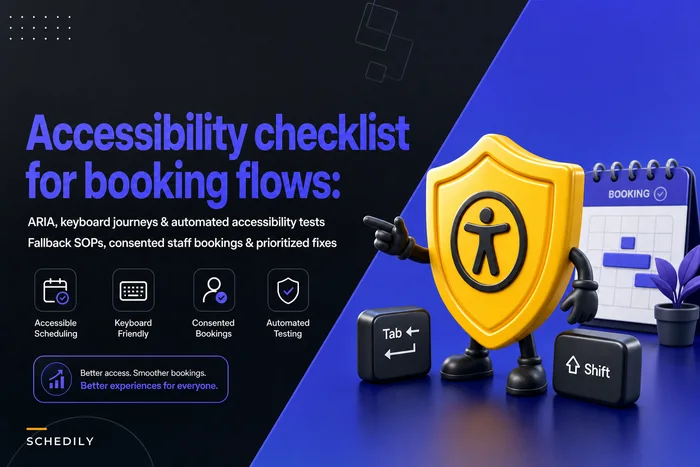
This is about building accessibility governance scheduling programs — the policies, audit rhythms, release gates, and training that turn "we did an audit once" into a standing accountability inside how you operate. If you've already worked through the tactical fixes from an accessibility checklist for booking flows, this is what keeps those fixes from rotting.
Why accessibility quietly breaks in scheduling systems
Scheduling is unusually hostile to accessibility staying fixed, and it's worth understanding why before you build anything.
Booking flows are assembled from borrowed parts. The calendar grid comes from one library, the time picker from another, the payment step from a processor's embedded widget, the SMS confirmation from a messaging vendor. Each updates on its own schedule. A library bump that "improves performance" can strip an ARIA label or change focus behavior, and your team has no idea because the release notes said nothing about accessibility.
Then there's the configuration layer. Most modern schedulers let non-engineers make changes — add a service, edit intake questions, build a new multi-step flow for a new location. Every one of those edits is a chance to introduce an unlabeled field, a color-only status indicator, or a keyboard trap. The people making those edits usually have zero accessibility training. They're front-desk leads and ops managers trying to get a new service live before the weekend.
What we've seen across a lot of appointment businesses is that accessibility quality tracks almost perfectly with change velocity. The faster you ship, the faster you break — unless there's a gate standing in the way. A single-location clinic that hasn't touched its booking page in two years is often more accessible than a fast-growing franchise that redesigns its flow quarterly, even though the franchise has a bigger budget and "cares more." Caring doesn't survive change. Governance does.
What actually breaks as you scale
The failure points shift depending on where you are in growth, and a governance program has to anticipate all of them.
Eliminate scheduling conflicts and missed meetings.
Schedily helps you organize and manage all appointments and team availability effortlessly.
- Unified appointment and resource management
- Automated notifications & reminders
- Team calendar synchronization
No credit card required
Early stage (one flow, one team). The risk here is invisibility. No audit, no baseline, and a quiet assumption that "the platform handles accessibility." It usually doesn't — or it handles the default template but not your custom intake questions. Nothing breaks loudly, so nothing gets attention.
Multi-flow stage (several services, custom intake, deposits). Now you have divergence. Your main booking flow might be solid, but the "new patient" flow, the "reschedule" flow, and the deposit-capture step were all built at different times by different people. Accessibility becomes inconsistent across paths, and the broken one is almost always the newest.
Multi-location / franchise stage. This is where it gets messy. Local managers customize flows, and you lose central visibility entirely. One location's booking page passes every check; another has a date picker nobody can navigate with a keyboard. Without a governance program, you don't even know which locations are compliant. This is the same coordination problem that surfaces in permissions, which is why role and permission matrices from your IAM setup matter here too — you need to know who can change a flow before you can govern what they change.
Integration-heavy stage. Webhooks, embedded widgets, partner portals. Accessibility now depends on vendors you don't control. Your flow can be solid and still fail because an embedded insurance-verification widget traps focus. Governance has to extend to procurement and vendor contracts, not just your own code.
The pattern underneath all of this: accessibility debt compounds silently. Nobody files a ticket that says "this is 15% less accessible than last quarter." It just degrades until a complaint — or a demand letter — forces a scramble.
The four pillars of an accessibility governance program
A real program rests on four things working together. Miss one and the others leak.
| Pillar | What it does | What breaks without it |
|---|---|---|
| Policy | Defines the standard, scope, and who owns what | Teams argue about "how accessible is accessible enough" every time |
| Audit cadence | Catches decay on a schedule, not by accident | Problems surface only via customer complaints |
| Release gates | Stops new breakage before it ships | Every release is a new roll of the dice |
| Training | Equips the people making changes | The same mistakes repeat with every new hire |
Policy without audits is a document nobody checks against. Audits without release gates means you find problems after they're already live. Gates without training means people learn to game the gate instead of understanding why it's there. You need the full loop.
Pillar 1: Policy templates that people actually follow
The mistake most teams make with accessibility policy is writing it like a legal statement — vague commitments to "WCAG 2.1 AA conformance" that nobody translates into daily decisions. A usable policy is specific about your scheduling context.
-
The standard and version you're holding to (e.g., WCAG 2.2 AA), plus any sector-specific requirements that apply to your industry
-
Scope — which flows are covered
booking, reschedule, cancel, intake, payment, confirmation, reminders. Confirmation emails and SMS get forgotten constantly.
-
Ownership — a named accessibility owner, not a committee. Someone whose job performance is partly measured on this.
-
Severity definitions — what counts as blocker vs. major vs. minor, in plain terms. A keyboard trap in the confirm button is a blocker. A low-contrast footer link is minor.
-
Remediation SLAs — blockers fixed in X days, majors in Y, with escalation if missed.
-
Change triggers — what kinds of changes require re-review before going live.
The severity-plus-SLA combination is what gives policy teeth. Without it, "we'll fix it" has no deadline and nothing ever gets prioritized against revenue work.
Pillar 2: Audit cadence that matches your change velocity
Annual audits are theater for anything that changes more than once a year. Your audit rhythm should be tied to how often your flows actually change.
-
Automated scans — continuous or weekly. Run an accessibility linter against your live booking flows. These catch maybe 30–40% of issues (missing labels, contrast failures, missing alt text) but they catch them cheaply and constantly.
-
Manual spot checks — monthly. A trained person actually tabs through one critical flow with a keyboard and a screen reader. Rotate which flow each month so everything gets touched over a quarter.
-
Full manual audit — quarterly or per major release. Complete keyboard and screen-reader walkthrough of every covered flow, including the edge cases that always get skipped: error states, timeout handling, deposit capture, timezone edge cases.
-
Vendor/integration review — on every new integration and annually after. Before an embedded widget goes live, it gets audited like your own code.
Rotate which flow gets the monthly manual spot check so no single flow is neglected.
The thing that separates mature programs from checkbox programs: automated scans are a floor, never a ceiling. The most damaging scheduling accessibility failures — a screen reader announcing an available slot that's actually booked, focus not moving to an error message after a failed submit — pass automated scans completely. They only show up when a human uses the thing the way a disabled customer would.
Log every audit result with a date, a flow, a finding, a severity, and an owner. That log is your accountability trail. When someone asks whether you were tracking this, the honest answer needs to be yes.
Pillar 3: Release-gate checks that stop new breakage
This is the pillar most teams skip, and it's the one that actually prevents decay instead of just measuring it.
Here's a simple visual of a release-gate workflow.
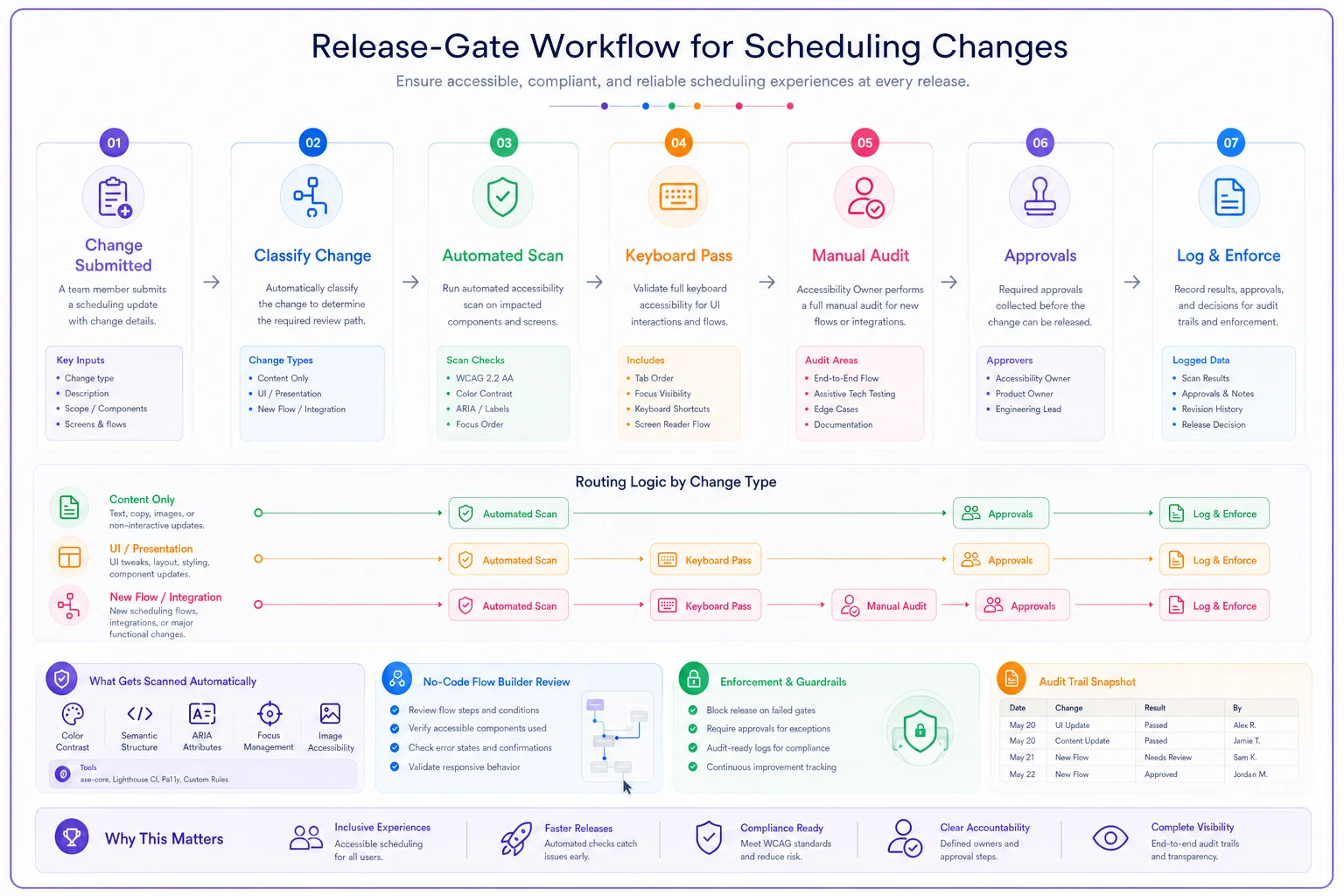
A practical gating model:
-
Content-only change (text, pricing copy)
automated scan must pass. Done in minutes.
-
UI change to an existing flow (new field, layout tweak)
automated scan plus a keyboard pass of the changed step.
-
New flow or new integration
full manual audit before launch, no exceptions.
The gate needs to be enforced by process, not goodwill. In practice that means the accessibility check is a required step in your release checklist, and the accessibility owner — or a trained reviewer — has to sign off. If your platform lets non-engineers publish flow changes, the gate has to live there too. Otherwise a front-desk manager publishing a new service flow bypasses engineering's gate entirely. That's the most common hole: engineering has gates, the no-code flow builder doesn't, and that's exactly where the breakage comes from.
This connects directly to compliance posture. Accessibility failures increasingly show up in the same risk bucket as consent and retention problems, and the common compliance mistakes in appointment systems are usually the same ones — no owner, no cadence, no record. A release gate produces the record almost for free.
Pillar 4: Training that reaches the people making changes
Accessibility training usually goes to developers and stops there. But in scheduling, the people introducing the most risk are often not developers — they're ops staff configuring flows and support staff handling the fallback when the flow fails someone.
-
Builders (devs and no-code flow editors) semantic structure, labels, focus management, error handling, and — critically — how to test their own change with a keyboard before they publish. Short, hands-on, repeated for every new hire.
-
Ops and support staff how to recognize an accessibility complaint when it doesn't sound like one ("the website won't let me book" is often an accessibility failure), and the fallback process for booking someone manually without friction or stigma.
-
Managers and owners why this is a standing operational risk, how to read the audit log, and what the SLAs actually commit them to.
Worth naming explicitly: the fallback process is where accessibility either earns trust or destroys it. A customer who hits a broken flow and gets a warm, fast "no problem, I'll book that for you right now" has a recoverable experience. One who gets treated like an inconvenience does not. Train for the recovery, not just the prevention.
A real scenario
A regional physical-therapy group running about seven clinics had a clean booking page — they'd paid for an audit when they launched. Eighteen months and several hundred flow edits later, a patient using a screen reader couldn't complete an intake form at one location because a required field added by a local manager had no label. The patient called, got bounced between front desk and corporate, and eventually went elsewhere.
What made it worse was that nobody could answer basic questions. Which locations had this problem? When did it start? Who edited the flow? No audit log, no change record, no owner.
They stood up a lightweight governance program over about a quarter: a two-page policy with severity SLAs, weekly automated scans, a monthly manual spot check rotating across locations, and a release gate on the no-code flow builder so local edits to required fields triggered a review. Nothing fancy. Within the first cycle the scans and spot checks surfaced around a dozen issues across locations — most minor, three that would have blocked a screen-reader user. Fix time on blockers dropped from "whenever someone complains" to inside a week, because there was now an owner and a deadline.
The quieter win was confidence. When a compliance question came up later, they had a dated log showing exactly what they monitored and when they fixed what. That record is worth more than any single fix.
When a full governance program makes sense — and when it doesn't
When it's clearly worth it: multiple flows, multiple locations, frequent changes, or any integrations you don't control. If non-technical staff can publish flow changes, you need gates and training regardless of size. And if you operate in healthcare, finance, government-adjacent, or any sector with heightened accessibility scrutiny, the full program is cheap insurance.
When a lighter touch is fine: a single, stable booking flow that rarely changes. You still want a baseline audit and a periodic re-check, but weekly scans and a formal release gate would be overhead you don't need yet. Scale the program to your change velocity, not your ambition.
Who should not try to do this all at once: a small team with no accessibility knowledge and no budget to get any. Don't build a heavyweight process you can't run. Start with one thing — a quarterly manual audit and a named owner — and add cadence and gates as you grow. A program you actually follow beats a comprehensive one that collapses in month two.
Making it a standing program, not a project
The difference between a team that treats accessibility as a project and one that treats it as a program comes down to whether it survives personnel changes and roadmap pressure. Projects end. Programs have an owner, a cadence on the calendar, a gate in the release process, and a training loop for new hires — so when the person who cared about this leaves, the system keeps running.
Where your scheduling platform helps is in making the cadence sustainable rather than purely manual: scheduled automated scans against live flows, change logs that record who edited which flow and when, release checklists that can't be skipped, and audit trails that answer "what were we monitoring" without a scramble. The goal isn't to automate judgment — a human still has to tab through the flow — it's to make the boring, repeatable parts happen reliably so your people spend their attention on the checks that actually require a person.
Accessibility in scheduling doesn't fail because teams don't care. It fails because booking flows change faster than anyone's attention, and good intentions have no cadence. Give it an owner, a rhythm, a gate, and a trained team, and it stops being the thing that breaks quietly between audits — and starts being something you can actually stand behind.
Ready to optimize your scheduling and operations?
Join thousands of businesses using Schedily to save time, improve coordination, and enhance operational efficiency.