



Most teams put enormous energy into picking a scheduling vendor and almost none into leaving one. That's backwards. The onboarding phase is forgiving — you're running in parallel, nobody's live yet, and mistakes get caught before they touch a customer. The offboarding is unforgiving. You're moving live bookings, live customer data, and live money-in-flight from one system to another while both systems keep taking new appointments. The cutover window is the single riskiest hour your operation will experience all year, and it's the one nobody rehearses.
What breaks during a scheduler switch is rarely the thing people worried about. Teams obsess over whether the data import will work, then get blindsided by a webhook still firing from the old vendor six days later, double-charging deposits. Or a customer confirmation email going out from both platforms because nobody paused the old reminder engine. Or a reconciliation script that "matched everything" but silently dropped 40 recurring appointments because the old vendor stored recurrence rules in a format nobody documented.
This is a systems problem, not a data-export problem. Your scheduler doesn't sit alone — it's wired into payments, calendars, staff notifications, customer comms, reporting, and often your front desk's muscle memory. Pull it out carelessly and every one of those threads snaps at a slightly different moment. A real scheduler vendor offboarding playbook treats the exit as a coordinated operation with contractual prep, staged technical cutover, customer communication timing, and hard rollback triggers — not a weekend "we'll just export and import."
Start with the contract, not the data
The mistake that quietly costs the most money happens before anyone touches an export button: teams give notice to their old vendor before they've secured their exit rights. Once you've triggered a termination clause, your leverage is gone. Suddenly the "full data export" you assumed was standard turns into a CSV of appointment titles with no customer records, no payment history, and no API access to pull the rest.
Before you announce anything internally or to the vendor, work through the contractual layer:
-
Data ownership and format. Confirm in writing what you're entitled to export, in what format, and whether it includes historical records, customer PII, payment tokens, notes, and recurrence definitions. "You can export your data" often means a stripped CSV, not a usable dataset.
-
API access during wind-down. You need the API to stay live through your dual-write and reconciliation period. Some vendors cut API access the moment you give notice. Get the wind-down window in writing.
-
Payment token portability. If the old vendor is your payment processor or holds card-on-file tokens, those usually cannot transfer. This determines whether customers have to re-enter payment details — a huge factor in churn during a switch.
-
Notice period and auto-renewal traps. Many scheduling contracts auto-renew with a 30–60 day cancellation window. Miss it and you're paying for both platforms for another year.
-
Deletion timeline. Know when the old vendor will purge your data. If they delete on day 30 and your reconciliation surfaces a problem on day 45, you have no source of truth to fix it.
A useful pattern here: negotiate a paid overlap month even if it feels wasteful. Running both systems in parallel for 30 days is cheap insurance compared to a botched cutover that loses customer trust. Most operators resist this because it feels like admitting the migration will be slow — but the ones who skip it are usually the ones calling their old vendor begging for access after the fact.
Negotiate a paid overlap month as cheap insurance to preserve API access and reconciliation ability during wind-down.
Most operators resist this because it feels like admitting the migration will be slow — but the ones who skip it are usually the ones calling their old vendor begging for access after the fact.
What actually breaks at scale during a cutover
A solo practitioner switching schedulers can survive a sloppy migration — worst case, they manually rebook 20 appointments. The failure modes get exponentially worse with volume, multiple locations, and integrated payments.
Eliminate scheduling conflicts and missed meetings.
Schedily helps you organize and manage all appointments and team availability effortlessly.
- Unified appointment and resource management
- Automated notifications & reminders
- Team calendar synchronization
No credit card required
| Operation size | What usually breaks | Why it's worse at this scale |
|---|---|---|
| 1–2 staff, ~100 bookings/mo | Manual re-entry errors, a few lost bookings | Recoverable by hand in an afternoon |
| Small team, ~300–600 bookings/mo | Duplicate reminders, deposit double-charges | Two reminder engines running; customers notice fast |
| Multi-location, 1,500+ bookings/mo | Recurrence rules corrupted, staff calendars desynced | No single person can eyeball the whole schedule |
| High-volume + integrated payments | Money-in-flight lost, reconciliation gaps | Preauthorized deposits and captures split across two systems |
The pattern across all of these: the technical import is usually the easy part. What breaks is the stuff that keeps running in the background — reminder jobs, webhook subscriptions, recurring booking generators, calendar sync connectors. These don't stop just because you imported your data somewhere new. Two systems both think they own the schedule, and they both act on it.
The other scale-specific failure is human. At a single location, staff adapt to a new tool in a day. Across locations, you get a long tail of "the old way" — front desk staff still checking the old dashboard, still quoting availability from the system you're trying to retire. That's a change-management problem as much as a technical one, and it's worth reading the change-management playbook for rolling out scheduling policies and tools before you set a cutover date.
The staged cutover: shadow, dual-write, then flip
Never cut over cold. The reliable approach moves through three stages, and each stage exists to catch a specific class of failure before it reaches a customer. The underlying mechanics of shadow mode and dual-write reconciliation are covered in depth in the guide on migrating a legacy scheduler with minimal disruption, so the focus here is on the offboarding-specific sequencing.
Here's a simple flow to visualize the stages.
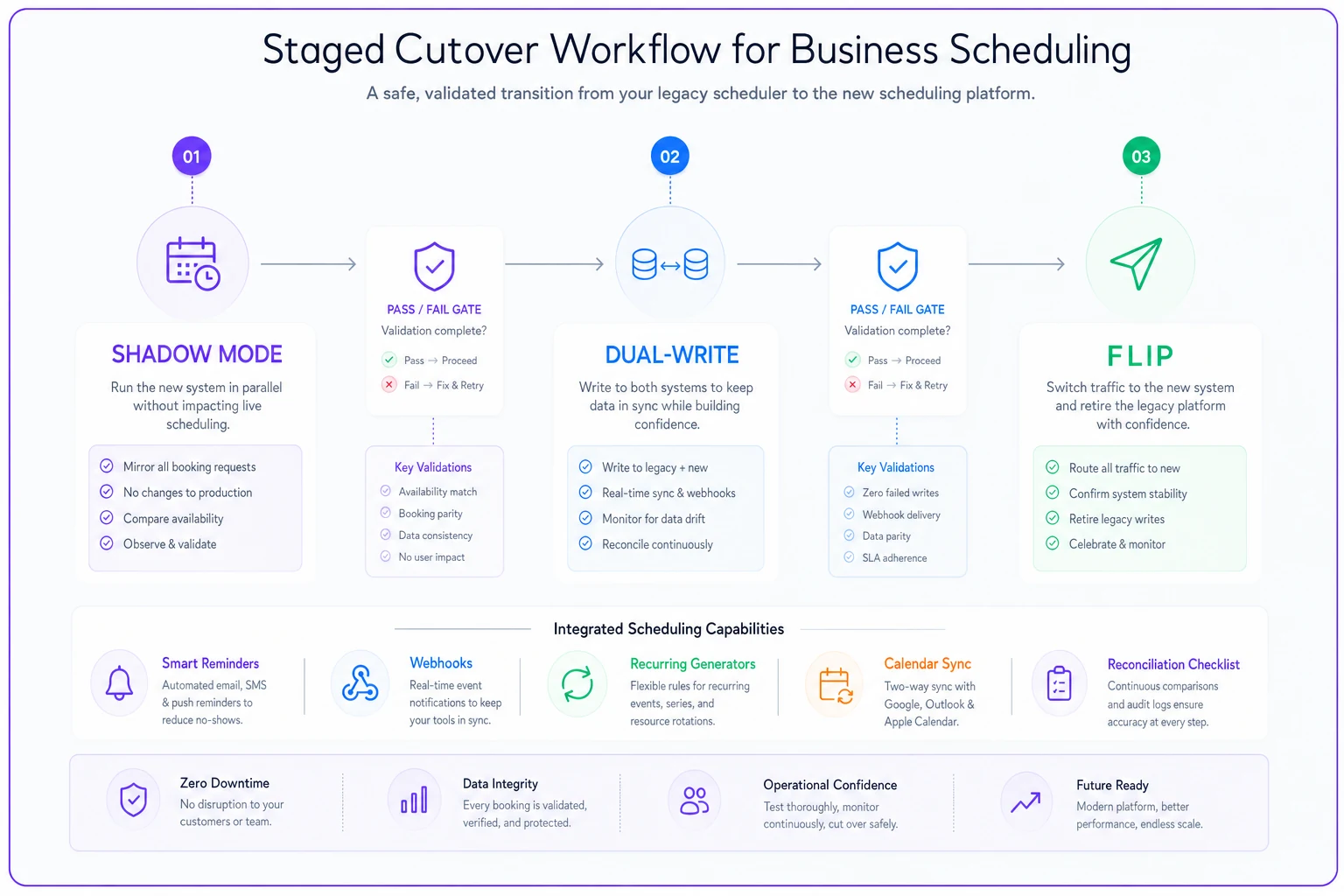
Stage 1 — Shadow mode. The new system runs in read-only parallel. You import a snapshot and let the new platform display the same schedule without taking any live bookings. This is where you catch data-shape problems: recurrence rules that didn't translate, time zones stored differently, buffer times that vanished, resource assignments that mapped to the wrong staff. You're comparing two views of the same day and hunting for divergence.
Stage 2 — Dual-write. New bookings get written to both systems. This is the dangerous, high-value stage. It proves the new system can handle live load, but it's also where the old vendor's background processes cause chaos if you haven't disabled them. The rule for this stage: the new system is the source of truth for new bookings, the old system is read-only for history. Turn off the old system's reminders, its recurring-appointment generator, and its outbound webhooks. Leave it able to receive but not act.
Stage 3 — The flip. New bookings go only to the new system. The old system becomes an archive. This is a short, scheduled window — ideally your lowest-traffic hours — with a pre-written checklist and someone whose only job is to watch reconciliation.
Each stage needs an explicit pass/fail gate. Don't advance to dual-write until shadow mode shows a clean match. Don't flip until dual-write has run clean for a defined period — a few days for a small operation, one to two weeks for anything high-volume with recurring bookings, because recurrence bugs only surface across a full cycle. Skipping a gate because you're behind schedule is how you trade a small delay for a large customer-facing incident.
Minute-by-minute cutover checklist
The flip itself should be boring. Boring means you prepared. Here's the structure of a cutover window for a mid-sized appointment business — adjust the timing to your volume, but keep the sequence:
-
T-24 hours Freeze schedule changes in the old system where possible. Send internal comms confirming the window. Confirm the reconciliation operator and the rollback decision-maker are both available.
-
T-60 min Take a final data snapshot from the old system. Verify the export completed and record counts match expected volume. Note the exact booking count — this is your reconciliation baseline.
-
T-45 min Confirm old-system reminders, recurring generators, and webhooks are disabled. This is the step people skip, and it's the step that double-charges customers.
-
T-30 min Run the final delta import into the new system (bookings created since the snapshot). Reconcile counts.
-
T-15 min Switch the public booking link / embed to the new system. Point calendar sync connectors at the new platform.
-
T-0 New system live. Old system read-only.
-
T+15 min Run reconciliation script #1 — total booking counts, next-24-hour appointments, and any appointments with attached payments.
-
T+60 min Place a real test booking through the live customer flow. Confirm the confirmation email fires once, from the right system.
-
T+4 hours Run reconciliation script #2 — verify no orphaned reminders went out, no duplicate charges, recurring appointments generated correctly.
-
T+24 hours Full reconciliation. Confirm next-7-days schedule matches across old snapshot and new system.
The reconciliation scripts don't need to be fancy. At minimum they should answer: Does every appointment in the old snapshot for the next 7 days exist in the new system with the same time, staff, resource, and payment status? Anything that doesn't match goes on an exception list a human reviews before the window closes. If your webhook behavior isn't solid going in, the scheduling incident response runbook is worth having open beside you during the flip.
Rollback triggers you decide *before* you start
The worst rollback decisions happen mid-crisis, when someone's emotionally invested in not admitting the cutover failed. Define your triggers in advance, in writing, with a named person who owns the call. If a trigger fires, you roll back — no debate at 11pm.
-
Reconciliation shows more than a small threshold of unexplained appointment mismatches (define the exact number — e.g., more than 5 next-24-hour appointments missing).
-
Any customer double-charge or duplicate deposit is detected.
-
Confirmation or reminder emails are firing from both systems and can't be stopped within 15 minutes.
-
Payment capture is failing on the new system.
-
Staff cannot access or read the live schedule after a defined grace period.
Your rollback plan only works if the old system is still capable of being the source of truth — which is exactly why you don't disable its booking capability during the flip, only its background actions. If you burned the boats by fully decommissioning the old system at T-0, you have no rollback, only firefighting.
A real scenario
A three-location wellness practice — massage, physio, and a small aesthetics room — ran roughly 1,400 bookings a month across the group, most of them recurring weekly or biweekly clients. They'd outgrown their old scheduler and wanted to switch over a quiet holiday weekend.
Their first attempt fell apart quietly. The import "succeeded," but the old system's reminder engine was never disabled. Over the next four days, around 200 clients got two sets of reminders — one from each platform — and about 30 recurring appointments never regenerated in the new system because the recurrence format didn't translate. The front desk spent most of a week manually rebooking regulars and fielding confused calls. Hard to put an exact dollar figure on it, but they estimated a dozen or so no-shows directly tied to conflicting reminders, plus a real hit to trust with long-standing clients.
The second attempt was different. They ran shadow mode for a week, caught the recurrence-format problem before going live, ran dual-write for about ten days to cover a full recurring cycle, and disabled the old reminders at T-45 as step one of the flip. The actual cutover took under an hour. Reconciliation surfaced three mismatched appointments, all resolved before the window closed. No duplicate reminders, no double charges. The difference wasn't better software — it was sequencing and a checklist.
When a staged cutover is overkill
Not every switch needs this much ceremony. If you're a solo provider with a hundred bookings a month, no integrated payments, and no recurring clients, a clean export-import over a slow evening is fine. The overhead of shadow mode and dual-write would cost you more effort than the failure it prevents.
The staged approach earns its keep when you have any of: recurring appointments, integrated or card-on-file payments, multiple locations or staff calendars, or a volume high enough that no single person can visually verify the schedule. The moment money-in-flight or recurrence is involved, cutting corners gets expensive — those are precisely the failures that reach customers.
Don't over-engineer a cutover for a tool nobody's deeply integrated with either. If your scheduler is a standalone booking page with no payments and no sync, building a two-week dual-write program is procrastination dressed up as diligence. Match the rigor to the blast radius.
Bringing it together
A scheduler switch is a coordination problem across your whole operation — contracts, data, payments, comms, calendars, and the people who use the thing every day.
The teams that come through it cleanly aren't the ones with the best new platform. They're the ones who secured their exit rights first, ran the switch in stages, disabled the old system's background actions before flipping, wrote their rollback triggers down in advance, and had a human watching reconciliation with a real baseline to check against.
Do those things and the actual cutover becomes the least eventful hour of the project — which is exactly what you want.
Ready to optimize your scheduling and operations?
Join thousands of businesses using Schedily to save time, improve coordination, and enhance operational efficiency.